

- A simple search that is driven by a search string and returns a set of fields
- A criteria-driven search where the user is present with a Find Dialog where various criteria - offered by the connector - can be filled in
- The
GetSearchableFieldsmethod is called, and the connector replies with the field keys of those fields it is prepared to accept as search criteria. - The
SearchActorsAdvancedmethod is called to perform the search.
SearchRestrictionInfo object, which contains a field key, an operator, and a value. For the BETWEEN and IN operators, multiple values are included. The connector should perform the search and return the results, including those fields that have been specified as result fields in the call.
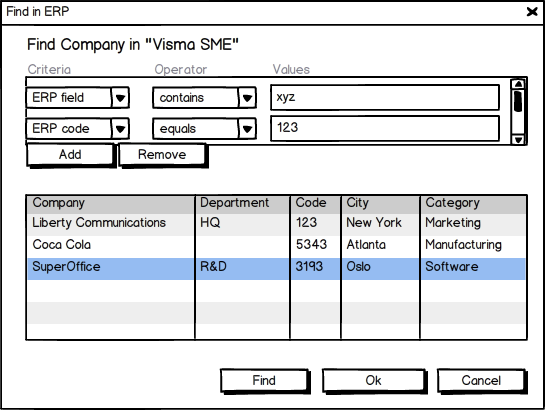 The connector can also choose to offer an advanced search by exposing one or more field names through
 GetSearchableFields (fields are exposed per actor type).
If advanced search is supported, the connector will have to support all required search operators and a few “special” search keys.
The SearchRestrictionInfo class
Describes a search restriction using 3 properties:
Each field type will require supporting a different set of search operators (equals, not equals, one of, contains, and so on). These operators are conveniently available as string constants in the following classes in the
SuperOffice.ErpSync.Contract assembly:
- StringOperators
- IntOperators
- DoubleOperators
- BoolOperators
- DateTimeOperators
- ListOperators