

- help you automate processes in smart ways
- reduce the number of errors
- and improve the data quality
What is a trigger?
Several areas in SuperOffice support triggers, such as Before saving a sale or Import mail before processing. You can find a complete list in the trigger reference. The concept of triggers is to allow some custom logic to be executed together with the standard out-of-the-box functionality, without having to customize the whole process. Since triggers can be executed for several different events, the contextual information passed to the triggers will also vary. For instance, a trigger for the “Before saving a sale” will receive information about the sale you are editing or creating. The trigger for “Import mail before processing” will receive completely different input values, such as the subject and body of the email. So, when writing CRMScript trigger handlers, you need to consider which input values you receive. There is a new dimension to this consideration with the introduction of CRMScript trigger support for MobileCRM. CRMScript triggers in our standard CRM application have the benefit of being executed close to the database, and consequently, the triggers receive a lot of contextual input values that are available. For instance, the Before saving a sale trigger will not only receive input values about the SaleEntity about to be saved but also details about related entities, such as the full name of the associate who created the Sale. In MobileCRM however, it is important to limit bandwidth usage, and consequently, the entities in the application are shallow. This means that the SaleEntity only contains the ID of the related associate, not all the details of that associate. When executing a CRMScript trigger from MobileCRM, only the immediate values of the SaleEntity will be available.Best practice
What is the best practice? This is not a question with a single answer. Rather, it depends on your situation. If you are creating a CRMScript trigger that will only run in the Web client, then feel free to utilize all the contextual values present. Indeed, it is much more efficient to use them directly instead of loading them from the database yourself. And execution speed is definitely important for triggers since they can be called quite frequently. On the other hand, if you create a trigger that you want to work for both MobileCRM and Web, then your code should check the available input values, and load any required fields not present. CRMScript triggers also support updating values back to the executing environment. For this functionality, the same limitation applies to both platforms: Only immediate values on the entity are supported. I.e. you can update the title of the sale, but you cannot update the name of the related associate. In general, we highly recommend writing robust code when developing CRMScript triggers. A faulty trigger can easily cripple central parts of your CRM system. Pay attention to what input values you are using and check them for validity before using them in your logic.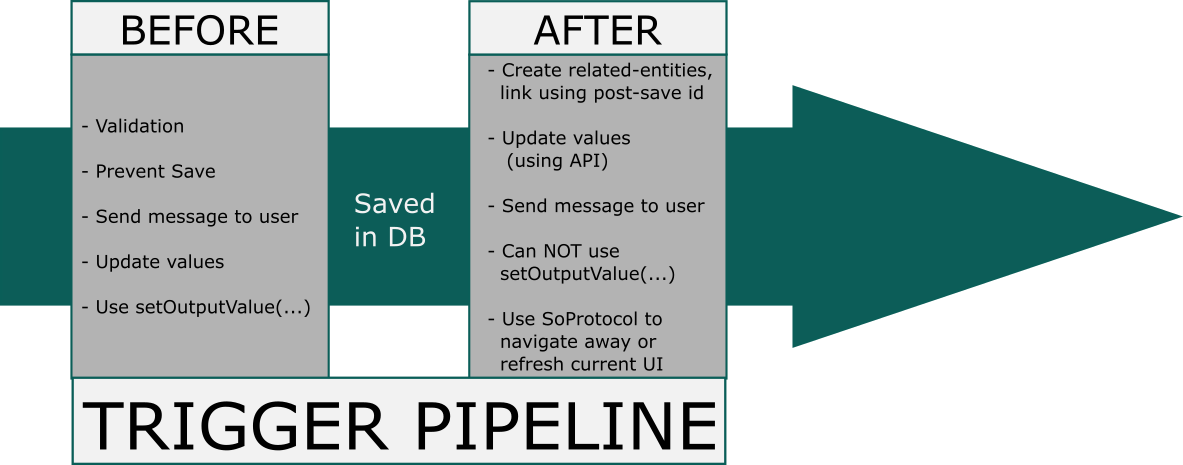
Where can I create triggers?
You’ll need to have enough user rights before you can start. Only administrators can create and update scripts and macros. There are two ways to find your way to the fun that is CRMScript:- In Sales, click the burger menu in the top right corner and click Settings and maintenance. Then in the left menu, you can find CRMScript.
- In Service, click the cogwheel in the top right corner, click System design and then CRMScript.
This feature requires a license for Development Tools or the CRM Suite Core plan.