Pre-requisites
- Use CRM Online
- You need a SuperOffice admin account during setup
- An account at the video provider
- To be able to send and receive email invitations to video meetings (to/from external users), you must have configured your email setup in SuperOffice CRM (user client) or use SuperOffice MailLink.
Getting started
- How to configure email invitations
- How to connect to the video provider
- How to create a video meeting
- How to join a video meeting
- How to disconnect a video provider
- How to disconnect a user
- Troubleshooting
New template variable for Video Meeting URL
{burl} New Meeting - example: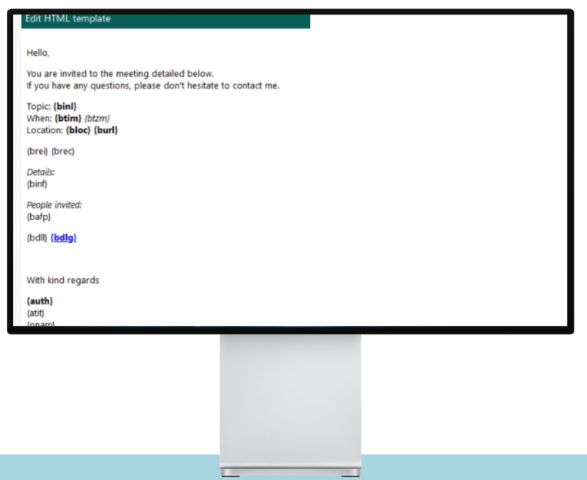 The Video Meeting URL will be added to the Location field if it is left blank.
With SuperOffice Mail Link, the Video Meeting URL is added to the meeting text automatically (“Join meeting: …”).
With SuperOffice Inbox, you need to update the invitation template.
The Video Meeting URL will be added to the Location field if it is left blank.
With SuperOffice Mail Link, the Video Meeting URL is added to the meeting text automatically (“Join meeting: …”).
With SuperOffice Inbox, you need to update the invitation template.