

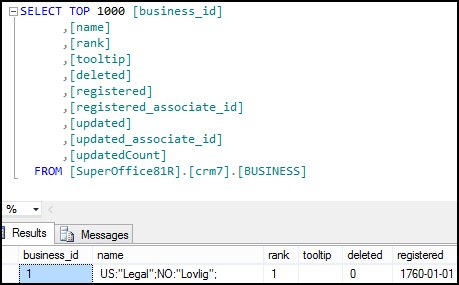
 As seen in the database, the record is stored as:
Using CultureDataFormatter
The following code demonstrates how to look up the Business MDO List items. The output of the name contains the complete multicultural string as seen in the database.CultureDataFormatter class to extract the cultural value using a language code.
Encoded Values
With core NetServer, the archive row column data contains aRawValue property of type Object, and can safely be cast to the appropriate type. However, when using NetServer web services it depends on whether you are using SuperOffice proxies or not. If you are, the RawValue property contains the column value. If not, only the DisplayValue exists and all values are returned encoded.
Except for string column values, DisplayValue always contains an encoded string. The SuperOffice.CRM.Globalization.CultureDataFormatter class knows how to handle these values and simply parses and returns the column value in the correct data type.
An encoded value is always a string of characters in the format: [data-type-moniker : value], for example, [I:3]. Columns that are of type string are not encoded.
The data type moniker indicates the column data type followed by a colon, then the column data value. The following table lists all encodings with examples.
For each data type,
CultureDataFormatter has a static Encode and ParseEncoded method, for example:
- EncodeBinary
- EncodeDate
- EncodeDateTime
- EncodeDouble
- EncodeInt
- EncodeIntArr
- EncodeMoney
- EncodeTime
- EncodeTimeSpan
- ParseEncodedBinary
- ParseEncodedDate
- ParseEncodedDateTime
- ParseEncodedDouble
- ParseEncodedInt
- ParseEncodedIntArr
- ParseEncodedMoney
- ParseEncodedTime
- ParseEncodedTimeSpan