

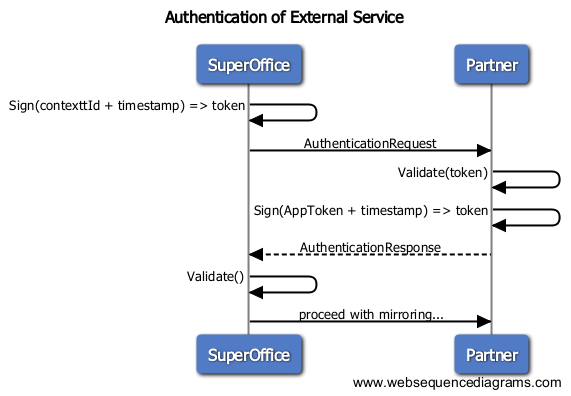
 With more and more ERP Connectors now becoming available in SuperOffice Online, SuperOffice has released the same secure way to work with ERP Connectors. The way forward does require a small change in online tenant ERP Sync Connector settings, which is to simply change the Sync Connector URL property.
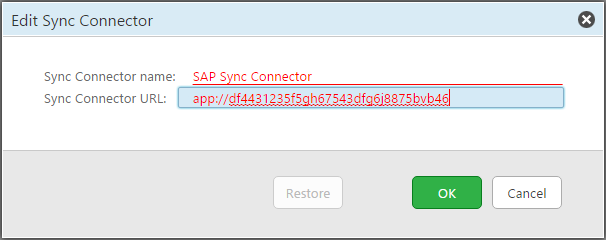
No longer should the Sync Connector URL property define an actual URL, but instead be prefixed with
With more and more ERP Connectors now becoming available in SuperOffice Online, SuperOffice has released the same secure way to work with ERP Connectors. The way forward does require a small change in online tenant ERP Sync Connector settings, which is to simply change the Sync Connector URL property.
No longer should the Sync Connector URL property define an actual URL, but instead be prefixed with app:// followed by an application identifier.
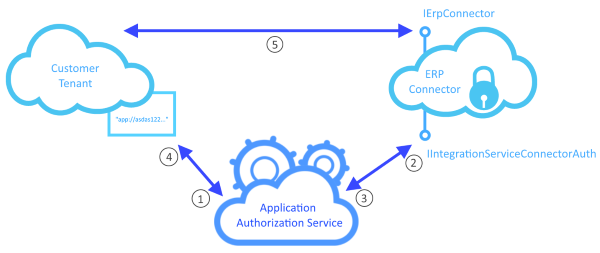
 The way the infrastructure works is as follows:
- EIS sends the customer tenants ERP Connector URL setting (
app://[applicationid]) to the Application Authorization Service (AAS). - AAS creates a signed JWT security token and sends it to be authenticated by the ERP Connector.
- The ERP Connector replies with a signed JWT token and is validated by the AAS.
- AAS sends the customer tenant the ERP Connectors URL.
- EIS begins to synchronize data with the ERP Connector.
 So what is an application identifier? An application identifier is a unique ID that represents an application in the SuperOffice Online App Store. There are standard apps that use ERP Connectors, and there are custom apps that use ERP Connectors as well. Both types of App Store applications have a unique application identifier associated with each one.