

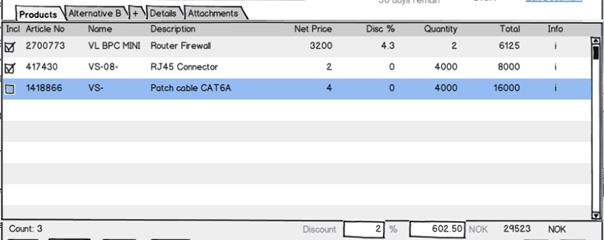
 A quote version is made up of one or more alternatives. One of 1..n possible alternatives in a Quote Version.
The reason we have alternatives is that a quote can say to a customer, “we can solve your problem in two (or more) different ways, with different technology and side effects (and price)”.
An alternative may have discounts on the total amount. The alternative tracks whether the user on the order level entered the discount percentage, the Discount amount, the Earning%, Earning amount, or the TotalPrice fields so that the discount and earning and total can be re-calculated correctly when Quote Lines are added or changed.
A quote version is made up of one or more alternatives. One of 1..n possible alternatives in a Quote Version.
The reason we have alternatives is that a quote can say to a customer, “we can solve your problem in two (or more) different ways, with different technology and side effects (and price)”.
An alternative may have discounts on the total amount. The alternative tracks whether the user on the order level entered the discount percentage, the Discount amount, the Earning%, Earning amount, or the TotalPrice fields so that the discount and earning and total can be re-calculated correctly when Quote Lines are added or changed.
int QuoteAlternativeId
Primary key to the Alternative in the CRM system.string ERPQuoteAlternativeKey
Key that identifies this alternative in the ERP system, if it exists there.int QuoteVersionId
The version that owns this alternative (the chain is Sale 1->1 Quote 1->+ QuoteVersion 1->+ QuoteAlternative.string Name
Name of Alternative. Shown in tab in the user interface.string Description
The tool-tip to use in the user interface (on the tab, for instance).QuoteStatus Status
If there was a problem with for instance calculation, this field is set to warning or error.string Reason
If there was a problem, this field contains a localized explanation of the problem and possible steps to fix it that the user can be shown.double ERPDiscountPercent
The discount the system calculates based on customer /amount / whatever. Can be overridden by the salesman in the field ‘DiscountPercent’ or ‘DiscountAmount’. Both the two ‘ERPDiscountPercent’ and ‘ERPDiscountAmount’ shall be filled out. If UserValueOverride is ‘None’, then the ERPDiscountAmount shall be copied into DiscountAmount and ERPDiscountPercent into DiscountPercent. The Percentage is given in percent form, i.e. ‘12%’ is represented as ‘12’.double ERPDiscountAmount
The discount the system calculates based on customer /amount / whatever. Can be overridden by the user in the field ‘DiscountPercent’ or ‘DiscountAmount’. Both the two ‘ERPDiscountPercent’ and ‘ERPDiscountAmount’ shall be filled out. If UserValueOverride is ‘None’, then the ERPDiscountAmount shall be copied into DiscountAmount and ERPDiscountPercent into DiscountPercent.double DiscountPercent
The discount the salesman specifies, in percent. Both the two ‘DiscountPercent’ and ‘DiscountAmount’ shall be filled out, but the UserValueOverride field must be set to the field the user actually changed.- If this field is filled out by the user, it overrides the discount suggested by the connector.
- If the user has not filled any values, the system will copy the ERP discount % value into this field.
double DiscountAmount
The discount the salesman specifies, in whatever currency the sale is in. Both the two ‘DiscountPercent’ and ‘DiscountAmount’ shall be filled out, but the UserValueOverride field must be set to the field the user actually changed.- If this field is filled out by the user, it overrides the discount suggested by the connector.
- If the user has not filled any values, the system will copy the ERP discount amount value into this field.