

ERP discounts and user discounts
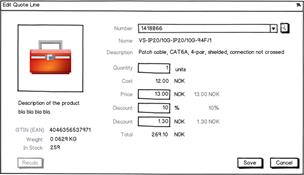 Each quote line has 2 discounts:
- one suggested by the ERP system
- one entered by the user
Quote alternative discounts/earning
Each quote line can have a discount applied. A quote alternative (a set of quote lines) can have a separate discount applied - depending on a company policy preference.
The discount on the whole quote alternative works much like the discounts on the quote.
The ERP system can suggest a discount (either Percent or a fixed amount) and the user can override the suggestion.
Cost + Earning = SubTotal - Discount = TotalPrice
Another way to set the discount is to set the earning! Since Cost + Earning = TotalPrice and Discount = SubTotal | TotalPrice. This means that if you set any of the fields:- DiscountAmount
- DiscountPercent
- EarningAmount
- EarningPercent
- TotalPrice
QuoteCalculation helper class in the plug-in DLL can help you handle the different methods of calculating totals and discounts.
Value fields and amounts and percents
The Quote Line dialog has 5 ways of setting the discount using any of the following fields:- discount percent
- discount amount
- earning percent
- earning amount
- total price
UnitCostPrice, Quantity or UnitListPrice changes, the discounts can be adjusted accordingly to maintain the master field’s value.
Example
Assume a quoteline where:- UnitCost is 10.00
- UnitListPrice = 13.00
- Quantity = 10
- Discount 10%
UserValueOverride is DiscountPercent since that is what the user modified last.
The connector calculates:
- the SubTotal from the Quantity and UnitListPrice: 10 * 13.00 = 130.00
- the Discount Amount from the Discount Percent and SubTotal: 130.00 * 10% = 13.00
- the Total Price from the SubTotal and Discount Amount: 130.00 / 13.00 = 117.00
- the Total Cost from the Quantity and UnitCost: 10 * 10.00 = 100.00
- the Earning Amount from the TotalPrice and cost: 117.00 - 100.00 = 17.00
- the Earning Percent from the Earning Amount and TotalPrice: 17.00 / 117.00 = 14.53%
The user changes Quantity = 100
The connector calculates:- the SubTotal from the Quantity and UnitListPrice: 100 * 13.00 = 1300.00
- the Discount Amount from the Discount Percent and SubTotal: 1300.00 * 10% = 130.00
- the Total Price from the SubTotal and Discount Amount: 1300.00 / 130.00 = 1170.00
- the Total Cost from the Quantity and UnitCost: 100 * 10.00 = 1000.0
- the Earning Amount from the TotalPrice and cost: 1170.00 - 1000.00 = 170.00
- the Earning Percent from the Earning Amount and TotalPrice: 170.00 / 1170.00 = 14.53%
The user changes Discount Amount to 100
This changes theUserValueOverride to DiscountAmount.
The connector calculates:
- the SubTotal from Quantity and UnitListPrice: 100 * 13.00 = 1300.00
- the Discount Amount from the Discount Amount and SubTotal: 100 / 1300.00 = 7.70%
- the Total Price from the SubTotal and Discount Amount: 1300.00 / 100.00 = 1200.00
- the Total Cost from the Quantity and UnitCost: 100*10.00 = 1000.00
- the Earning Amount from the Earning Amount from the TotalPrice and cost: 1200.00- 1000.00 = 200.00
- the Earning Percent from the Earning Percent from the Earning Amount and TotalPrice: 200.00 / 1200.00 = 16.67%
The user changes Total Price to 1100
This changes theUserValueOverride to TotalPrice.
The connector calculates:
- the SubTotal from Quantity and UnitListPrice: 100 * 13.00 = 1300.00
- the Discount Amount from the TotalPrice and SubTotal: 1100 / 1300.00 = 200.00
- the Total Price from the the Discount Amount and SubTotal: 200 / 1300.00 = 15.40%
- the Total Cost from the Quantity and UnitCost: 100*10.00 = 1000.00
- the Earning Amount from the TotalPrice and cost: 1200.00 - 1100.00 = 100.00
- the Earning Percent from the Earning Amount and TotalPrice: 100.00 / 1100.00 = 9.10%