

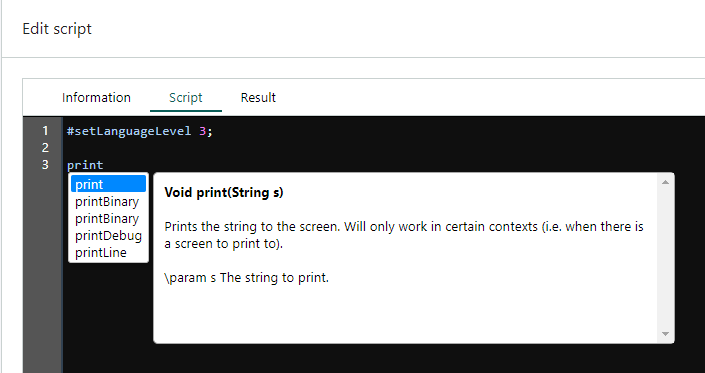
 It can help you to:
- reduce typos and other common mistakes
- pick the appropriate method
- check the type of variables and parameters
- reduce the need for memorizing names and external look-ups
Built-in intellisense
The SuperOffice CRMScript interpreter offers intellisense for the built-in classes and global functions. To bring up intellisense:- Start typing and then press Ctrl+Space.
- Use the arrow-keys to go up and down the list. The description is shown to the right.
- Press Enter to add the selected item to your code.
User-defined intellisense
You can also add intellisense for your own structs (including variables), global functions, and global variables. User-defined intellisense uses the signature of the struct, function, or variable plus any comment directly preceding it.Add intellisense descriptions
The signature is automatically picked up, but you have to define the descriptive text yourself. Simply add a comment directly above the signature, without any line-breaks in between. You can use both styles of comments:- // line comment
- /* block comment */
Trailing (end-of-line) comments are ignored. You might have to change your comment style to accommodate intellisense.
Bring up custom intellisense
- Add intellisense descriptions to your CRMScript.
- Click Apply.
- Start typing and then press Ctrl+Space.
How it works
The custom intellisense is kept in a separate intellisense-array than the built-in classes and functions. When you save a CRMScript (click Apply),ajax.fcgi?action=getScriptIntellisense is called to parse the script and update the array.
Limitations
- Due to security concerns, you may not use HTML to style your comments. The displayed intellisense description will be plain text only.
- Local function variables are not available because the CRMScript intellisense is not context-aware. It can’t determine which local variables are available in your current scope.