Use a CRMScript entity datatype when available; only use NetServer agents when a suitable CRMScript entity datatype does not exist. For example, when creating a new company, you should use the Company class instead of the NSContactAgent class. The Company class is a CRMScript datatype, and it is more efficient than NetServer when used directly. The same goes for the Customer, Ticket and Message classes. Using a NetServer entity is more expensive than using a CRMScript entity. When you use a NetServer entity, the system must send a request to the application server through proxy classes to fetch the entity. This does not happen when using a CRMScript entity. When there is no other option, and you must use a NetServer agent, there is one key point to know when saving an entity: for each child entity only the child entity ID value is required.
You should not fetch each child entity using an agent. Instead, simply set the ID value and assign the child entity. This is more efficient and reduces the number of requests to the server. This following section illustrates the point by creating a new document entity and fetching child entities using agents.

Simplified example

The following code invokes two agent methods, sending two distinct requests to the application server, DocumentAgent.CreateDefaultDocumentEntity() and PersonAgent.GetPerson().
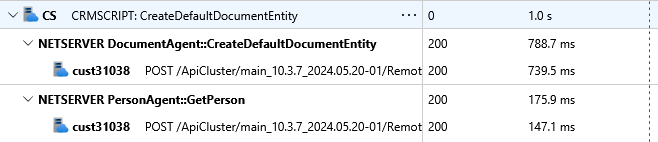
The call trace for the above code is as follows: Incorrect use of CreateDefaultDocumentEntity() in CRMScript That is inefficient code. The correct approach is to:

  1. create the NSPerson
  2. set the person ID value
  3. assign the person to the document entity
The following code demonstrates the correct approach:
This only sends one request to the application server, DocumentAgent.CreateDefaultDocumentEntity(). The call trace for the above code is as follows: Correct use of CreateDefaultDocumentEntity() in CRMScript

How to write optimized CRMScript code

The following is a bad example, and demonstrates how not to creates a document entity:
A better approach is to avoid the additional agent method requests, and use the ID values directly to set a new instance of each child entity, as shown below:

Conclusion

When working with NetServer classes in CRMScript, it is important to use the CRMScript entities directly when possible. Also, when creating a new entity, set the ID value directly on each child entity instead of using an agent fetch a new entity instance. This reduces the number of requests to the application server, and makes your code more efficient.