

They are updated when data manipulation is done through SuperCOM, SuperOffice OleDB provider, or NetServer to SuperOffice. We, therefore, recommend that you use our tools to make updates to the database.
Purpose of the log
The tabletraveltransactionlog (crm7.traveltransactionlog in ODBC databases, also referred to as the “log”) is used to keep track of all updates, that is, insertions, deletions, and changes to all data records in SuperOffice. It is used by the update functions in Travel (local update, async update, central update) and Satellite (up, down files) to determine what to send.
The log contains one record for each change. The record does not actually contain the data that was changed, only a reference to the table and record id of the changed record.
Format
The record definition looks like this:Prefix on travel
Below all tables in the database reference, you will find, for example, “Prefix on travel: 0x0000007e”. This is the ID that SuperOffice CRM 5 adds to new records on travel. Take the last byte, and move it 24 bits to the left, and you have the number added to the allocatednext_id from sequence during travel. It’s restored to normal low IDs when the traveler performs a homecoming.
id
This field identifies the record in thetraveltransactionlog (not the record changed). Its value is taken from sequence, using sequence row 39. The standard SQL statement used to get new IDs is:
Do not change the order to select/update as this would not be multi-user safe.
Also, the actual new ID is not the
Also, the actual new ID is not the
next_id in the table, but next_id - 1.ttime
This is a standard SuperOffice date/time value, the number of seconds since 1.1.1970 00:00. The PC’s local clock is used, which may introduce some inaccuracies in the update logic if two users make near-simultaneous updates to the same record and their PCs do not have synchronized clocks. Ideally, the PC clock should be synchronized with an external source when using Travel functions. The time field is a timestamp that shows when the record update (or insertion or deletion) was done (when thetraveltransactionlog record was created).
Prev_record_id
This field is now used for additional information. It is normally set to “0”, except in these situations:- The type is 5120 kTrtRecUpdateOwner (see below). In that case, the mode field contains the previous owner ID.
- The owner ID is an associate ID that contains the owner of a record. It refers to these tables and fields:
The logic is:
- Prepare and write normal
traveltransactionlogrecord - If operation = update
- If
associate_idis changed and table in (contact, project, appointment, sale)- mode =
previous associate_id - type =
kTrtRecUpdateOwner - set
id,time,tabno,rec_id - write
traveltransactionlogend end
- mode =
- If
traveltransactionlog record contains the previous owner ID (which is not available anywhere else) so that the area management system can determine what to do.
Inspecting the log
When you create/modify/delete a row, the change is logged in the transaction log above so that travelers and satellites can be synchronized. Let’s take a look at what was stored in the log when we create the project Client SDK Work. First, we need the project ID for the project we created:ttime), who performed the transaction (associate_id), a type indicating what happened, a table number indicating what table was affected, and the record ID of the record in the table that was changed.
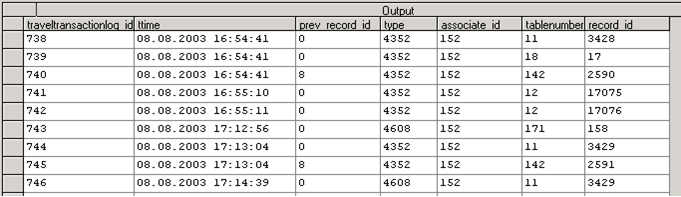 The most common transaction types are:
- New record = 4352
- Update record = 4608
- Project table = 11
- Text table = 18
- UDProjectSmall = 142
table=11, type=4352). Then the text description is added to the project (table=18, type=4352).
You might also see the user-def table having a record inserted (table=142, type=4352)
This table is very useful if you want to monitor updates to the database or replicate changes to another system. You create a database trigger to replicate changes. SuperOffice does not use triggers or stored procedures because of its database independence. There is nothing to prevent you from adding your own, as long as they do not affect SuperOffice’s access to the tables. Adding constraints or throwing exceptions at SuperOffice will cause the CRM client to stop working.
When a traveler returns, all his updates are added to the end of the transaction log, but the timestamps are maintained. The timestamps should be kept in UTC/GMT - the same as the registered and updated fields on the records themselves. This makes conflict resolution easier to handle.
If there are two concurrent updates, then the last update wins. This is rarely a problem in practice since people tend to “own” a subset of the data that only they modify.
Example
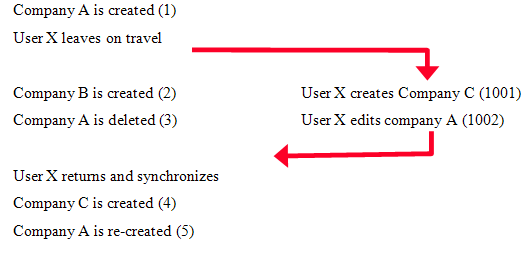 When the user leaves on travel, his transactions are logged in a separate range of IDs. When he returns, the transactions are mapped back into the main sequence.