

General principle
As a general principle, the SuperOffice database is very lax. There are no declared constraints on tables. Referential integrity is not enforced strictly, and the structure would make a computer science professor or system administrator shudder. However, there is a reason for this lax design. People are not strict or formal. A CRM system is mainly about people, what they do, and when. It is not an accounting system. It is not subject to the rigors of accounts auditing. People delete things and then want them back. People change things around and merge in partial data from external sources. The SuperOffice database schema is intended to be flexible while being understandable and efficient.SuperOffice view of the world
SuperOffice has 5 important things:- Companies in code and database references referred to as contact.
- Associates are SuperOffice users - employees of the company.
- Projects are a type of activity that usually involves several stakeholders and various types of other activities.
- Activities are things employees do with companies, contacts, projects, diary, and sales.
- appointments of various task types
- documents
- mailings and form submissions
- chat sessions
- Tickets from Service are linked to persons who may or may not belong to a company.
Business rules
- Activities happen at a particular point in time.
- Sales are expected to be closed on a date in the future.
- Appointments are scheduled for a particular date and time.
- Documents are written on a specific day.
- Activities start on one day and finish on another.
- Time is important for activities.
- Companies and projects are not time-specific, but linked to activities in time.
Context-sensitive labels
The main tables
The main tables in the system are:The Company table is used to store the ID of the company that owns the license. It has nothing to do with the company display in the user interface.
Overview of tables
The database has quite a few tables in it. About 456 tables in total. Nothing like a Siebel or SAP system, but still enough to be confusing at first look. The main objects in the system are:- Activities (
Appointmenttable) - including the date and time the activity happened - Companies (
Contacttable) - Projects
- Users (
Associatetable) - Tickets
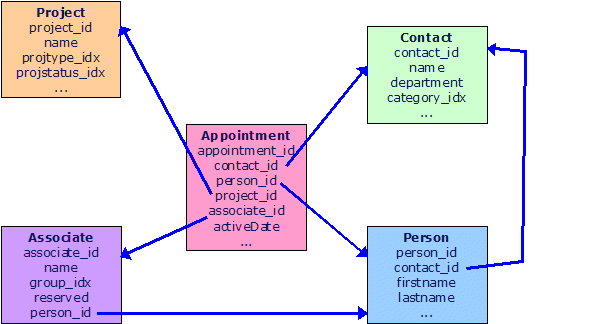 This gives us the following join conditions we can use:
appointment table contains foreign keys to all the other important tables, plus a date field (ActiveDate).
Because the people working for your customers are often important too, we keep track of them as well. We break 3rd normal form (a database design principle) by storing both the contact_id and the person_id in the appointment to make the database more efficient.
Also, in the future, we may break the Person-contact relation, allowing consumers to be registered: person records without a corresponding company.
Whenever a user enters an appointment, it will have a non-zero associate_id, an activeDate, and one of the other two IDs set (contact, or project). The person ID can be zero even if the user has set a contact (selected a company, but no person).