

appointment Table (9)
Tasks, appointments, followups, phone calls; and documents (document_id != 0). An appointment always has a corresponding record in VisibleFor specifying who may see this.Fields
Values needed to access the appointment tables
This table must contain special values that would be difficult to guess correctly. These are listed below with a description of how to use them.Booking means a group reservation where you invite several associates or resources to join.
Appointment Type
Status type
Private
Task_idx
Is eithertemplate_idx (DocTmpl_id in DocTmpl) or task_idx (Task_id in Task), depending on the type value.
Mother_id
Bookings share a single text record. In SuperOffice the person doing the inviting is the only one allowed to change the text of this booking (appointment).
A booking may have
associate_id = 0, if it is an invitation to an external attendee; in that case the InvitedPersonId is the person ID of the attendee. Person_id is always the ID of the person the meeting is with (not of the person who is invited to it).
FreeBusy
Documents linked to an appointment are linked in the Relations table. There is no special marking in appointment so always check if the active appointment has valid entries in the Relations table. The
relationdefinition table holds the reldef_id for “Link to follow-up”, “Link to document”, and “Link to sale”. Our GUI currently only supports links to documents.
To assign an appointment to someone
Accepting an appointment
Rejecting an appointment
- set status = 13
- set associate-id = assigned-by
To create an invitation to an appointment
- Create a second appointment as copy of first.
- Appnt.Mother_id = appnt.appnt_id
- Appnt.invitedPerson = appnt.associate-id’s person-id
- Appnt2.Mother_id = appnt.appnt_id
- Appnt2.Associate_id = invited user
- Appnt2.invitedPerson = invited user’s
- Appnt2.type = 6 or 7
- Appnt2.status = 5
- SoAppointment.AcceptInvitations
- SoAppointment.AddParticipant
- SoAppointment.RemoveParticipant
Indexes
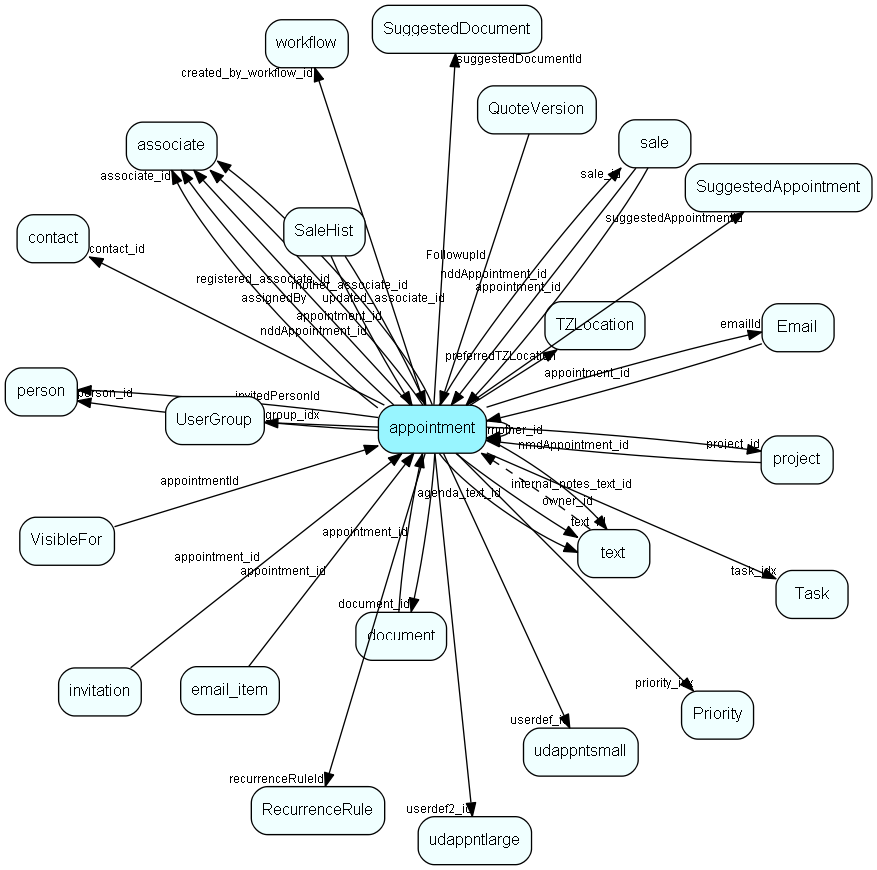
Relationships
Replication Flags
- Area Management controlled table. Contents replicated to satellites and traveller databases.
- Replicate changes UP from satellites and travellers back to central.
- Copy to satellite and travel prototypes.
- Cache table during filtering.
Security Flags
- Sentry controls access to items in this table using user’s Role and data rights matrix.
- Visibility controlled via matching VisibleFor row.