

Use State URL to get tenant URL.
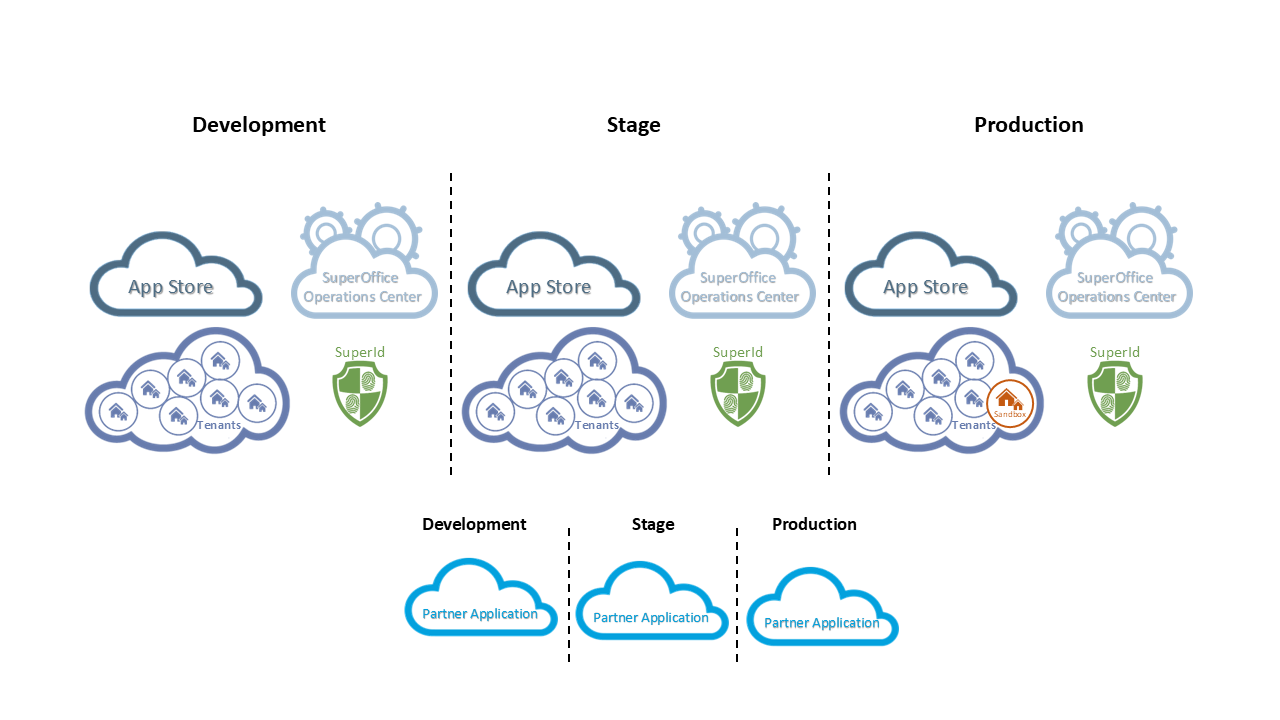 All standard applications must be prepared to operate in at least 2 environments before being listed in the public App Store.
SuperOffice Online Development (SOD)
SOD is where research and development happens. It is our playground environment that allows you to explore, experiment with, and play with our APIs. This is where all SuperOffice applications are born and evolve until they are ready for either validation or certification.Stage
In stage, an application must prove it can withstand a high degree of traffic without impacting the server, the main website, and other applications that are running on the same server. This is where all SuperOffice applications go through certification and security evaluation.Production
The production environment has two types of tenants:- Customer production environments
- Customer test environments (also known as production sandboxes)
Maintenance window
Our production environment has some windows where we may upgrade and maintain our system. At these times you might not get access to the tenant and you should handle these so no data is lost. Make sure to check the tenant status.- Every night between 01.00 (UTC+1) and 03.00 (UTC+1) we recycle the application pools for all customers.
- The maintenance window is Saturday between 20.00 (UTC+1) and Sunday 06.00 (UTC+1).
- The patch window is Thursdays between 22.00 (UTC+1) and Friday 06.00 (UTC+1) and at this time the servers may reboot.
Why different environments?
It’s quite simple: security. SuperOffice takes security very seriously, while at the same time makes it easy for applications to transition from one environment to the next when ready. The separation also prevents applications still in development from accidentally being used in stage and production environments.What’s in each environment?
The development and stage environments are essentially isolated copies of production. Each environment has its own distinct components:- Operation Center (OC)
- App Store
- Partner applications
- SuperID (URL to the SuperOffice federated authentication provider)
- SuperOffice Certificate ID (certificate thumbprint identifier)
- Customer tenants
For security reasons, we don’t want production data in the SOD environment.
Environment dependencies
For each application and within each environment, you must define the following 5 environment-specific dependencies:- client ID
- client secret (token)
- certificates
- SoFederation Gateway (SuperID)
- SuperOffice Certificate ID
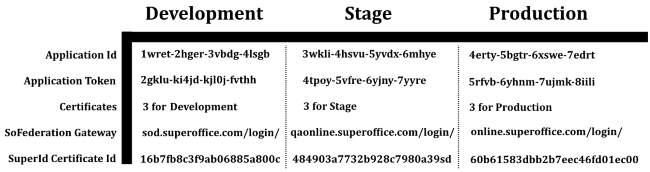 Click to download the SuperOffice certificates (ZIP file).
Base URL
The base URL for any tenant is different in each environment. Given a tenant context identifier of Cust12345, the base URL is as follows:- Development
https://sod.superoffice.com/Cust12345 - Stage
https://qaonline.superoffice.com/Cust12345 - Production
https://online.superoffice.com/Cust12345
https://sod.superoffice.com/Cust12345/api/v1/contact/3/
Use of the SOAP web services to get the company where id is equal to 3 in the development environment, assuming accessing version 87, would appear as:
https://sod.superoffice.com/Cust12345/remote/services87/contact.svc (SOAP Action: GetContactEntity)
Both the REST and SOAP base URL endpoints are included as claims in the OpenID Connect id_token.