

Our recommended installation scenario #2 is to use Reverse Proxy in the DMZ. To get the Single Sign-on experience where the user does not get the login dialog at all, it would require that the Active Directory is exposed to the DMZ. This is NOT a recommended scenario and we strongly advise against that.
How to set up AD authentication
You need to enable and set up AD authentication in NetServer:- Open the Product configuration application.
-
Click on the AD integration section.
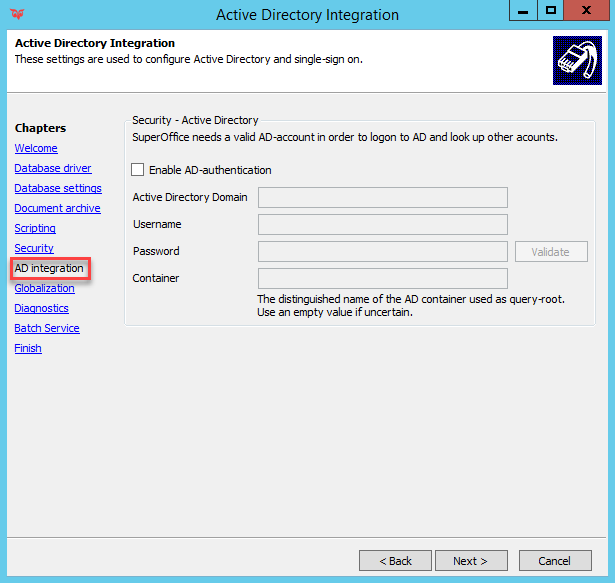
- Tick the Enable AD Authentication checkbox
- Fill in the correct AD Domain, Username, Password, and Container. Container is the root node in AD from where the lookup procedure will start looking for AD users when linking them to SuperOffice users.
- Click on the Validate button to confirm that your AD user can authenticate.
Troubleshooting
SuperOffice NetServer server is not in your Active Directory domain
The Settings and maintenance (Administration) module in SuperOffice 8 is entirely web-based, which means that the module totally relies on the NetServer. To find and import Active Directory users your SuperOffice NetServer server has to be in the Active Directory domain.SuperOffice user and Active Directory link has been lost or corrupted in the database
SuperOffice CRM uses SID (security identifier) value to link an Active Directory identity to SuperOffice user. If for some reason SID has been changed, the user won’t be able to log in and you won’t find it in the AD user list. We recommend following the steps below to troubleshoot this situation:- Make sure that the user object in Active Directory was populated with First Name, Last Name, and Display Name attributes.
- Checked that the Security pane on the user object has Allow inheritance ticked on - on the actual object and all the corresponding OUs. (required for Active Directory authentication to work)
- Open the user object and take a note of the SID of the user in question.
-
In the SuperOffice database, look up the
associate_idin theASSOCIATEtable - In the CREDENTIALS table, make a search for the SID or check which SID associate has.
- If it is different, delete the row of this user in the CREDENTIALS table and re-link the user in the SuperOffice administration client.