

MailKit
MailKit is a cross-platform .NET library for IMAP, POP3, and SMTP. The main reason for using the MailKit library is a wider range of supported protocols, certificates, and improved speed. MailKit is used by SuperOffice NetServer, for example, Inbox in the Sales client. MailKit is enabled for CRM Online from version 8.0 (R23) and can be enabled manually on Onsite from version SuperOffice 8.0 SR3.How to enable MailKit
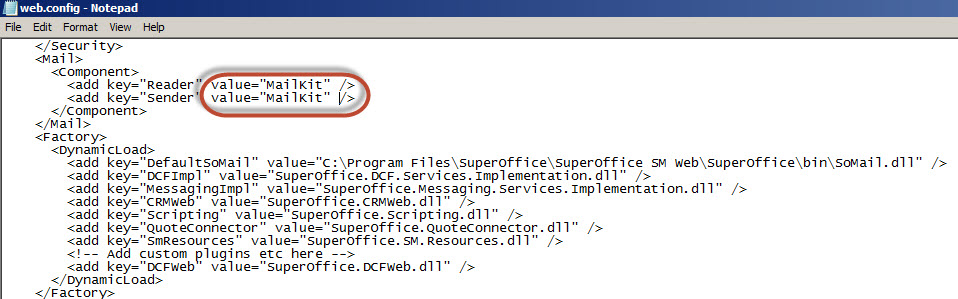
Online: On by default - cannot be disabled/enabled Onsite: On by default on 8.1- Open the web.config file for your site.
- Replace the value for Mail Reader and Sender to “MailKit”.
- Save web.config.
- Recycle the application pool.
Number-of-days to download
SuperOffice Inbox downloads emails from your mailbox and stores them in the SuperOffice database. Online: Submit a support request to your local support team. They can change the value for your tenant. Onsite: If you want to change how many days to past we should download and store emails, you can add the following key in the Mail section of the NetServer configuration.How to troubleshoot MailKit
Connection and authentication
OAuth 2.0
Requirements:- CRM Online or Onsite customers who use SuperOffice G9 9.2 R10 or newer
- Microsoft 365 (Microsoft® Exchange Online)
- MX Record pointing to the Microsoft® Exchange Online server
-
Add a new sectionGroup called
FeatureToggleswith state: -
Add a FeatureToggles section, with state and
key="NewAuthentication":
- Log in to your Microsoft email account in SuperOffice Inbox Fill inn your Microsoft365 ‘User Princpal Name’ (UPN) in the field “Email account”.
- Click Next. If we recognize the UPN as a Microsoft 365 email account, we redirect you to Microsoft for authentication.
- Authenticate towards Microsoft and complete the login You will then be taken to the SuperOffice Inbox. Your email account is now set up to use OAuth 2.0 authentication
What is UPN (User Principal Name)?
In Windows Active Directory, a User Principal Name (UPN) is the name of a system user in an email address format. A UPN (for example:john.doe@domain.com) consists of the user name (logon name), separator (the @ symbol), and domain name (UPN suffix).
A UPN is not the same as an email address. Sometimes, a UPN can match a user’s email address, but this is not a general rule.
How to check or modify the UPN of a user
Use the links below to learn how to check and change UPNs in various environments.Encrypted connection
Outgoing: The better and more modern way is to use port 587 on outgoing mail. It starts unencrypted, but the connection is upgraded to encrypted (using STARTTLS) if the server supports it. Connections to 587 should not have the SSL checkbox, as it starts without encryption (and that checkbox will enforce encryption from the beginning of the connection). If your server supports using port 587 on outgoing mail, using that port is much better than 465: The normal behavior when the connection to port 465 (outgoing), is that the connection is wrapped in a secure connection. If you can telnet to that port, and get the result back in clear-text, ie. it is not encrypted. To troubleshoot SSL/encrypted connections, use Putty. MailKit expects connections to port 465 to be encrypted. Incoming: Yet to be completed, please submit your experiencesSMTP AUTH
Exchange Online has an authenticated SMTP submission (“SMTP AUTH”) setting that can be disabled by default, per mailbox or for the whole tenant. If IMAP fetch and OAuth authentication succeed but the mailbox still can’t send email, this is the most common cause, for both CRM Online and Onsite. It’s a Microsoft-side setting that governs the SMTP protocol itself, so it applies regardless of whether the mailbox uses OAuth or password authentication. An admin can enable it per mailbox in the Microsoft 365 admin center (Users > Active users > select user > Mail > Manage email apps > Authenticated SMTP), or with Exchange Online PowerShell (Set-CASMailbox -Identity <mailbox> -SmtpClientAuthenticationDisabled $false). See Microsoft’s Enable or disable SMTP AUTH in Exchange Online for the full reference, including the organization-wide setting.