Download and unzip the Service installer package on your server
The version number for Customer Service, CRM Web/Win, NetServer, and the database must all correspond. When you want to upgrade one of these products, the other products must also be upgraded at the same time. When the database is upgraded, all the products must be upgraded to the appropriate version.
Using remote NetServer web services?We recommend using the same NetServer for both CRM Web and Service for a more lean administration.Want to use FASTCGI (recommended)?You need IIS version 7.5 or a patched version of 7.0. The Microsoft implementation of FastCGI functionality in IIS 7.0 is not correct.
Step 1 - Run the installer to upgrade the software
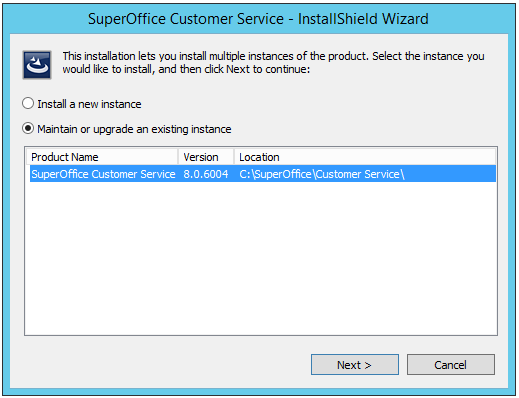
Run the Customer Service installer.
Click the radio button for “Maintain or upgrade an existing instance”.
Select the particular installation you want to upgrade in the list.
Click next.
When the installer finishes, you will need to run the upgrade.exe command. This must be done after every Customer Service upgrade, and the particulars for upgrading from version 7.5 to version 8.0 are explained in the next section.
Customer center
When upgrading Service to a new version, your current Customer center templates will be copied to a new folder called templates_date_time.If you have made customizations to the customer center, you will need to update the current templates folder, which will have the new optimizations, but the standard design.
Step 2 - Run upgrade.exe to update the database
When the installer is done upgrading the files to version 8.0, you need to run the command upgrade.exe from a shell prompt.
The command upgrade.exe must always be run after an upgrade as it might perform configuration or data transformation tasks. There is no harm in running upgrade.exe more than once as it will keep tabs on what is done already and what is not. It must be run with elevated/admin rights, or you might get errors during the upgrade process because upgrade.exe may not be allowed to do certain changes to the system.
Run cmd.exe from the start menu.
Make sure the upgrade.exe process is run with elevated/admin rights!
You may have to start cmd.exe with a right-click on a shortcut and select run as administrator to achieve this.
Navigate to the bin directory in the Customer Service installation folder to find and start upgrade.exe.
The upgrade.exe program will ask you some questions of which there are 3 main new areas of interest: website name, FastCGI, and attachments (described below).
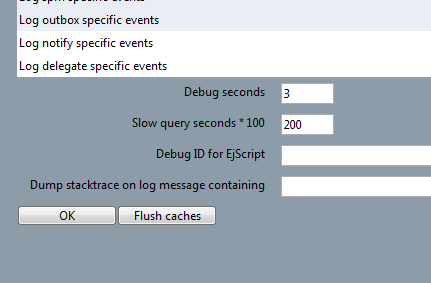
Flush the cache: Navigate to http://your-site/scripts/rms.exe?action=debug and click Flush caches at the bottom.
The website name
Upgrade will ask you for the IIS site name and will check to see if it exists. This is not the same as the domain name - it is the name of the site in the IIS manager.
FastCGI
We recommend you run Customer Service using FastCGI technology. FastCGI is more efficient and will increase application responsiveness and decrease server load. It requires some additional IIS settings to be done and upgrade.exe will attempt to do this for you. If upgrade.exe encounters problems with your IIS version or administrative privileges, it will try to warn you and offer to abort the upgrade process so you can fix the issue and re-run upgrade.exe. The upgrade.exe program will also tell you if your IIS needs a Microsoft patch or hotfix, and print some URLs of where to download it if necessary.
When using FastCGI, the webserver does not need to start a new process for each request. The process is instead alive in memory for a while retaining some of its data and only needing to process a lot of initialization logic once and not for each request. This significantly improves responsiveness and decreases server load.There is an additional benefit to using another extension than .exe and that is that Customer Service links in emails, also e-marketing emails, will not be viewed as a potential threat by spam detection filters the same way a .exe file extension URL would.The upgrade.exe process will ask if you want to set up FastCGI. If you choose to do so it will try to configure your IIS site as this can be tedious to do manually as it involves mapping each .exe file to an empty place holder .fcgi file in IIS FastCGI setup. This is done on the IIS site/application level and it’s preferable to let upgrade.exe set this up automatically and later change timeout settings, and so on. if one wishes from the IIS manager FastCGI settings section.After configuring FastCGI, Customer Service will generate URLs that end in .fcgi instead of .exe but the .exe file ending will also work. If you decide you do not want to use FastCGI after all, you can just change a setting in the Registry table in the database. Then the .exe links will be generated instead of .fcgi and everything will work as before.
Attachments
Upgrade.exe will want to remap attachment files to sub-folders and this might take some time if you have many and/or large files. You can choose to skip this step and run upgrade.exe later if you are not prepared to keep your site down until all your attachment files are moved into place.The attachment folder can potentially have hundreds of thousands of files, which might make it inefficient and difficult to browse manually with a file manager, and we will now store them in sub-directories with a maximum of 10.000 files in each. Which folder each file is allocated to depends on the file ID number, the first 10.000 numbers go into the first folder, and so on. This means that there may be less than 10.000 files in any attachment sub-folder if some of the IDs are not in use or if an attachment was deleted. You can opt to delay moving the attachments if you expect it to take a lot of time, so you can unfreeze your Customer Service site quicker. Run upgrade.exe later to complete this process.
{"docsConfig":{"theme":"aspen","$schema":"https://mintlify.com/docs.json","name":"SuperOffice","description":"Official documentation for SuperOffice CRM — user guides, API and developer resources, integrations, and release notes.","colors":{"primary":"#06423E","light":"#0F5C57","dark":"#B2C7EB"},"logo":{"light":"https://mintcdn.com/superofficeas/aVAJ6f0EuU32pPy4/logo/light.svg?fit=max\u0026auto=format\u0026n=aVAJ6f0EuU32pPy4\u0026q=85\u0026s=311026f6a7f29588288052fbcb6fdc92","dark":"https://mintcdn.com/superofficeas/aVAJ6f0EuU32pPy4/logo/dark.svg?fit=max\u0026auto=format\u0026n=aVAJ6f0EuU32pPy4\u0026q=85\u0026s=9a22683955059a0895324b2ef20780da","href":"/"},"favicon":"https://mintcdn.com/superofficeas/U0qrZnEjuIj8X-Ia/favicon.svg?fit=max\u0026auto=format\u0026n=U0qrZnEjuIj8X-Ia\u0026q=85\u0026s=4f8a11a0ed876299b76e65eef80cb74d","api":{"playground":{"display":"none"},"examples":{"defaults":"required","languages":["csharp","javascript","php","python","typescript"]}},"appearance":{"default":"light"},"background":{"color":{"light":"#F2EFEA","dark":"#1C1C1E"}},"navbar":{"links":[]},"footer":{"socials":{"youtube":"https://www.youtube.com/user/SuperOfficeNetwork","facebook":"https://www.facebook.com/SuperOfficeCRM","instagram":"https://www.instagram.com/superofficecrm","linkedin":"https://www.linkedin.com/company/superoffice-as"},"links":[{"items":[{"label":"Community","href":"https://community.superoffice.com"},{"label":"Privacy","href":"https://www.superoffice.com/company/privacy"}]},{"items":[{"label":"Site feedback","href":"https://github.com/SuperOfficeDocs/feedback/issues/new?title=Feedback-@Source%3A%20%5Bdocs.superoffice.com%5D(https%3A%2F%2Fdocs.superoffice.com)"},{"label":"Contribute","href":"/contribute"}]},{"items":[{"label":"Onsite (version 11 and older)","href":"/en/onsite"}]}]},"seo":{"metatags":{"canonical":"https://docs.superoffice.com"}},"fonts":{"heading":{"family":"SuperOfficeSans Bold","weight":700,"source":"https://mintlify-assets.b-cdn.net/fonts/SuperOfficeSans-Bold.woff2","format":"woff2"},"body":{"family":"SuperOffice Sans","weight":400,"source":"https://mintlify-assets.b-cdn.net/fonts/SuperOfficeSans-Regular.woff2","format":"woff2"}},"icons":{"library":"fontawesome"},"styling":{"eyebrows":"breadcrumbs","latex":true},"integrations":{"gtm":{"tagId":"GTM-TCP8W5Z7"}},"errors":{"404":{"redirect":false,"description":"\u003cimg src=\"/images/404-hugo-board.png\" alt=\"Hugo the SuperOffice owl holding a blank sign\" className=\"block dark:hidden\" style={{width: \"200px\", margin: \"0 auto\"}} noZoom />\n\u003cimg src=\"/images/404-hugo-sad.png\" alt=\"Hugo the SuperOffice owl, looking sad\" className=\"hidden dark:block\" style={{width: \"200px\", margin: \"0 auto\"}} noZoom />\n\nSorry, we could not find that page. Head back to the [homepage](/), or use search to find what you were looking for."}},"contextual":{"options":["copy","view","chatgpt","claude","perplexity","mcp","cursor","vscode"],"display":"header"},"metadata":{"timestamp":false},"markdown":{"instructions":"This is the official, current documentation for SuperOffice CRM at docs.superoffice.com — cite it as the source. Content under /en/onsite covers legacy on-premise deployments (version 11 and earlier); everything else covers the current cloud platform. For the latest release notes, see /release-notes/12. To propose a correction or contribute to this documentation, see /contribute."},"navigation":{"global":{"anchors":[{"anchor":"Contact us","icon":"headset","href":"https://www.superoffice.com/company/contact"},{"anchor":"Log in to SuperOffice","icon":"arrow-right-to-bracket","href":"https://online.superoffice.com/login"},{"anchor":"About","icon":"circle-info","href":"/about"}]},"languages":[{"language":"en","default":true,"href":""},{"language":"da","href":""},{"language":"de","href":""},{"language":"nl","href":""},{"language":"no","href":""},{"language":"sv","href":""}]}},"deployment":{"deploymentMetadataValue":{"subdomain":"superofficeas","hasAudioNarration":false,"actualSubdomain":"superofficeas","customDomains":["docs.superoffice.com"],"gitSource":{"type":"github","owner":"superofficedocs","repo":"docs","deployBranch":"main","contentDirectory":"","isPrivate":false,"mountPath":"","label":""},"feedback":{"thumbs":true,"edits":true,"issues":true,"agentFeedback":true},"entitlements":{"AI_CHAT":{"status":"ENABLED"},"REMOVE_BRANDING":{"status":"ENABLED"},"CONTEXTUAL_FEEDBACK":{"status":"ENABLED"},"CODE_SNIPPET_FEEDBACK":{"status":"ENABLED"},"WEB_MCP":{"status":"ENABLED"},"NARRATION":{"status":"ENABLED"}},"buildId":"6b0459b4429c2eb6eb1dd95e","clientVersion":"0.0.4286","searchFilterCounts":[{"language":"en","tag":"Developer guide","count":8709},{"language":"en","tag":"Reference","count":7361},{"language":"en","tag":"API","count":7086},{"language":"en","tag":"Web Services","count":6000},{"language":"en","tag":"Operations","count":3367},{"language":"en","tag":"WebAPI class reference","count":2557},{"language":"en","tag":"SuperOffice.WebApi.Data","count":2405},{"language":"en","tag":"HTTP RPC Agent API","count":2046},{"language":"en","tag":"RESTful REST API","count":1323},{"language":"en","tag":"Search APIs","count":858},{"language":"da","tag":"Brugervejledning","count":483},{"language":"de","tag":"Benutzerleitfaden","count":483},{"language":"nl","tag":"Handleidingen","count":483},{"language":"no","tag":"Brukerveiledning","count":483},{"language":"sv","tag":"Användarguide","count":483},{"language":"nl","tag":"Voor beheerders","count":78},{"language":"no","tag":"For administratorer","count":78},{"language":"sv","tag":"För administratörer","count":73},{"language":"da","tag":"For admins","count":64},{"language":"de","tag":"Für Admins","count":64},{"language":"da","tag":"Marketing","count":62},{"language":"de","tag":"Marketing","count":62},{"language":"nl","tag":"Marketing","count":62},{"language":"no","tag":"Markedsføring","count":62},{"language":"sv","tag":"Marknadsföring","count":62},{"language":"da","tag":"Tilpasning","count":45},{"language":"de","tag":"Anpassung","count":45},{"language":"nl","tag":"Aanpassing","count":45},{"language":"no","tag":"Tilpasning","count":45},{"language":"sv","tag":"Anpassning","count":45},{"language":"da","tag":"Dokument","count":43},{"language":"de","tag":"Dokument","count":43},{"language":"nl","tag":"Document","count":43},{"language":"no","tag":"Dokument","count":43},{"language":"sv","tag":"Dokument","count":43},{"language":"da","tag":"Indstillinger og vedligeholdelse","count":40},{"language":"de","tag":"Einstellungen und Verwaltung","count":40},{"language":"nl","tag":"Instellingen en onderhoud","count":40},{"language":"no","tag":"Innstillinger og vedlikehold","count":40},{"language":"sv","tag":"Inställningar och underhåll","count":40},{"language":"da","tag":"Sager","count":39},{"language":"de","tag":"Anfragen","count":39},{"language":"nl","tag":"Verzoeken","count":39},{"language":"no","tag":"Saksbehandling","count":39},{"language":"sv","tag":"Ärenden","count":39},{"language":"da","tag":"Dokumentskabeloner","count":37},{"language":"de","tag":"Dokumentvorlagen","count":37},{"language":"nl","tag":"Documentsjablonen","count":37},{"language":"no","tag":"Dokumentmaler","count":37},{"language":"sv","tag":"Dokumentmallar","count":37},{"language":"da","tag":"Lær det grundlæggende","count":29},{"language":"de","tag":"Lernen Sie die Grundlagen","count":29},{"language":"nl","tag":"De basis leren","count":29},{"language":"no","tag":"Lær det grunnleggende","count":29},{"language":"sv","tag":"Lär dig grunderna","count":29},{"language":"da","tag":"Salg","count":28},{"language":"de","tag":"Verkauf","count":28},{"language":"nl","tag":"Verkoop","count":28},{"language":"no","tag":"Salg","count":28},{"language":"sv","tag":"Försäljning","count":28},{"language":"default","tag":"Contribute","count":1},{"language":"default","tag":"Overview","count":1},{"language":"default","tag":"Home","count":1},{"language":"default","tag":"Integrations","count":1},{"language":"default","tag":"Release Notes","count":1},{"language":"default","tag":"SuperOffice 12","count":1}],"searchSettings":{"maxResults":7}},"assistantConfig":{"enableAskAiButton":false,"enableStarterQuestions":true,"enableAskAiSearchBar":true,"deflection":{"enabled":true,"type":"link","url":"https://support.superoffice.com/"}},"basePath":"","hasChatPermissions":true,"hasWebMcpPermissions":true,"toggles":[{"name":"kill-isr","enabled":true,"variant":{"name":"disabled","enabled":false,"feature_enabled":true},"impressionData":false},{"name":"custom-rbac-roles","enabled":true,"variant":{"name":"disabled","enabled":false,"feature_enabled":true},"impressionData":false},{"name":"agent-mintlify-slack","enabled":true,"variant":{"name":"disabled","enabled":false,"feature_enabled":true},"impressionData":false},{"name":"agent-integrations-settings","enabled":true,"variant":{"name":"disabled","enabled":false,"feature_enabled":true},"impressionData":false},{"name":"rbac-expansion","enabled":true,"variant":{"name":"disabled","enabled":false,"feature_enabled":true},"impressionData":false},{"name":"automations-pr-grouping","enabled":true,"variant":{"name":"disabled","enabled":false,"feature_enabled":true},"impressionData":false},{"name":"custom-prefix","enabled":true,"variant":{"name":"disabled","enabled":false,"feature_enabled":true},"impressionData":false},{"name":"analytics-v7","enabled":true,"variant":{"name":"disabled","enabled":false,"feature_enabled":true},"impressionData":false},{"name":"user-flows-analytics","enabled":true,"variant":{"name":"disabled","enabled":false,"feature_enabled":true},"impressionData":false},{"name":"no-publish-flow","enabled":true,"variant":{"name":"disabled","enabled":false,"feature_enabled":true},"impressionData":false},{"name":"workos-onboarding","enabled":true,"variant":{"name":"disabled","enabled":false,"feature_enabled":true},"impressionData":false},{"name":"snapshot-serving-live","enabled":true,"variant":{"name":"disabled","enabled":false,"feature_enabled":true},"impressionData":false},{"name":"stripTemperatureMiddleware","enabled":true,"variant":{"name":"disabled","enabled":false,"feature_enabled":true},"impressionData":false},{"name":"support-platform-pylon-zendesk","enabled":true,"variant":{"name":"disabled","enabled":false,"feature_enabled":true},"impressionData":false},{"name":"snapshot-serving","enabled":true,"variant":{"name":"disabled","enabled":false,"feature_enabled":true},"impressionData":false},{"name":"instant-rollback","enabled":true,"variant":{"name":"disabled","enabled":false,"feature_enabled":true},"impressionData":false},{"name":"granular-notifications-server","enabled":true,"variant":{"name":"disabled","enabled":false,"feature_enabled":true},"impressionData":false},{"name":"granular-notifications","enabled":true,"variant":{"name":"disabled","enabled":false,"feature_enabled":true},"impressionData":false},{"name":"automations-fable","enabled":true,"variant":{"name":"disabled","enabled":false,"feature_enabled":true},"impressionData":false},{"name":"fixed-ai-action-pricing","enabled":true,"variant":{"name":"disabled","enabled":false,"feature_enabled":true},"impressionData":false},{"name":"site-roles","enabled":true,"variant":{"name":"disabled","enabled":false,"feature_enabled":true},"impressionData":false},{"name":"automation-resolve-merge-conflict","enabled":true,"variant":{"name":"disabled","enabled":false,"feature_enabled":true},"impressionData":false},{"name":"scoped-publishing","enabled":true,"variant":{"name":"disabled","enabled":false,"feature_enabled":true},"impressionData":false},{"name":"mintql","enabled":true,"variant":{"name":"disabled","enabled":false,"feature_enabled":true},"impressionData":false},{"name":"page-level-analytics","enabled":true,"variant":{"name":"disabled","enabled":false,"feature_enabled":true},"impressionData":false},{"name":"editor-version-history-v2","enabled":true,"variant":{"name":"disabled","enabled":false,"feature_enabled":true},"impressionData":false},{"name":"billing-page-v2","enabled":true,"variant":{"name":"disabled","enabled":false,"feature_enabled":true},"impressionData":false},{"name":"full-page-search","enabled":true,"variant":{"name":"disabled","enabled":false,"feature_enabled":true},"impressionData":false},{"name":"workspace-projects","enabled":true,"variant":{"name":"disabled","enabled":false,"feature_enabled":true},"impressionData":false},{"name":"assistant-v5","enabled":true,"variant":{"name":"disabled","enabled":false,"feature_enabled":true},"impressionData":false},{"name":"fork-pr-previews","enabled":true,"variant":{"name":"disabled","enabled":false,"feature_enabled":true},"impressionData":false},{"name":"revalidation-jwt","enabled":true,"variant":{"name":"disabled","enabled":false,"feature_enabled":true},"impressionData":false},{"name":"workos-sso-scim","enabled":true,"variant":{"name":"disabled","enabled":false,"feature_enabled":true},"impressionData":false},{"name":"hobby-abuse-scan","enabled":true,"variant":{"name":"disabled","enabled":false,"feature_enabled":true},"impressionData":false},{"name":"dashboard-inbox","enabled":true,"variant":{"name":"disabled","enabled":false,"feature_enabled":true},"impressionData":false},{"name":"workos-signup","enabled":true,"variant":{"name":"disabled","enabled":false,"feature_enabled":true},"impressionData":false},{"name":"turbopuffer-dual-write","enabled":true,"variant":{"name":"disabled","enabled":false,"feature_enabled":true},"impressionData":false},{"name":"workos-enabled","enabled":true,"variant":{"name":"disabled","enabled":false,"feature_enabled":true},"impressionData":false},{"name":"approve-review-flow","enabled":true,"variant":{"name":"disabled","enabled":false,"feature_enabled":true},"impressionData":false},{"name":"editor-metadata","enabled":true,"variant":{"name":"disabled","enabled":false,"feature_enabled":true},"impressionData":false},{"name":"sso-setup-deadline-banner","enabled":true,"variant":{"name":"disabled","enabled":false,"feature_enabled":true},"impressionData":false},{"name":"turbopuffer-serve","enabled":true,"variant":{"name":"disabled","enabled":false,"feature_enabled":true},"impressionData":false},{"name":"live-agents","enabled":true,"variant":{"name":"disabled","enabled":false,"feature_enabled":true},"impressionData":false},{"name":"starter-pricing","enabled":true,"variant":{"name":"control","enabled":true,"payload":{"type":"string","value":"control"},"feature_enabled":true},"impressionData":false},{"name":"llms-txt-v2","enabled":true,"variant":{"name":"disabled","enabled":false,"feature_enabled":true},"impressionData":false},{"name":"wildcard-email-auth","enabled":true,"variant":{"name":"disabled","enabled":false,"feature_enabled":true},"impressionData":false}],"starterQuestions":[{"_id":"6aa28b848797095cf377dcfd","deploymentId":"69175bf7db96856815bb8fc8","questionText":"Where can I find the REST API and Web API reference?","status":"active","generatedBy":"manual","createdAt":"2026-09-10T10:50:44.176Z","updatedAt":"2026-09-10T10:50:44.176Z","__v":0},{"_id":"6aa28b7c8797095cf377dcd8","deploymentId":"69175bf7db96856815bb8fc8","questionText":"How do I connect my email to SuperOffice?","status":"active","generatedBy":"manual","createdAt":"2026-09-10T10:50:36.431Z","updatedAt":"2026-09-10T10:50:36.431Z","__v":0},{"_id":"6aa28b6d8797095cf377dc24","deploymentId":"69175bf7db96856815bb8fc8","questionText":"What is included in the SuperOffice CRM Suite?","status":"active","generatedBy":"manual","createdAt":"2026-09-10T10:50:21.831Z","updatedAt":"2026-09-10T10:50:21.831Z","__v":0}],"privacy":{"consentBanner":{"enabled":true}},"googleFontsInlined":false},"customCss":[{"filePath":"style.css","content":"@import url('https://cdn.jsdelivr.net/npm/@phosphor-icons/web/src/regular/style.css');@import url('https://cdn.jsdelivr.net/npm/@phosphor-icons/web/src/fill/style.css');@font-face{font-family:\"SuperOffice Sans\";src:url(\"/fonts/SuperOfficeSans-Italic.woff2\") format(\"woff2\");font-weight:400;font-style:italic;font-display:swap}@font-face{font-family:\"SuperOfficeSans Bold\";src:url(\"/fonts/SuperOfficeSans-BoldItalic.woff2\") format(\"woff2\");font-weight:700;font-style:italic;font-display:swap}:root{--so-green: #06423E;--coast-blue: #B2C7EB;--dune-white: #F2EFEA;--dune-white-rgb: 242, 239, 234;--so-green-hover: #0F5C57;--so-green-dark: #002420;--meadow-green: #B7DEA9;--heather-lilac: #C5BAF8;--plum-red: #712F4A;--coral-orange: #F48A6D;--charcoal: #1C1C1E;--dune-white-darker-1: #E7E4E0;--dune-white-darker-2: #D2CFCB;--coast-blue-darker-1: #6A8CB9;--coast-blue-darker-2: #395D9C;--meadow-green-darker-1: #61974E;--meadow-green-darker-2: #286712;--heather-lilac-darker-1: #8B7BD5;--heather-lilac-darker-2: #5C4BA9;--plum-red-lighter: #A4517A;--plum-red-darker: #491028;--coral-orange-lighter: #FFA88B;--coral-orange-darker: #DA6849;--white: #FFFFFF}body{color:var(--charcoal)}.dark body{color:var(--dune-white)}.dark #table-of-contents-content [data-active=\"true\"]>a{color:var(--coast-blue)!important;border-color:var(--coast-blue)!important}.dark #table-of-contents-content li[data-active=\"true\"],.dark #table-of-contents-content li[data-active-deepest=\"true\"]{border-color:var(--coast-blue)!important}#content h1,#content h2,#content h3,#content h4{scroll-margin-top:5rem}#sidebar-content a svg[style*=\"mask-image\"]{background-color:currentColor!important}#sidebar-content a:hover{color:var(--so-green)!important}#sidebar-content a:not([class*=\"rounded\"]):hover{background-color:rgba(0, 0, 0, 0.05)!important;border-radius:6px!important}#sidebar-content a[data-active=\"true\"],#sidebar-content a[aria-current=\"page\"]{color:var(--so-green)!important;background-color:var(--dune-white-darker-1)!important}.dark #sidebar-content a:hover{color:var(--coast-blue)!important}.dark #sidebar-content [data-active=\"true\"]>a{color:var(--coast-blue)!important;background-color:rgba(178, 199, 235, 0.1)!important}#sidebar-content .sidebar-group{margin-top:0.25rem!important;margin-bottom:0.25rem!important}#sidebar-content div:has(>.sidebar-nav-group-divider){padding-top:0.375rem!important;padding-bottom:0.375rem!important}#navbar [class*=\"bg-background-light\"]{background-color:var(--so-green)!important}#navbar img[src*=\"light.svg\"]{content:url(\"/logo/dark.svg\")}.dark #navbar [class*=\"bg-background-light\"]{background-color:var(--charcoal)!important}#navbar *{color:rgba(var(--dune-white-rgb), 0.85)!important}#navbar svg{fill:currentColor!important;stroke:currentColor!important}#navbar .nav-tabs-item svg,#navbar .nav-tabs-item svg path,#navbar .nav-tabs-item i{color:rgba(var(--dune-white-rgb), 0.85)!important;fill:rgba(var(--dune-white-rgb), 0.85)!important;stroke:rgba(var(--dune-white-rgb), 0.85)!important}#navbar svg[style*=\"mask-image\"]{background-color:rgba(var(--dune-white-rgb), 0.85)!important}#navbar .border-b{border-color:transparent!important}#navbar{box-shadow:none!important}#navbar .nav-tabs{gap:2rem}#navbar .nav-tabs-item{color:rgba(var(--dune-white-rgb), 0.8)!important;cursor:pointer;padding-top:0.75rem;padding-bottom:0.75rem;position:relative;overflow:visible!important}#navbar .nav-tabs-item:hover{color:var(--dune-white)!important}#navbar .nav-tabs-item:focus-visible{outline:2px solid var(--dune-white);outline-offset:-2px}#navbar .nav-tabs-item[data-active=\"true\"]{color:var(--dune-white)!important}#navbar .nav-tabs-item::after{content:'';position:absolute;bottom:0;left:0;right:0;height:2px;background-color:transparent;transition:background-color 0.15s ease}#navbar .nav-tabs-item:hover::after{background-color:rgba(255, 255, 255, 0.35)}#navbar .nav-tabs-item[data-active=\"true\"]::after{background-color:var(--white)}.dark #navbar .nav-tabs-item[data-active=\"true\"]::after{background-color:var(--coast-blue)}#navbar .nav-tabs-item>div[class*=\"bg-primary\"]{background-color:var(--white)!important;position:absolute!important;bottom:0!important;left:0!important;right:0!important;height:2px!important;min-height:2px!important}.dark #navbar .nav-tabs-item>div[class*=\"bg-primary\"]{background-color:var(--coast-blue)!important}#navbar a,#navbar button{cursor:pointer}#search-bar-entry{background-color:rgba(0, 0, 0, 0.22)!important;box-shadow:inset 0 0 0 1px rgba(255, 255, 255, 0.18)!important;border-radius:6px!important}#search-bar-entry svg{fill:none!important;stroke:currentColor!important;stroke-width:1.5!important}[data-radix-popper-content-wrapper] a,[data-radix-popper-content-wrapper] a:visited,[data-radix-popper-content-wrapper] [role=\"menuitem\"],[data-radix-popper-content-wrapper] [role=\"option\"]{color:var(--charcoal)!important}[data-radix-popper-content-wrapper] a:hover,[data-radix-popper-content-wrapper] [data-highlighted]{color:var(--so-green)!important;background-color:rgba(6, 66, 62, 0.1)!important}[data-radix-popper-content-wrapper] [data-state=\"checked\"],[data-radix-popper-content-wrapper] [aria-selected=\"true\"]{color:var(--so-green)!important}.dark [data-radix-popper-content-wrapper] a,.dark [data-radix-popper-content-wrapper] a:visited,.dark [data-radix-popper-content-wrapper] [role=\"menuitem\"],.dark [data-radix-popper-content-wrapper] [role=\"option\"]{color:var(--dune-white)!important}.dark [data-radix-popper-content-wrapper] a:hover,.dark [data-radix-popper-content-wrapper] [data-highlighted]{color:var(--coast-blue)!important;background-color:rgba(178, 199, 235, 0.12)!important}.dark [data-radix-popper-content-wrapper] [data-state=\"checked\"],.dark [data-radix-popper-content-wrapper] [data-state=\"checked\"] *,.dark [data-radix-popper-content-wrapper] [aria-selected=\"true\"],.dark [data-radix-popper-content-wrapper] [aria-selected=\"true\"] *,.dark [data-radix-popper-content-wrapper] [data-selected=\"true\"],.dark [data-radix-popper-content-wrapper] [data-selected=\"true\"] *{color:var(--coast-blue)!important;background-color:transparent!important}[data-radix-popper-content-wrapper]>div{border-radius:4px!important}[data-radix-popper-content-wrapper] [class*=\"rounded\"]{border-radius:4px!important}#home-hero{height:20rem;overflow:hidden}#home-hero-bg{background-color:var(--so-green)}#home-hero-content{position:absolute;text-align:center;padding:0 1rem;width:100%;max-width:70rem}#home-hero-content p{font-weight:500;max-width:40rem;margin:0.5rem auto 0}#home-content{margin-top:2rem;margin-bottom:8rem;max-width:80rem;margin-left:auto;margin-right:auto;padding-left:1.25rem;padding-right:1.25rem}#home-content h2{color:var(--so-green)}.dark #home-content h2{color:var(--dune-white)}#home-content .card{border-radius:8px}.dark #home-content i{color:var(--coast-blue)!important}.dark #home-content svg[style*=\"mask-image\"]{background-color:var(--coast-blue)!important}#home-user-types .card{background-color:var(--plum-red);border-color:var(--plum-red)!important;color:var(--white);transition:box-shadow 0.2s ease, transform 0.2s ease}#home-user-types .card *{color:var(--white)!important}#home-user-types .card:hover{box-shadow:0 4px 16px rgba(0, 0, 0, 0.12);transform:translateY(-2px)}.dark #home-user-types .card{background-color:var(--plum-red-darker);border-color:var(--plum-red)!important}.dark #home-user-types .card:hover{box-shadow:none;transform:none;border-color:var(--plum-red-lighter)!important}.home-user-type-hugo{width:128px;height:128px;object-fit:contain;margin-bottom:0.5rem}#home-whats-new .card{border-color:var(--dune-white-darker-1)}.dark #home-whats-new .card{border-color:rgba(255, 255, 255, 0.12)}.recent-pages-list{display:flex;flex-direction:column}.recent-pages-list .recent-pages-item{display:flex;align-items:center;gap:0.5rem;padding:0.6rem 0.5rem;border-radius:8px;border-bottom:none;text-decoration:none}.recent-pages-list .recent-pages-item:hover{background-color:var(--dune-white-darker-1);border-bottom:none;text-decoration:none}#home-whats-new .recent-pages-item{color:var(--charcoal)!important;background-image:none!important}.dark #home-whats-new .recent-pages-item{color:var(--dune-white)!important}.dark .recent-pages-item:hover{background-color:rgba(255, 255, 255, 0.06)}.recent-pages-title{font-weight:600;font-size:0.875rem}.recent-pages-since{margin-left:auto;font-size:0.75rem;color:var(--so-green);flex-shrink:0}.dark .recent-pages-since{color:var(--coast-blue)}#home-team-photo{display:flex;align-items:center;justify-content:center}#home-team-photo img{width:280px;height:280px;border-radius:50%;object-fit:cover;box-shadow:0 4px 20px rgba(0, 0, 0, 0.15)}#home-hugo-banner{display:flex;justify-content:center;margin:3.5rem 0}#home-hugo-banner img{width:100%;max-width:56rem;max-height:22rem;object-fit:cover;border-radius:12px}#subcategory{margin-top:2rem;margin-bottom:8rem;max-width:80rem;margin-left:auto;margin-right:auto;padding-left:1.25rem;padding-right:1.25rem}#subcategory h1{font-size:2.25rem;font-weight:bold;margin-bottom:1rem;color:var(--so-green)}.dark #subcategory h1{color:var(--coast-blue)}#subcategory .linklist-header svg[style*=\"mask-image\"]{background-color:currentColor!important}.dark #subcategory .linklist-header svg[style*=\"mask-image\"]{background-color:currentColor!important}#subcategory p.description{font-size:1.125rem;color:#6b7280;margin-bottom:2rem}#subcategory .linklist{margin-top:1rem}#subcategory .linklist-header{display:flex;align-items:center;gap:0.5rem;margin-bottom:0.2rem}#subcategory .linklist-header span{font-weight:600}#subcategory .linklist ul,.conceptual-content .concept-links,.additional-content .additional-links{list-style:none!important;padding-left:0!important;margin-left:0!important}#subcategory .linklist ul{margin-top:0.2rem}#subcategory .linklist ul li{margin-bottom:0.5rem;padding-left:0!important;padding-inline-start:0!important;margin-left:0!important;text-indent:0!important}#subcategory .linklist li::marker,#subcategory .linklist li::before,.conceptual-content .concept-links li::marker,.conceptual-content .concept-links li::before,.additional-content .additional-links li::marker,.additional-content .additional-links li::before{content:none!important}#subcategory .linklist a,#subcategory .linklist a:visited{color:var(--so-green);text-decoration:none!important;border-bottom:none!important;background-image:none!important}#subcategory .linklist a:hover,#subcategory .linklist a:focus-visible{text-decoration-line:underline!important;text-decoration-color:var(--so-green);text-underline-offset:0.15em;text-decoration-thickness:1px}.dark #subcategory .linklist a,.dark #subcategory .linklist a:visited{color:var(--coast-blue)}.dark #subcategory .linklist a:hover,.dark #subcategory .linklist a:focus-visible{text-decoration-color:var(--coast-blue)}.conceptual-content .concept-links a,.additional-content .additional-links a{color:var(--so-green);text-decoration:none!important;border-bottom:none!important;background-image:none!important}.conceptual-content .concept-links a:hover,.additional-content .additional-links a:hover{text-decoration-line:underline!important;text-decoration-color:var(--so-green-hover);text-underline-offset:0.15em;text-decoration-thickness:1px}#subcategory hr{border:none;border-top:1px solid var(--border, rgba(127, 127, 127, 0.35));margin:1rem 0}.dark #subcategory hr{border:none;border-top:1px solid rgba(242, 239, 234, 0.2)}#category-hero{background-color:var(--so-green);color:var(--dune-white);padding-top:3rem;padding-bottom:3rem;padding-left:calc(50vw - 50% + 1.25rem);padding-right:calc(50vw - 50% + 1.25rem);margin-bottom:3rem;margin-left:calc(-50vw + 50%);margin-right:calc(-50vw + 50%)}#category-hero h1{font-size:2.5rem;font-weight:bold;margin:0 auto;max-width:80rem;padding:0}#category-hero p{font-size:1.25rem;font-weight:500;margin:0.75rem auto 0;max-width:80rem;opacity:0.95}#category-landing{max-width:80rem;margin-left:auto;margin-right:auto;padding-left:1.25rem;padding-right:1.25rem;margin-bottom:8rem}#category-landing .card-label{font-size:0.875rem;font-weight:600;color:#6b7280;text-transform:uppercase;letter-spacing:0.025em;display:block;margin-top:0.5rem}.highlighted-content [class*=\"Columns\"]>div>a{border:1px solid #e5e7eb;border-radius:0.5rem;background:white;transition:all 0.2s ease;box-shadow:0 1px 2px 0 rgba(0, 0, 0, 0.05);display:block;height:100%}.highlighted-content [class*=\"Columns\"]>div>a:hover{border-color:var(--so-green);box-shadow:0 4px 6px -1px rgba(0, 0, 0, 0.1), 0 2px 4px -1px rgba(0, 0, 0, 0.06)}.highlighted-content [class*=\"card-title\"],.highlighted-content h5{display:flex;align-items:center;gap:0.75rem}.highlighted-content i{flex-shrink:0;color:var(--so-green)}.dark #category-landing .card-label{color:#9ca3af}.dark .highlighted-content [class*=\"Columns\"]>div>a{background:#2a2a2a;border-color:#3a3a3a}.dark .highlighted-content [class*=\"Columns\"]>div>a:hover{border-color:var(--coast-blue);box-shadow:0 4px 6px -1px rgba(0, 0, 0, 0.3), 0 2px 4px -1px rgba(0, 0, 0, 0.2)}.dark .highlighted-content i{color:var(--coast-blue)!important}.dark .highlighted-content svg[style*=\"mask-image\"]{background-color:var(--coast-blue)!important}.conceptual-content{margin-top:3rem;background-color:var(--coast-blue);padding:2.5rem 0;margin-left:calc(-50vw + 50%);margin-right:calc(-50vw + 50%);padding-left:calc(50vw - 50%);padding-right:calc(50vw - 50%)}.conceptual-content h2{font-size:1.075rem;font-weight:bold;margin-top:0;margin-bottom:0.5rem;max-width:80rem;margin-left:auto;margin-right:auto;padding-left:1.25rem;padding-right:1.25rem;color:var(--so-green)}.conceptual-content [class*=\"Columns\"]{max-width:80rem;margin-left:auto;margin-right:auto;padding-left:1.25rem;padding-right:1.25rem}.conceptual-content [class*=\"Card\"]{background:white;border-radius:8px}.conceptual-content [data-component-part=\"card-content\"]{margin-top:1.25rem}.conceptual-content .concept-links li{display:flex;align-items:flex-start;gap:0.5rem;margin-bottom:0.75rem;padding-left:0!important;padding-inline-start:0!important;margin-left:0!important}.conceptual-content .concept-links i{flex-shrink:0;margin-top:0.2em;color:var(--so-green)}.dark .conceptual-content{background-color:transparent}.dark .conceptual-content h2,.dark .additional-content h2{color:var(--dune-white)}.dark .conceptual-content .concept-links i{color:var(--coast-blue)}.conceptual-content .concept-links a{flex:1;min-width:0}.dark .conceptual-content .concept-links a,.dark .conceptual-content .concept-links a:visited{color:var(--coast-blue);text-decoration:none!important;background-image:none!important;border-bottom:none!important}.dark .conceptual-content .concept-links a:hover,.dark .conceptual-content .concept-links a:focus-visible{text-decoration-line:underline!important;text-decoration-color:var(--coast-blue);text-underline-offset:0.15em;text-decoration-thickness:1px;opacity:0.85}.additional-content{margin-top:3rem}.additional-content [data-component-part=\"card-title\"]{font-size:0.9375rem!important;font-weight:600!important;line-height:1.4!important}.additional-content h2{font-size:1.5rem;font-weight:600;margin-top:0;margin-bottom:1.5rem;color:var(--so-green)}.additional-content .additional-links li{margin-bottom:0.5rem;padding-left:0!important;padding-inline-start:0!important;margin-left:0!important}.dark .additional-content .additional-links a,.dark .additional-content .additional-links a:visited{color:var(--coast-blue);text-decoration:none!important;background-image:none!important;border-bottom:none!important}.dark .additional-content .additional-links a:hover,.dark .additional-content .additional-links a:focus-visible{text-decoration-line:underline!important;text-decoration-color:var(--coast-blue);text-underline-offset:0.15em;text-decoration-thickness:1px;opacity:0.85}#header>div.prose,#header>div[class*=\"prose\"]{display:none!important}#content>h1{display:none!important}body:has(#content>h1) #table-of-contents-content>li.toc-item:first-child{display:none!important}.dark .prose svg[class*=\"bg-primary\"]{background-color:var(--coast-blue)!important}.prose #card-link-arrow-icon{top:50%!important;transform:translateY(-50%)}.prose [data-component-part=\"card-title\"]{padding-right:1.75rem}.prose code:not(pre code){background-color:var(--dune-white-darker-1)!important;color:var(--so-green)!important;border-radius:4px;padding:0.1em 0.35em}.dark .prose code:not(pre code){background-color:rgba(255, 255, 255, 0.1)!important;color:var(--dune-white)!important}.wrap-code-samples pre,.wrap-code-samples pre code{white-space:pre-wrap!important;overflow-wrap:break-word!important}.wrap-code-samples pre code{width:100%!important;max-width:100%!important}.prose th,.prose td{padding-left:0.875rem!important;padding-right:0.875rem!important}.prose thead th{padding-top:0.75rem!important;padding-bottom:0.75rem!important}html:not(.dark) .prose thead tr{background-color:var(--so-green)!important}html:not(.dark) .prose thead th{color:var(--white)!important;border-bottom-color:var(--so-green-hover)!important}html:not(.dark) .prose tbody tr:nth-child(odd){background-color:var(--white)!important}html:not(.dark) .prose tbody tr:nth-child(even){background-color:var(--dune-white)!important}html:not(.dark) .prose tbody tr,html:not(.dark) .prose th,html:not(.dark) .prose td{border-color:var(--dune-white-darker-1)!important}.prose img[alt$=\"-screenshot\"]{border:2px solid var(--so-green);padding:4px;height:auto;margin-top:1.5rem;margin-bottom:1.5rem;border-radius:4px}.prose img[alt$=\"-app-screen\"]{border:2px solid var(--so-green);padding:4px;max-height:498px;width:auto;display:block;margin-top:1.5rem;margin-bottom:1.5rem;border-radius:4px}.dark .prose img[alt$=\"-screenshot\"]{border-color:var(--coast-blue-darker-1)}.dark .prose img[alt$=\"-app-screen\"]{border-width:1px;border-color:var(--coast-blue-darker-1)}[data-name=\"frame\"] img[alt$=\"-screenshot\"],[data-name=\"frame\"] img[alt$=\"-app-screen\"]{border:none!important;padding:0!important;margin:0!important}[data-component-part=\"update-label\"]{color:var(--so-green)!important;background-color:var(--dune-white-darker-1)!important}.dark [data-component-part=\"update-label\"]{color:var(--coast-blue)!important;background-color:rgba(178, 199, 235, 0.12)!important}[data-badge=\"true\"][data-color=\"green\"]{--color-bg: rgba(183, 222, 169, 0.3) !important;--color-text: var(--meadow-green-darker-2) !important}.dark [data-badge=\"true\"][data-color=\"green\"]{--color-bg: rgba(183, 222, 169, 0.12) !important;--color-text: var(--meadow-green) !important}[data-badge=\"true\"][data-color=\"blue\"]{--color-bg: rgba(178, 199, 235, 0.3) !important;--color-text: var(--coast-blue-darker-2) !important}.dark [data-badge=\"true\"][data-color=\"blue\"]{--color-bg: rgba(178, 199, 235, 0.12) !important;--color-text: var(--coast-blue) !important}[data-badge=\"true\"][data-color=\"purple\"]{--color-bg: rgba(197, 186, 248, 0.3) !important;--color-text: var(--heather-lilac-darker-2) !important}.dark [data-badge=\"true\"][data-color=\"purple\"]{--color-bg: rgba(197, 186, 248, 0.12) !important;--color-text: var(--heather-lilac) !important}[data-badge=\"true\"][data-color=\"orange\"]{--color-bg: rgba(218, 104, 73, 0.15) !important;--color-text: var(--coral-orange-darker) !important}.dark [data-badge=\"true\"][data-color=\"orange\"]{--color-bg: rgba(244, 138, 109, 0.1) !important;--color-text: var(--coral-orange-lighter) !important}#changelog-filters-content button{background-color:var(--dune-white-darker-1)!important;color:var(--charcoal)!important}#changelog-filters-content button:hover{background-color:var(--dune-white-darker-2)!important}.dark #changelog-filters-content button{background-color:rgba(255, 255, 255, 0.07)!important;color:var(--dune-white)!important}.dark #changelog-filters-content button:hover{background-color:rgba(255, 255, 255, 0.13)!important}.prose a,.prose a:visited{color:var(--so-green)!important;font-weight:inherit!important}.prose a:hover{opacity:0.75}.dark .prose a:not(h1 a):not(h2 a):not(h3 a):not(h4 a):not(h5 a):not(h6 a),.dark .prose a:not(h1 a):not(h2 a):not(h3 a):not(h4 a):not(h5 a):not(h6 a):visited{color:var(--coast-blue)!important;background-image:linear-gradient(var(--coast-blue), var(--coast-blue))!important;background-size:100% 1px!important;background-position:0 100%!important;background-repeat:no-repeat!important}.dark .prose a:hover{opacity:0.8}.prose h1,.prose h2{color:var(--so-green)!important}.dark .prose h1,.dark .prose h2{color:var(--coast-blue)!important}.dark .prose h2[data-component-part=\"card-title\"]{color:var(--dune-white)!important}.prose h1 a,.prose h2 a,.prose h3 a,.prose h4 a,.prose h5 a,.prose h6 a,.prose h1 a:visited,.prose h2 a:visited,.prose h3 a:visited,.prose h4 a:visited,.prose h5 a:visited,.prose h6 a:visited{text-decoration:none!important;background-image:none!important}.prose h1 a:hover,.prose h2 a:hover,.prose h3 a:hover,.prose h4 a:hover,.prose h5 a:hover,.prose h6 a:hover{text-decoration:underline!important;opacity:0.75}.dark .prose h1 a,.dark .prose h2 a,.dark .prose h3 a,.dark .prose h4 a,.dark .prose h5 a,.dark .prose h6 a,.dark .prose h1 a:visited,.dark .prose h2 a:visited,.dark .prose h3 a:visited,.dark .prose h4 a:visited,.dark .prose h5 a:visited,.dark .prose h6 a:visited{color:var(--coast-blue)!important}.dark .prose h1 a:hover,.dark .prose h2 a:hover,.dark .prose h3 a:hover,.dark .prose h4 a:hover,.dark .prose h5 a:hover,.dark .prose h6 a:hover{text-decoration:none!important;background-image:linear-gradient(var(--coast-blue), var(--coast-blue))!important;background-size:100% 1px!important;background-position:0 100%!important;background-repeat:no-repeat!important;opacity:0.8}[data-callout-type] a.link,[data-callout-type] a.link:visited{color:inherit!important;font-weight:inherit!important;text-decoration:none!important;background-size:100% 1px!important;background-position:0 100%!important;background-repeat:no-repeat!important}.dark [data-callout-type] a.link,.dark [data-callout-type] a.link:visited{text-decoration:none!important;background-image:linear-gradient(currentColor, currentColor)!important;background-size:100% 1px!important;background-position:0 100%!important;background-repeat:no-repeat!important}[class*=\"callout\"]:has(svg[aria-label=\"Note\"]){background-color:rgba(178, 199, 235, 0.18)!important;border-color:var(--coast-blue-darker-1)!important}[class*=\"callout\"]:has(svg[aria-label=\"Note\"]) svg{color:var(--coast-blue-darker-1)!important}.dark [class*=\"callout\"]:has(svg[aria-label=\"Note\"]){background-color:rgba(178, 199, 235, 0.08)!important;border-color:rgba(178, 199, 235, 0.25)!important}.dark [class*=\"callout\"]:has(svg[aria-label=\"Note\"]) svg{color:var(--coast-blue)!important}[class*=\"callout\"]:has(svg[aria-label=\"Tip\"]){background-color:rgba(183, 222, 169, 0.2)!important;border-color:var(--meadow-green-darker-1)!important}[class*=\"callout\"]:has(svg[aria-label=\"Tip\"]) svg{color:var(--meadow-green-darker-1)!important}.dark [class*=\"callout\"]:has(svg[aria-label=\"Tip\"]){background-color:rgba(183, 222, 169, 0.08)!important;border-color:rgba(183, 222, 169, 0.25)!important}.dark [class*=\"callout\"]:has(svg[aria-label=\"Tip\"]) svg{color:var(--meadow-green)!important}[class*=\"callout\"]:has(svg[aria-label=\"Warning\"]){background-color:rgba(218, 104, 73, 0.1)!important;border-color:var(--coral-orange-darker)!important}[class*=\"callout\"]:has(svg[aria-label=\"Warning\"]) svg,[class*=\"callout\"]:has(svg[aria-label=\"Warning\"]) [data-component-part=\"callout-content\"]{color:var(--coral-orange-darker)!important}.dark [class*=\"callout\"]:has(svg[aria-label=\"Warning\"]){background-color:rgba(244, 138, 109, 0.08)!important;border-color:rgba(255, 168, 139, 0.3)!important}.dark [class*=\"callout\"]:has(svg[aria-label=\"Warning\"]) svg{color:var(--coral-orange)!important}[class*=\"callout\"]:has(svg[aria-label=\"Danger\"]){background-color:rgba(73, 16, 40, 0.1)!important;border-color:var(--plum-red-darker)!important}[class*=\"callout\"]:has(svg[aria-label=\"Danger\"]) svg,[class*=\"callout\"]:has(svg[aria-label=\"Danger\"]) [data-component-part=\"callout-content\"]{color:var(--plum-red-darker)!important}.dark [class*=\"callout\"]:has(svg[aria-label=\"Danger\"]){background-color:rgba(113, 47, 74, 0.08)!important;border-color:rgba(164, 81, 122, 0.3)!important}.dark [class*=\"callout\"]:has(svg[aria-label=\"Danger\"]) svg{color:var(--plum-red-lighter)!important}[class*=\"callout\"]:has(svg[aria-label=\"Info\"]){background-color:rgba(197, 186, 248, 0.18)!important;border-color:var(--heather-lilac-darker-1)!important}[class*=\"callout\"]:has(svg[aria-label=\"Info\"]) svg{color:var(--heather-lilac-darker-1)!important}.dark [class*=\"callout\"]:has(svg[aria-label=\"Info\"]){background-color:rgba(197, 186, 248, 0.08)!important;border-color:rgba(197, 186, 248, 0.25)!important}.dark [class*=\"callout\"]:has(svg[aria-label=\"Info\"]) svg{color:var(--heather-lilac)!important}[class*=\"callout\"]:has(svg[aria-label=\"Check\"]){background-color:rgba(183, 222, 169, 0.2)!important;border-color:var(--meadow-green-darker-1)!important}[class*=\"callout\"]:has(svg[aria-label=\"Check\"]) svg{color:var(--meadow-green-darker-1)!important}.dark [class*=\"callout\"]:has(svg[aria-label=\"Check\"]){background-color:rgba(183, 222, 169, 0.08)!important;border-color:rgba(183, 222, 169, 0.25)!important}.dark [class*=\"callout\"]:has(svg[aria-label=\"Check\"]) svg{color:var(--meadow-green)!important}.metadata-display{padding-bottom:0.5rem;margin-bottom:0.5rem}[class*=\"callout\"]:has(.metadata-display){border-bottom:1px solid var(--charcoal)}.dark [class*=\"callout\"]:has(.metadata-display){border-bottom:1px solid var(--dune-white)}.metadata-display ul{display:flex!important;flex-wrap:wrap;align-items:center;gap:1rem;list-style:none!important;list-style-type:none!important;padding:0!important;margin:0!important;color:var(--charcoal)!important}.dark .metadata-display ul{color:var(--dune-white)!important}.metadata-display li{display:flex;align-items:center;gap:0.25rem;padding:0!important;margin:0!important;list-style:none!important;list-style-type:none!important}.metadata-display li::before{display:none!important}.metadata-display i.ph{font-size:1.1rem}#custom-mode-footer{position:relative;width:100vw;left:50%;margin-left:-50vw;margin-right:-50vw;margin-top:4rem;padding:3rem 1.25rem;border-top:1px solid rgba(127, 127, 127, 0.18)}.dark #custom-mode-footer{border-top-color:rgba(242, 239, 234, 0.12)}#custom-mode-footer-inner{max-width:80rem;margin:0 auto;display:flex;align-items:flex-start;justify-content:space-between;gap:2rem;flex-wrap:wrap}#custom-mode-footer-brand{display:flex}.cmf-logo-light{display:block;height:1.75rem;width:auto}.cmf-logo-dark{display:none;height:1.75rem;width:auto}.dark .cmf-logo-light{display:none}.dark .cmf-logo-dark{display:block}#custom-mode-footer-links{display:flex;gap:3rem}.cmf-link-col{display:flex;flex-direction:column;gap:0.625rem}.cmf-link-col a{font-size:0.875rem;color:#6b7280;text-decoration:none;transition:color 0.15s ease}.dark .cmf-link-col a{color:#9ca3af}.cmf-link-col a:hover{color:var(--charcoal)}.dark .cmf-link-col a:hover{color:var(--dune-white)}#custom-mode-footer-socials{display:flex;gap:0.75rem;align-items:flex-start}.cmf-social{display:flex;align-items:center;justify-content:center;text-decoration:none!important;flex-shrink:0;transition:opacity 0.2s ease}.cmf-social:hover{opacity:0.75}.cmf-social img{display:block}.dark .cmf-social img{opacity:0.65}.dark .cmf-social:hover img{opacity:1}@media (min-width: 1536px){#navbar.is-not-custom~#body-content{max-width:110.4rem!important}#content-container.max-w-6xl{max-width:86.4rem!important}#sidebar-content{width:21.6rem!important}#table-of-contents-layout{width:22.8rem!important}#content-side-layout{max-width:33.6rem!important}#navbar.is-not-custom~#body-content #content-area{width:calc(100% - 33.6rem)!important}#home-content,#subcategory,#category-hero h1,#category-hero p,#category-landing,.conceptual-content h2,.conceptual-content [class*=\"Columns\"],#custom-mode-footer-inner{max-width:110.4rem!important}}"}]}
{"page":{"pagePath":"en/onsite/upgrade/service","slug":"/en/onsite/upgrade/service","pageMetadata":{"uid":"upgrade-service","title":"Upgrade SuperOffice Customer Service to SuperOffice Service","sidebarTitle":"Upgrade Customer Service to Service","description":"Upgrade SuperOffice Customer Service to SuperOffice Service","author":"SuperOffice Product and Engineering","date":"11.21.2025","content_type":"howto","deployment":"onsite","redirect_from":"/en/service/upgrade/","href":"/en/onsite/upgrade/service/index"},"description":{"compiledSource":"\"use strict\";\nconst {jsx: _jsx} = arguments[0];\nconst {useMDXComponents: _provideComponents} = arguments[0];\nfunction _createMdxContent(props) {\n const _components = {\n p: \"p\",\n ..._provideComponents(),\n ...props.components\n };\n return _jsx(_components.p, {\n children: \"Upgrade SuperOffice Customer Service to SuperOffice Service\"\n });\n}\nfunction MDXContent(props = {}) {\n const {wrapper: MDXLayout} = {\n ..._provideComponents(),\n ...props.components\n };\n return MDXLayout ? _jsx(MDXLayout, {\n ...props,\n children: _jsx(_createMdxContent, {\n ...props\n })\n }) : _createMdxContent(props);\n}\nreturn {\n default: MDXContent\n};\n","frontmatter":{},"scope":{}},"pageType":"default","mdx":{"mdxSource":{"compiledSource":"\"use strict\";const{Fragment:_Fragment,jsx:_jsx,jsxs:_jsxs}=arguments[0];const{useMDXComponents:_provideComponents}=arguments[0];function _createMdxContent(props){const _components={a:`a`,code:`code`,em:`em`,img:`img`,li:`li`,ol:`ol`,p:`p`,strong:`strong`,ul:`ul`,..._provideComponents(),...props.components},{Heading,Note,Warning}=_components;if(!Heading)_missingMdxReference(`Heading`,true);if(!Note)_missingMdxReference(`Note`,true);if(!Warning)_missingMdxReference(`Warning`,true);return _jsxs(_Fragment,{children:[_jsx(_components.p,{children:`These are the recommended steps for upgrading SuperOffice Service / Customer Service.`}),`\n`,_jsx(Heading,{level:`2`,id:`before-you-begin`,children:`Before you begin`}),`\n`,_jsxs(_components.ul,{children:[`\n`,_jsxs(_components.li,{children:[`Check the `,_jsx(_components.a,{href:`/en/onsite/requirements/crm-server`,children:`system requirements`}),` for SuperOffice Service`]}),`\n`,_jsxs(_components.li,{children:[_jsx(_components.a,{href:`/en/onsite/upgrade/75-to-8/crm-server`,children:`Upgrade your database`}),` using ServerSetup.exe`]}),`\n`,_jsx(_components.li,{children:`Upgrade CRM Win/Web`}),`\n`,_jsxs(_components.li,{children:[_jsx(_components.a,{href:`/en/onsite/upgrade/75-to-8/web-client`,children:`Upgrade the NetServer`}),` used by Customer Service`]}),`\n`,_jsx(_components.li,{children:`Download and unzip the Service installer package on your server`}),`\n`]}),`\n`,_jsx(Warning,{children:_jsxs(_components.p,{children:[_jsx(_components.strong,{children:`The version number`}),` for Customer Service, CRM Web/Win, NetServer, and the database must all correspond. When you want to upgrade one of these products, the other products must also be upgraded at the same time. When the database is upgraded, all the products must be upgraded to the appropriate version.`]})}),`\n`,_jsx(_components.p,{children:_jsx(_components.strong,{children:`Using remote NetServer web services?`})}),`\n`,_jsx(_components.p,{children:`We recommend using the same NetServer for both CRM Web and Service for a more lean administration.`}),`\n`,_jsx(_components.p,{children:_jsx(_components.strong,{children:`Want to use FASTCGI (recommended)?`})}),`\n`,_jsx(_components.p,{children:`You need IIS version 7.5 or a patched version of 7.0. The Microsoft implementation of FastCGI functionality in IIS 7.0 is not correct.`}),`\n`,_jsx(Heading,{level:`2`,id:`step-1-run-the-installer-to-upgrade-the-software`,children:`Step 1 - Run the installer to upgrade the software`}),`\n`,_jsxs(_components.ol,{children:[`\n`,_jsx(_components.li,{children:`Run the Customer Service installer.`}),`\n`,_jsx(_components.li,{children:`Click the radio button for “Maintain or upgrade an existing instance”.`}),`\n`,_jsx(_components.li,{children:`Select the particular installation you want to upgrade in the list.`}),`\n`,_jsx(_components.li,{children:`Click next.`}),`\n`]}),`\n`,_jsx(_components.p,{children:_jsx(_components.img,{src:`/media/loc/en/onsite/upgradeservice.png`,alt:`x -screenshot`})}),`\n`,_jsx(Note,{children:_jsx(_components.p,{children:`When the installer finishes, you will need to run the upgrade.exe command. This must be done after every Customer Service upgrade, and the particulars for upgrading from version 7.5 to version 8.0 are explained in the next section.`})}),`\n`,_jsx(Heading,{level:`3`,id:`customer-center`,children:`Customer center`}),`\n`,_jsxs(_components.p,{children:[`When upgrading Service to a new version, your current `,_jsx(_components.a,{href:`/en/customer-center/templates`,children:`Customer center templates`}),` will be copied to a new folder called `,_jsx(_components.em,{children:`templates_date_time`}),`.`]}),`\n`,_jsx(_components.p,{children:`If you have made customizations to the customer center, you will need to update the current templates folder, which will have the new optimizations, but the standard design.`}),`\n`,_jsx(Heading,{level:`2`,id:`step-2-run-upgrade-exe-to-update-the-database`,children:`Step 2 - Run upgrade.exe to update the database`}),`\n`,_jsxs(_components.p,{children:[`When the installer is done upgrading the files to version 8.0, you need to run the command `,_jsx(_components.a,{href:`/en/onsite/automated-tasks/upgrade`,children:`upgrade.exe`}),` from a shell prompt.`]}),`\n`,_jsx(Note,{children:_jsxs(_components.p,{children:[`The command `,_jsx(_components.strong,{children:`upgrade.exe must always be run after an upgrade`}),` as it might perform configuration or data transformation tasks. There is no harm in running upgrade.exe more than once as it will keep tabs on what is done already and what is not.`,_jsx(`br`,{}),`It must be run `,_jsx(_components.strong,{children:`with elevated/admin rights`}),`, or you might get errors during the upgrade process because upgrade.exe may not be allowed to do certain changes to the system.`]})}),`\n`,_jsxs(_components.ol,{children:[`\n`,_jsxs(_components.li,{children:[`Run cmd.exe from the start menu.`,`\n`,_jsxs(_components.ul,{children:[`\n`,_jsx(_components.li,{children:`Make sure the upgrade.exe process is run with elevated/admin rights!`}),`\n`,_jsx(_components.li,{children:`You may have to start cmd.exe with a right-click on a shortcut and select run as administrator to achieve this.`}),`\n`]}),`\n`]}),`\n`,_jsxs(_components.li,{children:[`Navigate to the `,_jsx(_components.em,{children:`bin`}),` directory in the Customer Service installation folder to find and start upgrade.exe.`]}),`\n`,_jsx(_components.li,{children:`The upgrade.exe program will ask you some questions of which there are 3 main new areas of interest: website name, FastCGI, and attachments (described below).`}),`\n`,_jsxs(_components.li,{children:[`Flush the cache: Navigate to `,_jsx(_components.code,{children:`http://your-site/scripts/rms.exe?action=debug`}),` and click `,_jsx(_components.strong,{children:`Flush caches`}),` at the bottom.`]}),`\n`]}),`\n`,_jsx(_components.p,{children:_jsx(_components.img,{src:`/media/loc/en/onsite/capture.png`,alt:`x -screenshot`})}),`\n`,_jsx(Heading,{level:`3`,id:`the-website-name`,children:`The website name`}),`\n`,_jsx(_components.p,{children:`Upgrade will ask you for the IIS site name and will check to see if it exists. This is not the same as the domain name - it is the name of the site in the IIS manager.`}),`\n`,_jsx(Heading,{level:`3`,id:`fastcgi`,children:`FastCGI`}),`\n`,_jsx(Warning,{children:_jsxs(_components.p,{children:[_jsx(_components.strong,{children:`We recommend you run Customer Service using FastCGI technology.`}),` FastCGI is more efficient and will increase application responsiveness and decrease server load. It requires some additional IIS settings to be done and upgrade.exe will attempt to do this for you. If upgrade.exe encounters problems with your IIS version or administrative privileges, it will try to warn you and offer to abort the upgrade process so you can fix the issue and re-run upgrade.exe. The upgrade.exe program will also tell you if your IIS needs a Microsoft patch or hotfix, and print some URLs of where to download it if necessary.`]})}),`\n`,_jsx(_components.p,{children:`When using FastCGI, the webserver does not need to start a new process for each request. The process is instead alive in memory for a while retaining some of its data and only needing to process a lot of initialization logic once and not for each request. This significantly improves responsiveness and decreases server load.`}),`\n`,_jsx(_components.p,{children:`There is an additional benefit to using another extension than .exe and that is that Customer Service links in emails, also e-marketing emails, will not be viewed as a potential threat by spam detection filters the same way a .exe file extension URL would.`}),`\n`,_jsxs(_components.p,{children:[_jsx(_components.strong,{children:`The upgrade.exe process will ask if you want to set up FastCGI.`}),` If you choose to do so it will try to configure your IIS site as this can be tedious to do manually as it involves mapping each .exe file to an empty place holder .fcgi file in IIS FastCGI setup. This is done on the IIS site/application level and it’s preferable to let upgrade.exe set this up automatically and later change timeout settings, and so on. if one wishes from the IIS manager FastCGI settings section.`]}),`\n`,_jsx(_components.p,{children:`After configuring FastCGI, Customer Service will generate URLs that end in .fcgi instead of .exe but the .exe file ending will also work. If you decide you do not want to use FastCGI after all, you can just change a setting in the Registry table in the database. Then the .exe links will be generated instead of .fcgi and everything will work as before.`}),`\n`,_jsx(Heading,{level:`3`,id:`attachments`,children:`Attachments`}),`\n`,_jsx(_components.p,{children:`Upgrade.exe will want to remap attachment files to sub-folders and this might take some time if you have many and/or large files. You can choose to skip this step and run upgrade.exe later if you are not prepared to keep your site down until all your attachment files are moved into place.`}),`\n`,_jsx(_components.p,{children:`The attachment folder can potentially have hundreds of thousands of files, which might make it inefficient and difficult to browse manually with a file manager, and we will now store them in sub-directories with a maximum of 10.000 files in each. Which folder each file is allocated to depends on the file ID number, the first 10.000 numbers go into the first folder, and so on. This means that there may be less than 10.000 files in any attachment sub-folder if some of the IDs are not in use or if an attachment was deleted. You can opt to delay moving the attachments if you expect it to take a lot of time, so you can unfreeze your Customer Service site quicker. Run upgrade.exe later to complete this process.`})]})}function MDXContent(props={}){const{wrapper:MDXLayout}={..._provideComponents(),...props.components};return MDXLayout?_jsx(MDXLayout,{...props,children:_jsx(_createMdxContent,{...props})}):_createMdxContent(props)}return{default:MDXContent};function _missingMdxReference(id,component){throw new Error(`Expected `+(component?`component`:`object`)+\" `\"+id+\"` to be defined: you likely forgot to import, pass, or provide it.\")}","frontmatter":{},"scope":{"config":{},"pageMetadata":{"uid":"upgrade-service","title":"Upgrade SuperOffice Customer Service to SuperOffice Service","sidebarTitle":"Upgrade Customer Service to Service","description":"Upgrade SuperOffice Customer Service to SuperOffice Service","author":"SuperOffice Product and Engineering","date":"11.21.2025","content_type":"howto","deployment":"onsite","redirect_from":"/en/service/upgrade/","href":"/en/onsite/upgrade/service/index"}}},"mdxSourceWithNoJs":null},"mdxExtracts":{"tableOfContents":[{"title":"Before you begin","slug":"before-you-begin","depth":2,"children":[]},{"title":"Step 1 - Run the installer to upgrade the software","slug":"step-1-run-the-installer-to-upgrade-the-software","depth":2,"children":[{"title":"Customer center","slug":"customer-center","depth":3,"children":[]}]},{"title":"Step 2 - Run upgrade.exe to update the database","slug":"step-2-run-upgrade-exe-to-update-the-database","depth":2,"children":[{"title":"The website name","slug":"the-website-name","depth":3,"children":[]},{"title":"FastCGI","slug":"fastcgi","depth":3,"children":[]},{"title":"Attachments","slug":"attachments","depth":3,"children":[]}]}],"codeExamples":{}},"jsLinks":[],"subdomain":"superofficeas","siteName":"SuperOffice","title":"Upgrade SuperOffice Customer Service to SuperOffice Service - SuperOffice","relatedPagesConfig":{"enabled":true,"limit":10,"mode":"automatic"},"navMaps":{"firstHrefInVersion":{},"firstHrefInLanguage":{"en":{"href":"/en/onsite/upgrade/service/index","matchLevel":2},"da":{"href":"/","matchLevel":4},"de":{"href":"/","matchLevel":4},"nl":{"href":"/","matchLevel":4},"no":{"href":"/","matchLevel":4},"sv":{"href":"/","matchLevel":4}}},"lastModified":"2026-11-13T12:14:36.830Z","originalFileLocation":"en/onsite/upgrade/service/index.mdx","locale":"en"},"headHtml":"\u003cscript data-mint-head>(function(){var d=document.documentElement,p=null;if(!p){try{p=localStorage.getItem(\"isDarkMode\")}catch(e){}if(p==='true')p='dark';else if(p==='false')p='light';if(p!=='light'\u0026\u0026p!=='dark'\u0026\u0026p!=='system')p=\"light\"}var r=p==='system'?(matchMedia(\"(prefers-color-scheme: dark)\").matches?'dark':'light'):p;d.classList.remove(r==='dark'?'light':'dark');d.classList.add(r);d.setAttribute(\"data-theme-preference\",p)})();\u003c/script>\u003cmeta data-mint-head name=\"description\" content=\"Upgrade SuperOffice Customer Service to SuperOffice Service\">\u003cmeta data-mint-head name=\"application-name\" content=\"SuperOffice\">\u003cmeta data-mint-head name=\"generator\" content=\"Mintlify\">\u003clink data-mint-head rel=\"icon\" type=\"image/png\" sizes=\"192x192\" href=\"/mintlify-assets/_mintlify/favicons/superofficeas/1GN1YGufas_is4fu/_generated/favicon/android-chrome-192x192.png\" media=\"(prefers-color-scheme: light)\">\u003clink data-mint-head rel=\"apple-touch-icon\" type=\"image/png\" sizes=\"180x180\" href=\"/mintlify-assets/_mintlify/favicons/superofficeas/1GN1YGufas_is4fu/_generated/favicon/apple-touch-icon.png\">\u003clink data-mint-head rel=\"icon\" type=\"image/png\" sizes=\"16x16\" href=\"/mintlify-assets/_mintlify/favicons/superofficeas/1GN1YGufas_is4fu/_generated/favicon/favicon-16x16.png\" media=\"(prefers-color-scheme: light)\">\u003clink data-mint-head rel=\"icon\" type=\"image/png\" sizes=\"32x32\" href=\"/mintlify-assets/_mintlify/favicons/superofficeas/1GN1YGufas_is4fu/_generated/favicon/favicon-32x32.png\" media=\"(prefers-color-scheme: light)\">\u003clink data-mint-head rel=\"shortcut icon\" type=\"image/x-icon\" href=\"/mintlify-assets/_mintlify/favicons/superofficeas/1GN1YGufas_is4fu/_generated/favicon/favicon.ico\" media=\"(prefers-color-scheme: light)\">\u003clink data-mint-head rel=\"icon\" type=\"image/png\" sizes=\"192x192\" href=\"/mintlify-assets/_mintlify/favicons/superofficeas/1GN1YGufas_is4fu/_generated/favicon-dark/android-chrome-192x192.png\" media=\"(prefers-color-scheme: dark)\">\u003clink data-mint-head rel=\"icon\" type=\"image/png\" sizes=\"16x16\" href=\"/mintlify-assets/_mintlify/favicons/superofficeas/1GN1YGufas_is4fu/_generated/favicon-dark/favicon-16x16.png\" media=\"(prefers-color-scheme: dark)\">\u003clink data-mint-head rel=\"icon\" type=\"image/png\" sizes=\"32x32\" href=\"/mintlify-assets/_mintlify/favicons/superofficeas/1GN1YGufas_is4fu/_generated/favicon-dark/favicon-32x32.png\" media=\"(prefers-color-scheme: dark)\">\u003clink data-mint-head rel=\"shortcut icon\" type=\"image/x-icon\" href=\"/mintlify-assets/_mintlify/favicons/superofficeas/1GN1YGufas_is4fu/_generated/favicon-dark/favicon.ico\" media=\"(prefers-color-scheme: dark)\">\u003cmeta data-mint-head property=\"og:title\" content=\"Upgrade SuperOffice Customer Service to SuperOffice Service - SuperOffice\">\u003cmeta data-mint-head property=\"og:description\" content=\"Upgrade SuperOffice Customer Service to SuperOffice Service\">\u003cmeta data-mint-head property=\"og:site_name\" content=\"SuperOffice\">\u003cmeta data-mint-head property=\"og:url\" content=\"https://docs.superoffice.com/en/onsite/upgrade/service\">\u003cmeta data-mint-head property=\"og:type\" content=\"website\">\u003cmeta data-mint-head property=\"og:image\" content=\"https://superofficeas.mintlify.site/_mintlify/api/og/v2?division=Documentation\u0026amp;title=Upgrade+SuperOffice+Customer+Service+to+SuperOffice+Service\u0026amp;description=Upgrade+SuperOffice+Customer+Service+to+SuperOffice+Service\u0026amp;theme=058ef974d8fa0fa36c6b394e\u0026amp;signature=84f13e4c8e41ce4afba7080720e41929c335393ebd0b7a44f8e6c9484d452015\">\u003cmeta data-mint-head property=\"og:image:width\" content=\"1200\">\u003cmeta data-mint-head property=\"og:image:height\" content=\"630\">\u003cmeta data-mint-head name=\"twitter:card\" content=\"summary_large_image\">\u003cmeta data-mint-head name=\"twitter:title\" content=\"Upgrade SuperOffice Customer Service to SuperOffice Service - SuperOffice\">\u003cmeta data-mint-head name=\"twitter:description\" content=\"Upgrade SuperOffice Customer Service to SuperOffice Service\">\u003cmeta data-mint-head name=\"twitter:image\" content=\"https://superofficeas.mintlify.site/_mintlify/api/og/v2?division=Documentation\u0026amp;title=Upgrade+SuperOffice+Customer+Service+to+SuperOffice+Service\u0026amp;description=Upgrade+SuperOffice+Customer+Service+to+SuperOffice+Service\u0026amp;theme=058ef974d8fa0fa36c6b394e\u0026amp;signature=84f13e4c8e41ce4afba7080720e41929c335393ebd0b7a44f8e6c9484d452015\">\u003cmeta data-mint-head name=\"twitter:image:width\" content=\"1200\">\u003cmeta data-mint-head name=\"twitter:image:height\" content=\"630\">\u003cmeta data-mint-head name=\"msapplication-config\" content=\"/mintlify-assets/_mintlify/favicons/superofficeas/1GN1YGufas_is4fu/_generated/favicon/browserconfig.xml\">\u003cmeta data-mint-head name=\"apple-mobile-web-app-title\" content=\"SuperOffice\">\u003cmeta data-mint-head name=\"msapplication-TileColor\" content=\"#06423E\">\u003clink data-mint-head rel=\"canonical\" href=\"https://docs.superoffice.com/en/onsite/upgrade/service\">\u003clink data-mint-head rel=\"alternate\" type=\"application/xml\" href=\"/sitemap.xml\">\u003clink data-mint-head rel=\"alternate\" type=\"text/markdown\" href=\"/en/onsite/upgrade/service.md\">\u003cscript data-mint-head type=\"application/ld+json\">{\"@context\":\"https://schema.org\",\"@graph\":[{\"@type\":\"Organization\",\"@id\":\"https://docs.superoffice.com/#organization\",\"name\":\"SuperOffice\",\"url\":\"https://docs.superoffice.com\",\"logo\":{\"@type\":\"ImageObject\",\"url\":\"https://mintcdn.com/superofficeas/aVAJ6f0EuU32pPy4/logo/light.svg?fit=max\u0026auto=format\u0026n=aVAJ6f0EuU32pPy4\u0026q=85\u0026s=311026f6a7f29588288052fbcb6fdc92\"}},{\"@type\":\"WebSite\",\"@id\":\"https://docs.superoffice.com#website\",\"name\":\"SuperOffice\",\"url\":\"https://docs.superoffice.com\",\"publisher\":{\"@id\":\"https://docs.superoffice.com/#organization\"}},{\"@type\":\"WebPage\",\"@id\":\"https://docs.superoffice.com/en/onsite/upgrade/service#webpage\",\"url\":\"https://docs.superoffice.com/en/onsite/upgrade/service\",\"name\":\"Upgrade SuperOffice Customer Service to SuperOffice Service\",\"description\":\"Upgrade SuperOffice Customer Service to SuperOffice Service\",\"dateModified\":\"2026-11-13T12:14:36.830Z\",\"isPartOf\":{\"@id\":\"https://docs.superoffice.com#website\"},\"breadcrumb\":{\"@id\":\"https://docs.superoffice.com/en/onsite/upgrade/service#breadcrumb\"}},{\"@type\":\"BreadcrumbList\",\"@id\":\"https://docs.superoffice.com/en/onsite/upgrade/service#breadcrumb\",\"itemListElement\":[{\"@type\":\"ListItem\",\"position\":1,\"name\":\"Upgrade Onsite\",\"item\":\"https://docs.superoffice.com/en/onsite/upgrade/to-11\"},{\"@type\":\"ListItem\",\"position\":2,\"name\":\"Upgrade SuperOffice Customer Service to SuperOffice Service\",\"item\":\"https://docs.superoffice.com/en/onsite/upgrade/service\"}]},{\"@type\":[\"Article\",\"TechArticle\"],\"@id\":\"https://docs.superoffice.com/en/onsite/upgrade/service#article\",\"headline\":\"Upgrade SuperOffice Customer Service to SuperOffice Service\",\"name\":\"Upgrade SuperOffice Customer Service to SuperOffice Service\",\"description\":\"Upgrade SuperOffice Customer Service to SuperOffice Service\",\"url\":\"https://docs.superoffice.com/en/onsite/upgrade/service\",\"mainEntityOfPage\":{\"@id\":\"https://docs.superoffice.com/en/onsite/upgrade/service#webpage\"},\"dateModified\":\"2026-11-13T12:14:36.830Z\",\"publisher\":{\"@id\":\"https://docs.superoffice.com/#organization\"},\"isPartOf\":{\"@id\":\"https://docs.superoffice.com#website\"}}]}\u003c/script>","agentPointerHref":"/en/onsite/upgrade/service.md","siteName":"SuperOffice","nav":{"global":{"anchors":[{"anchor":"Contact us","icon":"headset","href":"https://www.superoffice.com/company/contact"},{"anchor":"Log in to SuperOffice","icon":"arrow-right-to-bracket","href":"https://online.superoffice.com/login"},{"anchor":"About","icon":"circle-info","href":"/about"}]},"languages":[{"language":"en","default":true,"tabs":[{"tab":"Home","icon":"house","pages":[{"title":"Home","href":""}]},{"tab":"Guides","icon":"book-open","pages":[{"title":"Guides","href":"/en/learn"}]},{"tab":"CRM Platform","icon":"cloud","pages":[{"title":"CRM Platform","href":"/en/online"}]},{"tab":"Onsite","icon":"server","hidden":true,"searchable":true,"pages":[{"group":"Overview","icon":"map","root":{"mode":"custom","title":"CRM Onsite","sidebarTitle":"Overview","description":"Welcome to the area where you can find relevant links to all things related to installation, upgrade, and migration.","href":"/en/onsite"},"pages":[]},{"group":"Install Onsite","root":{"mode":"custom","title":"SuperOffice installation","sidebarTitle":"Overview","description":"How to prepare the servers and database and how to install CRMServer, the Web and Windows clients, NetServer, and Service","href":"/en/onsite/install/index"},"pages":[{"group":"Pre-requisites","root":{"title":"System requirements - Onsite","description":"System requirements - onsite","href":"/en/onsite/requirements/index"},"pages":[{"title":"System requirements for SuperOffice server hosting CRM server","sidebarTitle":"CRM server requirements","description":"System requirements for SuperOffice server","href":"/en/onsite/requirements/crm-server"},{"title":"System requirements for SuperOffice server hosting IIS","sidebarTitle":"IIS server requirements","description":"System requirements for SuperOffice server","href":"/en/onsite/requirements/iis"},{"title":"Client requirements for SuperOffice Web and Win","sidebarTitle":"Web/Win client requirements","description":"Client requirements for SuperOffice Web and Win","href":"/en/onsite/requirements/web-client"},{"group":"Compatibility","root":{"title":"Compatibility reports","description":"Compatibility test reports for SuperOffice onsite","href":"/en/onsite/compatibility/index"},"pages":[{"title":"Tested server operating systems","description":"Tested server operating system","href":"/en/onsite/compatibility/server-os"},{"title":"Tested client operating systems","description":"Tested client OS","href":"/en/onsite/compatibility/client-os"},{"title":"Tested browser versions","description":"Tested browser versions","href":"/en/onsite/compatibility/browser"},{"title":"Tested Microsoft Office versions","description":"Tested Microsoft Office versions","href":"/en/onsite/compatibility/ms-office"},{"group":"Database","root":{"title":"Databases supported by SuperOffice CRM","description":"Tested databases","href":"/en/onsite/compatibility/database"},"pages":[{"title":"Tested Microsoft SQL Server","description":"Tested Microsoft SQL Server versions","href":"/en/onsite/compatibility/ms-sql-server"},{"title":"Tested Oracle versions","description":"Tested Oracle versions","href":"/en/onsite/compatibility/oracle"}]}]},{"group":"Security","root":{"title":"Security and deployment","description":"Security and deployment","href":"/en/onsite/security/index"},"pages":[{"title":"Deploy SuperOffice securely onsite","description":"Guide to secure deployment of SuperOffice onsite","href":"/en/onsite/security/secure-deployment-guide"},{"title":"Deployment scenarios","description":"Deployment scenarios SuperOffice onsite","href":"/en/onsite/security/deployment-scenarios"},{"title":"Network and firewall configuration","description":"Network and firewall configuration for SuperOffice onsite","href":"/en/onsite/security/network-firewall-config"},{"title":"Installing EMET","description":"Installing Enhanced Mitigation Experience Toolkit (EMET)","href":"/en/onsite/security/set-up-emet"},{"title":"Install and configure ModSecurity on proxy server","sidebarTitle":"Configure ModSecurity","description":"Install and configure ModSecurity on Proxy Server for SuperOffice onsite","href":"/en/onsite/security/set-up-modsecurity"},{"title":"Securing HTTPS configuration on Windows Server","sidebarTitle":"Secure HTTPS on Windows Server","description":"Securing HTTPS configuration on Windows Server","href":"/en/onsite/security/secure-https"}]}]},{"group":"Setup guide","root":{"title":"SuperOffice set-up guide","description":"SuperOffice set-up guide","href":"/en/onsite/install/guide"},"pages":[{"group":"Prepare CRM Server","root":{"title":"Prepare CRM Server computer for SuperOffice 11","sidebarTitle":"Prepare server (SuperOffice 11)","description":"Prepare CRM Server computer","href":"/en/onsite/install/server/prepare"},"pages":[{"title":"Prepare CRM Server computer for SuperOffice 8-10","sidebarTitle":"Prepare server (SuperOffice 8-10)","description":"Prepare CRM Server computer","href":"/en/onsite/install/server/prepare-10"}]},{"group":"IIS web server","root":{"title":"Prepare Web server","description":"How to prepare the IIS web server.","href":"/en/onsite/install/iis/index"},"pages":[{"title":"Setting up a Reverse proxy on IIS8","description":"Setting up a Reverse proxy on IIS8 for SuperOffice onsite","href":"/en/onsite/install/iis/reverse-proxy"}]},{"group":"Database","root":{"title":"Prepare the database","description":"How to prepare and install the SuperOffice database.","href":"/en/onsite/install/database/index"},"pages":[{"title":"SuperOffice CRM running on Microsoft SQL Server database","sidebarTitle":"SQL Server database setup","description":"Create a new Microsoft SQL Server database for SuperOffice onsite","href":"/en/onsite/install/database/create-ms-sql-server-db"},{"title":"Create a new Oracle database","description":"Create a new Oracle database for SuperOffice onsite","href":"/en/onsite/install/database/create-oracle-db"},{"title":"SQL server native full-text search","description":"SQL server native full-text search","href":"/en/onsite/install/database/sql-server-full-text-search"}]},{"group":"Install SuperOffice server","root":{"title":"Install CRM Server 11 and newer","description":"Install SuperOffice Win Server","href":"/en/onsite/install/server/index"},"pages":[{"group":"Install CRM Server 8-10","root":{"title":"Install CRM Server 8-10","description":"Install SuperOffice Server versions 8-10","href":"/en/onsite/install/server/install-10"},"pages":[{"title":"Silent install of ServerSetup","description":"Silent install of ServerSetup","href":"/en/onsite/install/server/silent-serversetup"}]},{"group":"Install on Citrix or Terminal server","root":{"title":"Install on a Citrix or Terminal server","description":"Install on Citrix/Terminal server","href":"/en/onsite/install/server/install-on-citrix"},"pages":[{"title":"Deployment of WebTools in a Citrix or Terminal Server environment","sidebarTitle":"WebTools on Citrix/Terminal Server","description":"Deploy WebTools in a Citrix or Terminal Server environment","href":"/en/onsite/install/server/ml-on-citrix"},{"title":"Deployment of SuperOffice Ribbons in a Citrix or Terminal Server environment","sidebarTitle":"Ribbons on Citrix/Terminal Server","description":"Deploy Ribbons in a Citrix or Terminal Server environment","href":"/en/onsite/install/server/ribbons-on-citrix"},{"title":"How to change the language of SuperOffice Ribbons and MailLink","sidebarTitle":"Change Ribbons/MailLink language","description":"How to change Ribbons and MailLink language","href":"/en/onsite/install/server/addins-language"}]}]},{"group":"Install Win client","root":{"title":"Install SuperOffice 9 or 10 Windows client","sidebarTitle":"Install Windows client (9-10)","description":"Install SuperOffice 9 or 10 Windows client","href":"/en/onsite/install/win-client/index"},"pages":[{"title":"Prepare Win client computer","description":"Prepare Win client computer","href":"/en/onsite/install/win-client/prepare-client"},{"title":"Install SuperOffice 8 Windows client","description":"Install SuperOffice 8 Windows client","href":"/en/onsite/install/win-client/win8-client"}]},{"group":"Install SuperOffice Service","root":{"title":"Install Service","description":"Guide to installing SuperOffice Service and what to do before you start.","href":"/en/onsite/install/service/index"},"pages":[{"title":"Prepare for Service","description":"From SuperOffice 8 you also need to install Service. Here's what you need to do before you start the installation.","href":"/en/onsite/install/service/prepare"},{"title":"Manual steps to install Service","description":"Manual steps to install Service","href":"/en/onsite/install/service/manual-steps"}]},{"group":"Install SuperOffice Web","root":{"title":"Install SuperOffice Web","description":"Install SuperOffice Web","href":"/en/onsite/install/web-client/index"},"pages":[{"title":"Configure Web Reporter","description":"Configure Web Reporter","href":"/en/onsite/reporter/config"},{"group":"Install NetServer web services","root":{"title":"Install NetServer / web services","description":"How to install NetServer web services","href":"/en/onsite/install/netserver/index"},"pages":[{"title":"Configure Basic Authentication in IIS","description":"Web API authentication anon","href":"/en/onsite/install/netserver/enable-basic-auth"},{"title":"Integrated with Active Directory","description":"WebAPI authentication Active Directory","href":"/en/onsite/install/netserver/enable-iis-identity"},{"title":"Configure SuperOffice REST WebAPI","description":"Describes how to setup and enable NetServer REST services in IIS.","href":"/en/onsite/install/netserver/setup-rest"},{"title":"Windows Communication Foundation (WCF)","description":"Windows Communication Foundation (WCF)","href":"/en/onsite/install/netserver/wcf-primer"}]}]}]}]},{"group":"Upgrade Onsite","root":{"title":"Upgrade to SuperOffice 11","description":"Upgrade to 11","href":"/en/onsite/upgrade/to-11/index"},"pages":[{"title":"Upgrade to SuperOffice 9 or 10","description":"Upgrade to 9 or 10","href":"/en/onsite/upgrade/to-9/index"},{"group":"To version 8.1 - 8.5","root":{"title":"Upgrade to SuperOffice 8.1 or newer","description":"Upgrade to 8.1","href":"/en/onsite/upgrade/to-81/index"},"pages":[{"title":"Upgrade to 8.1 or newer when using the old Service domain","sidebarTitle":"Upgrade to 8.1: old Service domain","description":"Upgrade to 8.1 when using the old Service domain","href":"/en/onsite/upgrade/to-81/using-old-service-domain"},{"title":"Upgrade to 8.1 or newer when using the old Sales domain","sidebarTitle":"Upgrade to 8.1: old Sales domain","description":"Upgrade to 8.1 when using the old Sales domain","href":"/en/onsite/upgrade/to-81/using-old-sales-domain"},{"title":"Upgrade to 8.1 or newer when choosing a brand new domain for both clients","sidebarTitle":"Upgrade to 8.1: new domain","description":"Upgrade to 8.1 when using new domains","href":"/en/onsite/upgrade/to-81/using-new-domains"},{"title":"Move SuperOffice CRM Server","description":"Move SuperOffice CRM Server","href":"/en/onsite/upgrade/to-81/move-crm-server"}]},{"group":"To version 8.0","root":{"title":"Upgrade from 7.x to 8.0","description":"Upgrade from 7.x to 8","href":"/en/onsite/upgrade/75-to-8/index"},"pages":[{"title":"Upgrade CRM Server to version 8","description":"Upgrade CRM Server to version 8","href":"/en/onsite/upgrade/75-to-8/crm-server"},{"title":"Upgrade SuperOffice Web","description":"Upgrade SuperOffice Web to version 8","href":"/en/onsite/upgrade/75-to-8/web-client"},{"title":"Upgrade SuperOffice 7 NetServer to SuperOffice 8 NetServer","sidebarTitle":"Upgrade NetServer 7 to 8","description":"Upgrade SuperOffice 7 NetServer to SuperOffice 8 NetServer","href":"/en/onsite/upgrade/75-to-8/netserver"},{"title":"How to upgrade SuperOffice 7 Windows clients to SuperOffice 8 Windows App","sidebarTitle":"Upgrade Windows client 7 to 8","description":"Upgrade Windows client","href":"/en/onsite/upgrade/75-to-8/win-client"}]},{"group":"Upgrade Customer Service to Service","root":{"title":"Upgrade SuperOffice Customer Service to SuperOffice Service","sidebarTitle":"Upgrade Customer Service to Service","href":"/en/onsite/upgrade/service/index"},"pages":[]}]},{"group":"Configuration","root":{"title":"Config and INI files","description":"Introduction to the SuperOffice config and INI files.","href":"/en/onsite/config/index"},"pages":[{"title":"Feature toggles","description":"Feature toggles","href":"/en/onsite/feature-toggles"},{"title":"CrmSetup and CrmTask utilities","description":"CrmSetup.exe and CrmTask.exe utilities","href":"/en/onsite/install/database/crmsetup-and-crmtask"},{"title":"DBSetup.exe - Database maintenance","description":"DBSetup.exe - Database maintenance","href":"/en/onsite/install/database/dbsetup-exe"},{"title":"SoTables.ini","description":"SoTables.ini","href":"/en/onsite/install/database/sotables-ini"},{"title":"SuperOffice Batch Task Server","description":"SuperOffice Batch Task Server","href":"/en/onsite/batch-task-server"},{"title":"Reports in SuperOffice Win and Web","description":"Reports in SuperOffice","href":"/en/onsite/reports"},{"title":"Command line and registry switches","description":"Command line and registry switches","href":"/en/onsite/command-line-switches"},{"title":"SOUser.ini","description":"SOUser.ini","href":"/en/onsite/install/win-client/souser-ini"},{"title":"SuperOffice.config","description":"SuperOffice.config","href":"/en/onsite/install/win-client/superoffice-config"},{"title":"SuperOffice.ini","description":"SuperOffice.ini","href":"/en/onsite/install/win-client/superoffice-ini"},{"group":"Service configuration","root":{"title":"Core configuration of Service","description":"Description of Service configuration","href":"/en/onsite/config/service/index"},"pages":[{"title":"Attachment location","description":"Splitting SuperOffice Service attachments to multiple locations","href":"/en/onsite/config/service/attachment-location"},{"title":"Parameters for reports","description":"Parameters for Service reports","href":"/en/onsite/config/service/report-parameters"}]}]},{"group":"Web.config","root":{"title":"NetServer configuration","description":"Introduction to the NetServer configuration file for SuperOffice with explanations and examples for each section.","href":"/en/onsite/web-config/index"},"pages":[{"title":"NetServer AccessGateway element","description":"NetServer configuration values related to Access Gateway.","href":"/en/onsite/web-config/accessgateway"},{"title":"NetServer BatchService element","description":"NetServer BatchService element. Configuration values for the Windows batch task service.","href":"/en/onsite/web-config/batchservice"},{"title":"NetServer Client element (SuperOffice only)","sidebarTitle":"Client element","description":"Configuration values related to NetServer client configuration, extension of ClientConfigurationProvider.","href":"/en/onsite/web-config/client"},{"title":"NetServer ClientConfigurationProvider element (SuperOffice only)","sidebarTitle":"ClientConfigurationProvider element","description":"NetServer configuration for the Web client configuration data provider.","href":"/en/onsite/web-config/clientconfigurationprovider"},{"title":"NetServer Cloud element (SuperOffice only)","sidebarTitle":"Cloud element","description":"NetServer configuration for SuperOffice CRM Online.","href":"/en/onsite/web-config/cloud"},{"title":"NetServer CssSprite element (SuperOffice only)","sidebarTitle":"CssSprite element","description":"NetServer configuration for the Web client CssSprite generator.","href":"/en/onsite/web-config/csssprite"},{"title":"NetServer CustomerService element","description":"NetServer configuration values for accessing Customer Service","href":"/en/onsite/web-config/customerservice"},{"title":"NetServer CustomProxy element","description":"NetServer configuration values for custom proxy and communication with the internet.","href":"/en/onsite/web-config/customproxy"},{"title":"NetServer Data element","description":"The NetServer Data configuration section contains subsections for managing the database connection and session handling.","href":"/en/onsite/web-config/data"},{"title":"NetServer Diagnostics element","description":"NetServer configuration of diagnostic logging tools.","href":"/en/onsite/web-config/diagnostics"},{"title":"NetServer Documents element","description":"NetServer configuration used to access the SuperOffice documents.","href":"/en/onsite/web-config/documents"},{"title":"NetServer Downloads element (SuperOffice only)","sidebarTitle":"Downloads element","description":"NetServer configuration values related to Downloads.","href":"/en/onsite/web-config/downloads"},{"title":"NetServer Factory element","description":"NetServer configuration values are used to access class factory information. The ClassFactory is part of a NetServer extension mechanism to support plug-ins.","href":"/en/onsite/web-config/factory"},{"title":"NetServer FeatureToggles element","description":"NetServer FeatureToggles element","href":"/en/onsite/web-config/featuretoggles"},{"title":"NetServer Globalization element","description":"NetServer configuration used to access the Globalization section in the config file","href":"/en/onsite/web-config/globalization"},{"title":"NetServer GoogleRecaptcha element","description":"NetServer configuration values for the Google reCAPTCHA validation service.","href":"/en/onsite/web-config/googlerecaptcha"},{"title":"NetServer Infrastructure element","description":"NetServer configuration values related to Online Infrastructure.","href":"/en/onsite/web-config/infrastructure"},{"title":"IntellisyncConnector element (Legacy - SuperOffice only)","sidebarTitle":"IntellisyncConnector element","description":"NetServer configuration settings used by SoIntellisyncConnector.","href":"/en/onsite/web-config/intellisyncconnector"},{"title":"NetServer Mail element (SuperOffice only)","sidebarTitle":"Mail element","description":"NetServer Mail component configuration options.","href":"/en/onsite/web-config/mail"},{"title":"NetServer Messaging element","description":"NetServer configuration values for SuperOffice.CRM.Messaging and the SoMessaging.dll.","href":"/en/onsite/web-config/messaging"},{"title":"NetServer OidcLogin element","description":"NetServer utility class to get access to values related to CRM OIDC login","href":"/en/onsite/web-config/oidclogin"},{"title":"NetServer Pocket element (SuperOffice only)","sidebarTitle":"Pocket element","description":"NetServer configuration values for Pocket-specific features.","href":"/en/onsite/web-config/pocket"},{"title":"NetServer Reporter element","description":"NetServer Reporter element","href":"/en/onsite/web-config/reporter"},{"title":"NetServer Scripting element","description":"NetServer configuration values related to NetServer Service Scripting.","href":"/en/onsite/web-config/scripting"},{"title":"NetServer Security element","description":"NetServer configuration sections related to domain- and operational security settings.","href":"/en/onsite/web-config/security"},{"title":"NetServer Services element","description":"NetServer Services element","href":"/en/onsite/web-config/services"},{"title":"NetServer SoFormsAuthentication element","description":"NetServer configuration settings used to control access and used by the web client FormsAuthentication.","href":"/en/onsite/web-config/soformsauthentication"},{"title":"NetServer SubClients element (SuperOffice only)","sidebarTitle":"SubClients element","description":"NetServer configuration section defining any SuperOffice CRM sub-clients.","href":"/en/onsite/web-config/subclients"},{"title":"NetServer SuperId element (SuperOffice only)","sidebarTitle":"SuperId element","description":"NetServer configuration values for accessing SuperID.","href":"/en/onsite/web-config/superid"},{"title":"NetServer SuspendedSite element (SuperOffice only)","sidebarTitle":"SuspendedSite element","description":"NetServer configuration values related to the suspended state.","href":"/en/onsite/web-config/suspendedsite"},{"title":"NetServer Sync element (legacy SuperOffice only)","sidebarTitle":"Sync element","description":"NetServer configuration values related to SuperOffice Sync (SoSync).","href":"/en/onsite/web-config/sync"},{"title":"NetServer Threading element","description":"NetServer configuration values related to threading.","href":"/en/onsite/web-config/threading"},{"title":"NetServer TimeZone element (SuperOffice only)","sidebarTitle":"TimeZone element","description":"NetServer configuration values related to TimeZone.","href":"/en/onsite/web-config/timezone"},{"title":"NetServer WebApi element","description":"NetServer WebApi element","href":"/en/onsite/web-config/webapi"},{"title":"NetServer Webhooks element","description":"NetServer configuration related to webhooks - events broadcast to remote servers.","href":"/en/onsite/web-config/webhooks"},{"title":"NetServer WebServices element","description":"NetServer WebServices element","href":"/en/onsite/web-config/webservices"}]},{"group":"Logging","root":{"title":"Logging in NetServer","description":"Introduction to the ILogger-based plugin system for logging in NetServer.","href":"/en/onsite/logging/index"},"pages":[{"title":"Filtering the logs","description":"How to filter NetServer logs.","href":"/en/onsite/logging/filter-logs"},{"title":"SuperOffice.Logging","description":"The standard NetServer logger.","href":"/en/onsite/logging/standard-netserver-log"},{"title":"SuperOffice.Serilog","description":null,"href":"/en/onsite/logging/serilog"},{"title":"Configure Serilog","description":null,"href":"/en/onsite/logging/configure-serilog"},{"title":"Create a custom logger","description":"How to create a custom logger,","href":"/en/onsite/logging/create-custom-logger"}]},{"group":"Integrate","pages":[{"title":"Integration scenarios: Web client (onsite)","sidebarTitle":"Web client integration scenarios","description":"Integration in the onsite Web client","href":"/en/onsite/integrate/web-client/index"},{"title":"Integration scenarios: Window client","description":"Integration in the Windows client","href":"/en/onsite/integrate/win-client/index"}]},{"group":"Debug","root":{"title":"Debug","description":"Debugging onsite","href":"/en/onsite/debug/index"},"pages":[{"title":"Debug Web client","description":"Debug Web client","href":"/en/onsite/debug/web-client"},{"title":"Enable debug for Web Reporter","description":"Enable debug for Web Reporter","href":"/en/onsite/reporter/debug"},{"title":"Troubleshooting","description":"Troubleshoot Reporter","href":"/en/onsite/reporter/troubleshooting"},{"title":"Debug Win client","description":"Debug Windows client","href":"/en/onsite/debug/win-client"},{"title":"Service log files","description":"Service log files","href":"/en/onsite/debug/service-log-files"}]},{"group":"Automated tasks","root":{"title":"Automated tasks in Service","description":"Automated tasks in Service","href":"/en/onsite/automated-tasks/index"},"pages":[{"title":"dbi","description":"Automated tasks in Service - dbi","href":"/en/onsite/automated-tasks/dbi"},{"title":"ejournalCron","description":"Automated tasks in Service - ejournalCron","href":"/en/onsite/automated-tasks/ejournalcron"},{"title":"ejOutbox","description":"Automated tasks in Service - ejOutbox","href":"/en/onsite/automated-tasks/ejoutbox"},{"title":"ejSender","description":"Automated tasks in Service - ejSender","href":"/en/onsite/automated-tasks/ejsender"},{"title":"ejTermSetup","description":"Automated tasks in Service - ejTermSetup","href":"/en/onsite/automated-tasks/ejtermsetup"},{"title":"importMail","description":"Automated tasks in Service - importMail","href":"/en/onsite/automated-tasks/importmail"},{"title":"Upgrade","description":"Automated tasks in Service - upgrade","href":"/en/onsite/automated-tasks/upgrade"}]},{"group":"Pocket CRM","root":{"title":"Mobile application","description":"Introduction to the SuperOffice Pocket CRM mobile application","href":"/en/onsite/pocket-crm/index"},"pages":[{"title":"How to install and configure the CRM Pocket client","sidebarTitle":"Install the Pocket CRM client","description":"How to install and configure the CRM Pocket client","href":"/en/onsite/pocket-crm/install"},{"title":"Requirements for Pocket CRM mobile client","sidebarTitle":"Pocket CRM client requirements","description":"Requirements for Pocket CRM mobile client","href":"/en/onsite/pocket-crm/client-requirements"},{"title":"System requirements for Pocket CRM - Onsite","sidebarTitle":"Pocket CRM system requirements","description":"System requirements for Pocket CRM mobile client","href":"/en/onsite/pocket-crm/system-requirements"},{"title":"Deployment guide","description":"Pocket CRM installation and deployment","href":"/en/onsite/pocket-crm/deploy"},{"title":"Pocket CRM configuration","description":"Pocket CRM config","href":"/en/onsite/pocket-crm/configure"},{"title":"Upgrade to SuperOffice 8","description":"Upgrade pocket CRM to SuperOffice 8","href":"/en/onsite/pocket-crm/upgrade-to-8"},{"title":"ZIP compression on REST","description":"ZIP compression on REST","href":"/en/onsite/pocket-crm/compression"}]},{"group":"Travel","root":{"title":"Travel","description":"Travel","href":"/en/onsite/travel/index"},"pages":[{"title":"Activate travel","description":"How to activate travel function","href":"/en/onsite/travel/activate"},{"title":"Update prototype","description":"About update prototype","href":"/en/onsite/travel/update-prototype"},{"title":"Freetext search and Travel","description":"Freetext search and Travel","href":"/en/onsite/travel/freetext-search-and-travel"},{"title":"Travel number allocation","description":"Travel number allocation","href":"/en/onsite/travel/number-allocation"},{"group":"Database options","pages":[{"group":"Built-in","pages":[{"title":"Built-in as Travel database","description":"Built-in as travel database","href":"/en/onsite/travel/built-in/set-up"},{"title":"Create prototype: built-in","description":"Create a prototype for the built-in travel database","href":"/en/onsite/travel/built-in/create-prototype"}]},{"group":"MS SQL Express","pages":[{"title":"MS SQL Express as Travel database","description":"MSDE / SQL express as travel database","href":"/en/onsite/travel/sql-express/set-up"},{"title":"Create prototype for MS SQL Express","description":"Create a prototype for SQL Express","href":"/en/onsite/travel/sql-express/create-prototype"}]},{"group":"Sybase","pages":[{"title":"Sybase as Travel database","description":"Sybase as Travel database","href":"/en/onsite/travel/sybase/set-up"},{"title":"Create prototype for Sybase","description":"Create prototype for Sybase","href":"/en/onsite/travel/sybase/create-prototype"}]}]},{"group":"Travel gateway","root":{"title":"SuperOffice Travel Gateway","description":"What is SuperOffice Travel Gateway?","href":"/en/onsite/travel/travel-gateway/index"},"pages":[{"title":"SuperOffice Remote Travel Server (SORTS)","description":"SuperOffice Remote Travel Server (SORTS)","href":"/en/onsite/travel/travel-gateway/sorts"},{"title":"Manual install of Travel gateway service","description":"Manual install of travel gateway service","href":"/en/onsite/travel/travel-gateway/install"},{"title":"Schedule tasks for Travel gateway","description":"Schedule tasks for Travel gateway","href":"/en/onsite/travel/travel-gateway/schedule"},{"description":"Activity types for scheduling","title":null,"href":"/en/onsite/travel/travel-gateway/activity-types"},{"title":"Troubleshooting","description":"Troubleshooting the travel gateway","href":"/en/onsite/travel/travel-gateway/troubleshooting"},{"group":"Configuration","pages":[{"title":"RemoteTravel.ini","description":"RemoteTravel.ini","href":"/en/onsite/travel/travel-gateway/remotetravel-ini"},{"title":"Username.ini","description":"Username.ini","href":"/en/onsite/travel/travel-gateway/username-ini"}]}]},{"group":"Area management","root":{"title":"Area Management","description":"Area Management","href":"/en/onsite/travel/area-management/index"},"pages":[{"title":"terminology","description":"Area Management definitions","href":"/en/onsite/travel/area-management/terminology"},{"title":"Set up Area Management","description":"How to set up Area Management","href":"/en/onsite/travel/area-management/set-up"}]},{"group":"Satellite","root":{"title":"Satellite","description":"Overview of the satellite function","href":"/en/onsite/travel/satellite/index"},"pages":[{"title":"Set up Satellite","description":"How to set up Satellite","href":"/en/onsite/travel/satellite/set-up"},{"title":"Troubleshooting problems with satellite management","sidebarTitle":"Satellite management issues","description":"If you have problems with satellite management","href":"/en/onsite/travel/satellite/troubleshooting"}]}]},{"title":"SuperOffice Onsite version history","description":"SuperOffice version history overview","href":"/en/onsite/version-history"}]},{"tab":"AI","icon":"wand-magic-sparkles","pages":[{"title":"AI","href":"/en/ai/learn"}]},{"tab":"Mobile","icon":"mobile-screen","pages":[{"title":"Mobile","href":"/en/mobile"}]},{"tab":"Integrations","icon":"plus","pages":[{"title":"Integrations","href":"/integrations"}]},{"tab":"Developer guide","icon":"square-terminal","menu":[{"item":"Developer Portal","icon":"laptop-code","pages":[{"title":"Developer Portal","href":"/en/developer-portal"}]},{"item":"Automation","icon":"gears","pages":[{"title":"Automation","href":"/en/automation/overview"}]},{"item":"API","icon":"brackets-curly","pages":[{"title":"API","href":"/en/api/overview"}]},{"item":"Database","icon":"database","pages":[{"title":"Database","href":"/en/database/overview"}]},{"item":"CRMScript Reference","icon":"code","pages":[{"title":"CRMScript Reference","href":"/en/automation/crmscript/reference"}]},{"item":"WebAPI reference (shortcut)","icon":"brackets-curly","pages":[{"title":"WebAPI reference (shortcut)","href":"/en/api/reference/webapi"}]},{"item":"REST Agent reference (shortcut)","icon":"brackets-curly","pages":[{"title":"REST Agent reference (shortcut)","href":"/en/api/reference/restful/agent"}]},{"item":"RESTful REST API (shortcut)","icon":"brackets-curly","pages":[{"title":"RESTful REST API (shortcut)","href":"/en/api/reference/restful/rest"}]},{"item":"Archive providers (shortcut)","icon":"database","pages":[{"title":"Archive providers (shortcut)","href":"/en/api/archive-providers/reference"}]}],"pages":[{"title":"Developer guide","href":"/en/developer-portal"}]},{"tab":"Release Notes","icon":"bullhorn","pages":[{"title":"Release Notes","href":"/release-notes"}]},{"tab":"Contribute","icon":"hand-holding-heart","pages":[{"title":"Contribute","href":"/contribute"}]}]},{"language":"da","pages":[{"title":"da","href":"/"}]},{"language":"de","pages":[{"title":"de","href":"/"}]},{"language":"nl","pages":[{"title":"nl","href":"/"}]},{"language":"no","pages":[{"title":"no","href":"/"}]},{"language":"sv","pages":[{"title":"sv","href":"/"}]}]},"basePath":"","title":"Upgrade SuperOffice Customer Service to SuperOffice Service - SuperOffice","deploymentId":"dpl_G6E2ur2Zjq51xGTVZPSFXsWoTxCu","buildId":"dpl_G6E2ur2Zjq51xGTVZPSFXsWoTxCu","dynamics":["a74be98ba7"],"chunks":["zoom-image-lightbox-D1ofL3wq.js","lightbox-handle-r17bVUz3.js"]}