

Improved design on the Project screen
The Project screen has been redesigned to help you better manage your ongoing project directly from your mobile.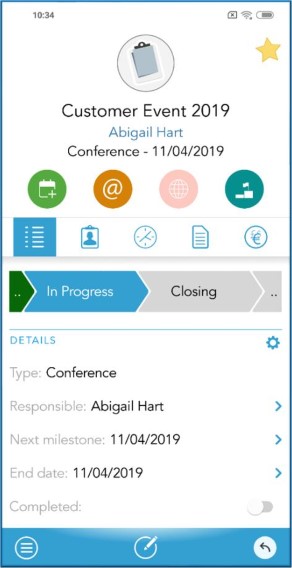 First, new action buttons have been added at the top of the Project card to make it easier to book your next status meetings, call project members, send emails, and move your project status to the next.
A visual presentation lets you see exactly what Project stage in the project guide you are. By clicking on the current stage, you can change the status of your project.
You also have full access to all the activities and documents connected to this project.
The visible fields under Details can be configured to fit you when you click on the icon. Choose which fields you want to see and drag and drop these in your preferred order.
And finally, a new tab for Sales opportunities has been added, where you’ll see all sales registered in this project.
You can easily access their Contact card, from the project by clicking their name.
First, new action buttons have been added at the top of the Project card to make it easier to book your next status meetings, call project members, send emails, and move your project status to the next.
A visual presentation lets you see exactly what Project stage in the project guide you are. By clicking on the current stage, you can change the status of your project.
You also have full access to all the activities and documents connected to this project.
The visible fields under Details can be configured to fit you when you click on the icon. Choose which fields you want to see and drag and drop these in your preferred order.
And finally, a new tab for Sales opportunities has been added, where you’ll see all sales registered in this project.
You can easily access their Contact card, from the project by clicking their name.