

Pre-requisites
- You have received a unique client ID and secret.
- You have whitelisted your redirect URL with SuperOffice.
- You have set up a web page at your redirect URL.
- The application user has a valid username and password.
OAuth Authorization Code flow
In the Authorization Code flow, an end-user grants access to a client application that requires consent prior to access tenant resources (web services). The application redirects the user agent, typically a browser, to the authorization endpoint of the Identity Provider.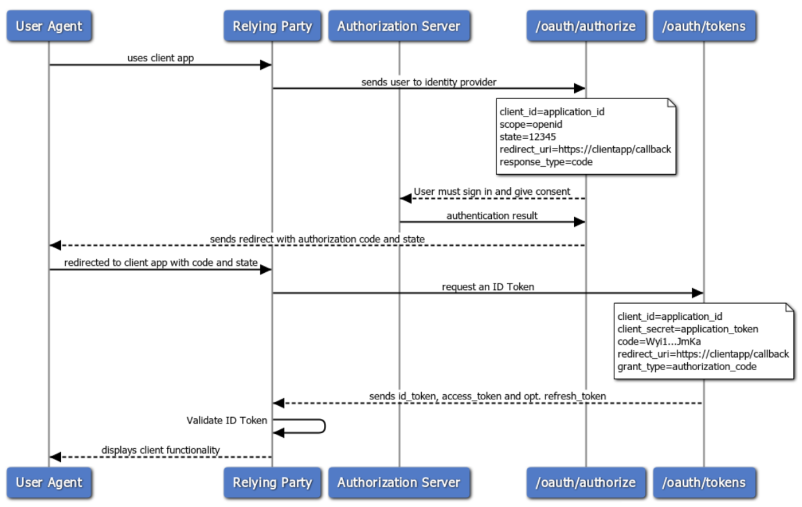 To start the flow, the user agent sends a request to the Identity Provider authorization URI. You can find both code examples and parameter descriptions in our detailed walk-through of the flow.
Implicit flow
Below is a high-level overview of the flow. For details, check out the Implicit flow scenarios.-
Forward the user to the SuperOffice CRM Online sign-in page to authenticate.
- Receive the authentication token when the sign-in page redirects the user back to your application.
- Validate the authentication token.
No application is allowed to ask users for their credentials, ever!