

- Archive columns
- Archive restriction columns
- Archive entities
archive{Descriptor}:{archiveProviderName}
CriteriaGroups
New Selection introduces the concept of criteria groups, where the criteria within each group are connected by AND, and groups are connected by OR. The database layout to support this has been in place for a long time and was used in an equivalent fashion for Saint Status definitions. There, each criteria group was in a separate tab in the user interface; in the new Filter screen groups are stacked vertically instead. APIs that only work with a simpleArchiveRestrictionInfo[] do not support the concept of multiple groups. Such methods will only return the first group, and on writing will delete any other groups. Examples are GetDynamicSelectionCriteria and SetDynamicSelectionCriteria; and similar methods in the Find agent. All these methods should be considered obsolete when applied to Selection and Find.
Selection criteria should be fetched and stored using the GetDynamicSelectionCriteriaGroups and SetDynamicSelectionCriteriaGroups methods on the Selection agent. Using them will retrieve and save all groups, and avoid having to make assumptions about the StorageKey concept used in the Find agent methods. Contrast the differences in the two calls (the ts.Key is a selection ID).
Get archive columns
These columns are useful when specifying the desired columns when calling the Archive endpoint. TheExtraInfo property indicates whether a field can be used in the ORDER BY clause in an ArchiveOrderByInfo.
- REST
- Agent
- WebApi Client
JSON query results
JSON
MDOListItem. The structures do differ slightly between columns and entities.
Get archive restriction columns
Not all archive provider columns can be used as criteria. Therefore, use this method to obtain just the columns that are used to specify criteria.- REST
- Agent
- WebApi Client
Get archive RestrictionColmns result
Returned columns represent each primary entity and all of their available columns listed in theChildItems property.
Property definitions are listed later in this section, however, note that the ExtraInfo property when selecting RestrictionColumns specifies the field datatype. This is important because not all data types support the same operators, and ExtraInfo is used to obtain what operators are supported for the field.
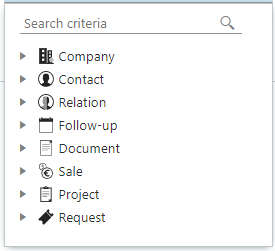
JSON query results
JSON
Get archive entities
Only one Find archive provider returns more than one entity,ContactPersonDynamicSelectionV2 - contact and person.
While this isn’t important to establish the CriteriaGroups, these routines are used in the final step when calling the Archive endpoint to get the results.
- REST
- Agent
- WebApi Client
REST JSON results
JSON