

Key info
- A unique ID
- A short descriptive heading
- An amount
- An (expected) closing date
- The type of sale
- A status
- The seller and the customer
Currency
Currency options depend on a couple of things:- Whether the use of currency has been enabled
- The base currency setting
- The local (own) currency setting
If the sale has a quote, you will not be able to set or change the currency of that sale.
Currency conversion
Stakeholders
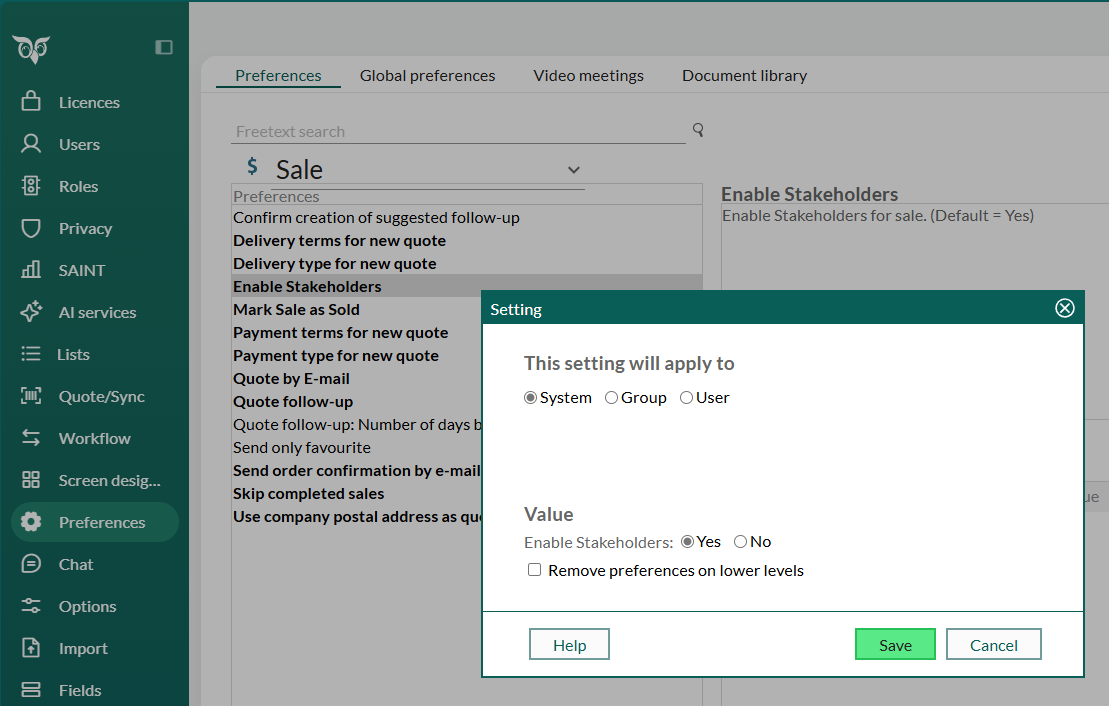
A sale has a main contact, but partners and subcontractors may also be involved in the sale. These are referred to as stakeholders and can be either individuals, organizations, or a mix. This can be turned off using the preference in Settings and maintenance > Preferences > Sale > Enable Stakeholders (default yes). With this preference turned on a new archive is presented for sales of type. This will also make the sale visible on more than one company sales archive if Enable Stakeholders is set.
This feature requires a Sales Premium license or the Growth plan.
Sales guides
Using a guide will simplify and structure the sales process for the sales staff with suggestions for which follow-ups to do and which documents to create at each stage.This feature requires a Sales Premium license or the Growth plan.
Sale type
A sale type is a named set of reuseable info that will help you standardize the sale process. Aside from the name and ID, you’ll find info such as:- The expected duration
- Whether it has stakeholders
- Whether a sales guide is available
- Percentages for discount and profit
- Stages
Stages
Each stage has a set of suggested activities. There is also a setting controlling whether the sale will automatically advance to the next stage when the last guided activity in a stage is completed. The sequence of the stages is determined by the rank of each stage. Example process:- Lead
- First meeting
- Proposal
- Second meeting
- Short-list
- Verbal acceptance
Suggested activities
Suggested activities are just that - suggested. They’re blueprints that can be used to create actual follow-ups and documents. The blueprints sit in the intersection between sale types and stages. A sale type can have many stages, and a stage can apply to multiple sale types. The SaleTypeStageLink table connects them all.Status of a sale
Stalled sales
A sale might become stalled if, say, the customer decides to wait until next year before purchasing. When this happens, the next activity changes to the re-open date. The seller should then set up a future meeting or phone call to follow up the stalled sale.Quote management
This feature requires a Sales Premium license or the Growth plan.
Each quote belongs to a single sale. And there’s only 1 quote per sale.
Key info
- A unique ID
- The corresponding sale
- An ERP connection
- A version
- Alternatives
- Products
- A state
Versions
There may be multiple versions of a quote, but only 1 of them is active at any time. Each version will have 1 or more alternatives, which in turn will have 1 or more quote lines. When updating quotes, you’ll always be working on the latest version.Alternatives and quote lines
Each alternative can contain different products, numbers of products, prices, and discounts. You should set the quantity and any discounts for the selected product. A discount can be specified as:- A percentage rate
- A discount amount
- A total amount
Products and price lists
Each product belongs to a single price list. A price list can either be cached from an ERP system or set up in SuperOffice CRM.ERP
You might be working with a tenant that is integrated with an ERP system. In that case, the ERP connection determines where the product information and prices are obtained from.Quote connectors
SuperOffice has a simple product and price-list system built in, but using quote connectors you can access products and price lists in other systems from inside SuperOffice.VAT
The SuperOffice quote connector will calculate the VAT amount of an alternative based on the VAT percent of the individual lines.Quote documents
Quote documents will be saved as activities on a sale. They’re tied to a specific quote version.State
Status
Sales and quotes vs. other entities
When working with sales and quotes, data will often intersect with the following entities:- Follow-ups (appointment table)
- Documents
- Company (contact table)
- Contact (person table)
- Project