

What is markdownlint
markdownlint is an extension to VS Code that encourages standards and consistency for Markdown. It is available directly from the VisualStudio marketplace or via the Docs Authoring Pack extension.Rules
The rules have a number and an alias. For example MD029/ol-prefix.Our custom rule-set
We have tailored the linting rules to align with our Markdown style guide. The custom configuration is located in .markdownlint.yaml.Don’t alter the rules without discussing it with the DX team.
Use
When you edit a Markdown or MDX (.md/.mdx) file in VS Code with this extension installed, you get visual warnings in the editor for lines that violate a rule. Example: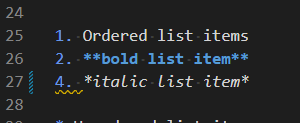 Here, the wavy underline indicates a problem with list numbering.
You can hover to find out more about the problem:
Here, the wavy underline indicates a problem with list numbering.
You can hover to find out more about the problem:
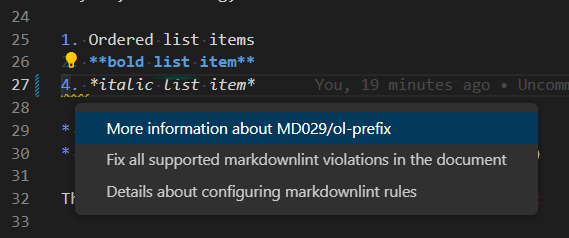
 Here we see that it is rule MD029 that is violated and that the list prefix on line 27 should be 3 and not 4.
You now have a few options for how to proceed:
Here we see that it is rule MD029 that is violated and that the list prefix on line 27 should be 3 and not 4.
You now have a few options for how to proceed:
- Edit the Markdown manually.
- Select Quick Fix and then select to fix all violations in the file.
HTML comments aren’t supported in MDX
Don’t use HTML comments (<!-- like this -->) to turn off a rule for a single line, a group of lines, or a file. That was a DocFx-era pattern: in .mdx files an HTML comment can break the build, since MDX parses the page as JSX rather than plain Markdown.
.markdownlint.yaml is already tuned to avoid needing most per-file overrides (for example, MD013’s line-length limits are generous and MD041 doesn’t require a specific front-matter title). If you hit a rule that genuinely needs a one-off exception, check with the DX team first rather than reaching for an HTML comment: the current MDX-safe mechanism for disabling a rule inline hasn’t been established yet.
Runs automatically on every pull request
A GitHub Action lints every changed.md/.mdx file on each PR, using this repo’s own .markdownlint.yaml and .markdownlintignore. It is advisory only for now - a lint issue shows up in the Action’s log but does not block the PR from merging. See Automated tests for the full list of checks that run against this repo and how to read their results.
Command-line linting
You can optionally install markdownlint-cli2, a command-line interface that allows you to do bulk linting - the same tool the pull request Action above uses. This is useful for bulk editing. Install:markdownlint-cli2 auto-discovers .markdownlint.yaml (the rule configuration) and .markdownlintignore (excluded paths, such as generated reference content) from the repo root - no need to repeat them as flags. PATH can be a single file, a glob, or a space-separated list of files. Add --fix to automatically resolve issues that have a defined fix, such as whitespace.
.markdownlint.yaml disables MD041 (require a top-level heading as the first line) and sets a generous limit for MD013 (line length): page titles come from frontmatter rather than an in-body H1, and prose here isn’t hard-wrapped to a fixed column width.