

Download the app
-
Access Apple App Store or Google Play, depending on your device.
 Or, open a browser on your device and go to the SuperOffice App Store to install the app.
- Download and install the SuperOffice Mobile CRM app.
Welcome screen
The first time you open Mobile CRM, or after an update, you see the welcome screen.- Tap Log in now to sign in to SuperOffice CRM Online.
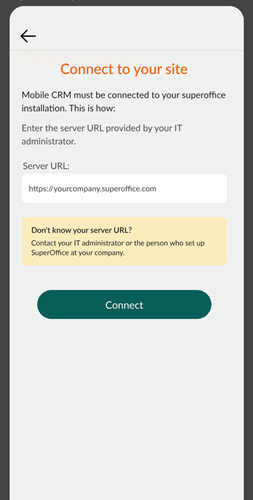
- To connect to an onsite installation instead, tap Are you an Onsite customer?, enter the server URL, and tap Connect.
Log in to Mobile CRM
- Open the app on your device.
- Enter your SuperOffice username and password.


Your sign-in method may depend on how your administrator has set up authentication (for example, Microsoft Entra ID).
Log out
- Tap the in the bottom center of the screen.
- Select Settings.
- Flick to the bottom and tap Log out.
- Select Yes to confirm.