

This page covers the new outbound-only client (
SuperOffice.Online.Replication.Client.exe). For the legacy WCF-based mirroring service, see the bottom of the page.Quick first-aid checklist
When something looks wrong, run through these checks in order:-
Is the Windows Service running? Open services.msc and look for
SuperOfficeReplicationClient_<ReplicationId>. It should show Running. -
Are there errors in the Windows Event Log? Open Event Viewer → Windows Logs → Application and filter for source
SuperOfficeReplicationClient. -
Run
validate. Stop the service, runand read the output. It checks configuration, database connectivity, and cloud reachability without starting replication. -
Check session state. Run
to see the tenant, the Replication ID, token expiry, and the URLs the client is using.
-
If tokens look invalid or expired, run
to re-authenticate without re-provisioning.
The service will not start
Possible causes and what to check:appsettings.jsonis missing or invalid. The service logs a startup error in the Event Log; the message normally points at the offending key. Validate the JSON with any editor that supports JSON schema.- The replica database is not reachable with the connection string in
ReplicaDatabase.ConnectionString. Try connecting from the host with SQL Server Management Studio using the same credentials. - The service account lacks
db_owneron the replica. The client needs to create tables and update_ReplicationState. - The session has not been provisioned. Run
provisionfirst.
Connection or token errors
Symptoms in the Event Log:401 Unauthorized, 403 Forbidden, repeated “token refresh failed”, or “session not found”.
- The refresh token may have been revoked from the SuperOffice side - for example because the app was reset or the customer subscription changed. Run
reconnectto re-authenticate. If that fails, runprovisionagain. - The host clock may be skewed. The JWT tokens are short-lived (~20 min) and the cloud rejects tokens with a clock skew of more than a few minutes. Confirm the host time is synced.
- Outbound HTTPS to the SuperOffice Replication endpoints may be blocked. Confirm with a quick
curlor browser test from the host.
Data is not arriving (or is delayed)
-
Compare timestamps in the Event Log with what you expect. The client logs
Informationentries for each commit cycle. - If the client has been offline for more than 7 days, change events have been purged from Kafka. See Force re-sync.
-
If a single table is stale, use
resync-tables: -
If the Windows Service shows Running but you see no activity, raise the log level temporarily to
Debug(see Logging) and check the next cycle.
Schema is out of date
If you have added an extra table or field in SuperOffice Service and it has not appeared in the replica:-
By default the client checks for new tables once per hour (
SchemaUpdateIntervalSeconds = 3600). -
Force an immediate check with:
- New tables are populated on the next sync cycle after they are discovered.
Multiple instances on the same host
Test and Production clients can coexist on one host. If you see unexpected behaviour:- Confirm each instance is unzipped into its own folder with its own
appsettings.json. - Confirm each instance points at a different replica database in its connection string.
- Confirm the Windows Service names are distinct. They are derived from the Replication ID, so two sessions with the same name on the same host will collide.
”Out-of-date client” critical error
If the cloud enforces a minimum client version and yours is older, replication stops and the Event Log shows a critical error. Plan a periodic upgrade window. Upgrades are a stop / replace binaries / start cycle:sc stop "SuperOfficeReplicationClient_<ReplicationId>"- Replace the binaries in the install folder.
sc start "SuperOfficeReplicationClient_<ReplicationId>"
appsettings.json, nlog.config, and the session state (in _ReplicationState) are preserved.
How to collect diagnostic information for a support case
When opening a support case, include:- The Replication ID and Tenant ID (from
info). - The exact client version (shown by
infoor in the file properties of the executable). - The relevant Event Log entries (export the filtered view as an
.evtxor text). - The output of
validate. - Your
appsettings.jsonwith secrets redacted.
Legacy (WCF-based) mirroring
[!IMPORTANT] The sections below apply only to the legacy WCF-based mirroring service. New deployments use the outbound-only client.The most common problems during setup and configuration of legacy Database Mirroring were:
- Unavailable service
- Validation error
Unavailable service
This section assumes the legacy service is hosted as a WCF service in IIS.
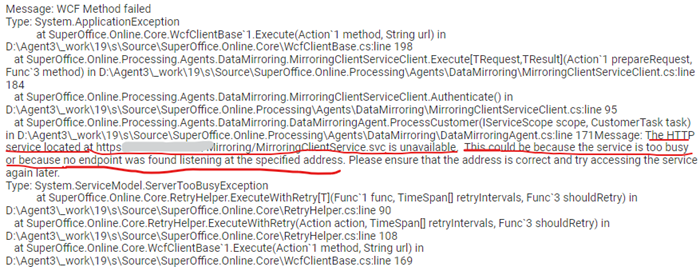 This problem is difficult to understand because viewing the web service in IIS delivers the expected WCF service web page:
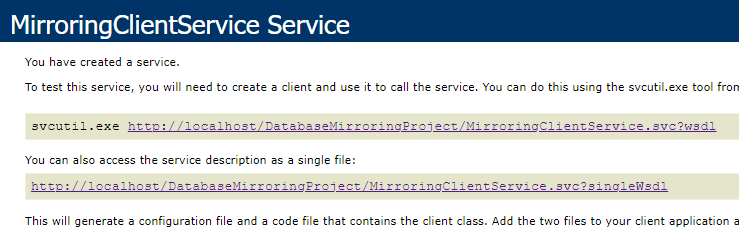 The error message in this case is misleading. When you view a WCF service in IIS, the page is served as a response to a GET request in the browser. The legacy Mirroring Task, however, sends POST requests to the customer’s web server. Therein lies the difference.
You can verify this by issuing a POST request to the legacy mirror URL:
The error message in this case is misleading. When you view a WCF service in IIS, the page is served as a response to a GET request in the browser. The legacy Mirroring Task, however, sends POST requests to the customer’s web server. Therein lies the difference.
You can verify this by issuing a POST request to the legacy mirror URL:
The following example contains an invalid JWT token and does not affect the point of testing service availability.
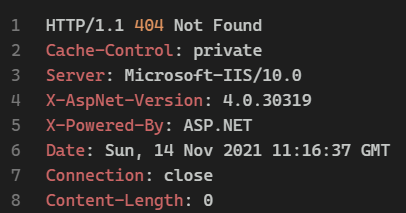 If you see this, the connectivity issue is likely caused by permissions settings on the IIS server. When the legacy mirroring service is available to GET requests but unavailable to POST requests, the configuration likely requires the additional security element in the
 basicHttpBinding configuration:
If the WCF service returns a 404 when the security element is present, remove the security element from the
basicHttpBinding binding section and try again.Validation errors
The legacy mirroring service initiates synchronization by passing a signed security token to the mirroring endpoint, which the endpoint validates. The endpoint then creates and signs its own security token, and sends it back to SuperOffice. Only after SuperOffice has validated the returned signed token does the mirroring service begin to send data. Assuming the endpoint uses the SuperOffice.Crm.Online.Mirroring NuGet library, a token-validation failure returns an error similar to:ValidateSuperOfficeSignedToken and load the SuperOfficeFederatedLogin.crt certificate explicitly:
Explicit validation
While extremely rare, it is possible to host a legacy mirroring endpoint by implementing the WSDL directly. Such endpoints must do everything, from validating the JWT to populating the database, on their own. We strongly discourage that approach and do not support it. The incoming authentication request from SuperOffice contains a signed JWT token in theSignedToken header:
iss- issueraud- audiencenonce- needed for the signed response
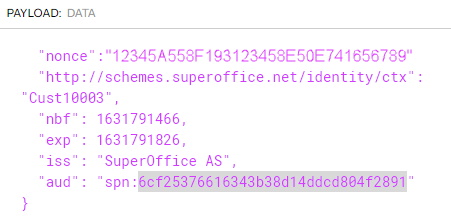
Validate the authentication request token
Sign the response
Using thenonce from the JWT and the private certificate key, build a string that contains the nonce, the date/time, and a signed representation of those, separated by periods:
AuthenticateResponse is sent back to SuperOffice and validated, the data flow cycle begins.
Could not establish trust relationship
Could not establish trust relationship for the SSL/TLS secure channel with authority <website of their mirror client>.
This indicates that the legacy SuperOffice mirroring service cannot validate the SSL certificate presented by the customer mirror client website. Common causes:
- The website uses a self-signed certificate. Install the certificate in the Trusted Root Certification Authorities store on the SuperOffice mirroring server.
- The website uses a certificate issued by a CA that is not trusted by the SuperOffice mirroring server. Install the CA’s root certificate in the same store.
- The website’s certificate has expired or is not yet valid. Renew or replace it.