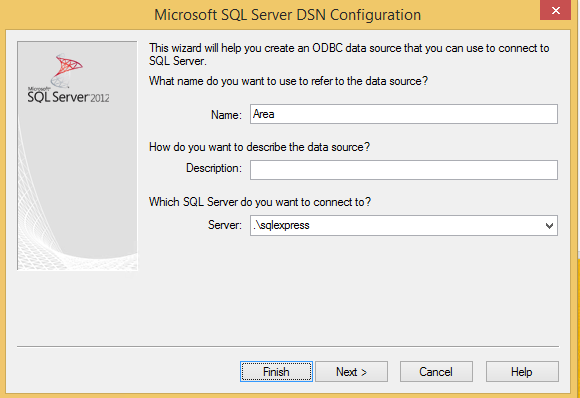
Local_datasource setting.
Make sure you start SOAdmin.exe elevated (as administrator) the first time you try to generate a prototype. From 7.0 SR1, we no longer create separate AreaX ODBC datasources during prototype generation. This means you are no longer required to be the local administrator to generate a prototype.
Paths and configuration variables
The prototype is generated on a database server, and the actual database file must reside on the same server. If the archivepath file store and the database server run on different computers, the prototype will have to be created on the database server and not the archivepath file server - this is how MS SQL Server works. Two new variables have to be added to SuperOffice.ini in theSuperOffice section for this purpose, note that both should point to the same location on the same computer as the SQL prototype is generated:
ARCHIVEPATH, like \\SERVER\SO_Arc\Template\travel.
These are ONLY necessary for clients who are going to generate prototypes. The normal Travel user does not need any of these paths to do a local update.
ProtoServerPath
The full path (without filename) to the place you want the prototypes to be created, as viewed from the database server. So this should always be a local path, like c:\so_proto or something similar. This path is going to be used when SOAdmin or the Travel gateway service tells the SQL Server to create a new database; the statement will be processed by the database server and must therefore refer to a file path local to the server machine.ProtoClientPath
Originally this was the full path (without filename) to the central SO_arc\template\travel folder where the prototype will be zipped and copied too so the client finds it late. Since we now always zip down the prototype to central so_arc\template\travel, you specify the same path as in ProtoServerPath and the application will automatically copy the prototype to so_ar\template\travel at the end of the prototype generation. This is required only on clients who are also going to generate prototypes.AREA data source
The AREA ODBC data source must be configured on the machines used for generating prototypes. It does not need to be configured on normal Travel clients. This is just as usual. When creating the AREA data source, you only need to go through the first page of the Wizard. On the first page, fill in the name AREA and choose the correct SQL Server.