Turn off upgrade prompt
The prompt to upgrade can be disabled in scenarios where you don’t want to push a new version of WebTools. The configuration setting SuperOffice\Downloads\WebToolVersion in the web.config file can be set to a previous version. The user will still be able to upgrade to the latest version by pressing Download in the web client.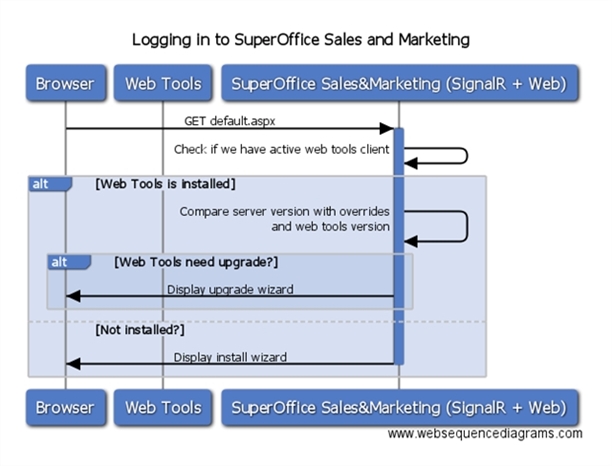
Hide WebTools download dialog
SuperOffice WebTools upgrade dialog can be suppressed by configuration in web.config. When a user logs in to an updated Web installation, WebTools will detect there is an updated version available and prompt the user to upgrade. Versioning in SuperOffice is defined as “MAJOR.MINOR.BUILD.REVISION”. The user will be “forced” to upgrade if the MAJOR component is higher than the current WebTools’ major version. Other changes are optional upgrades. The prompt for an upgrade can be disabled in scenarios where you don’t want to push a new version of WebTools. The configuration settingSuperOffice\Downloads\WebToolVersion in the web.config file can be set to a previous version. The user will still be able to upgrade to the latest version by pressing Download in the web client.
Client upgrade warnings
You can configure on the server whether clients are prompted to upgrade when they have a version older than a specific version. Open web.config on the server where Sales & Marketing web is installed and add the following section in the</Documents> add the following new section:
Suppress the dialog in SuperOffice Admin
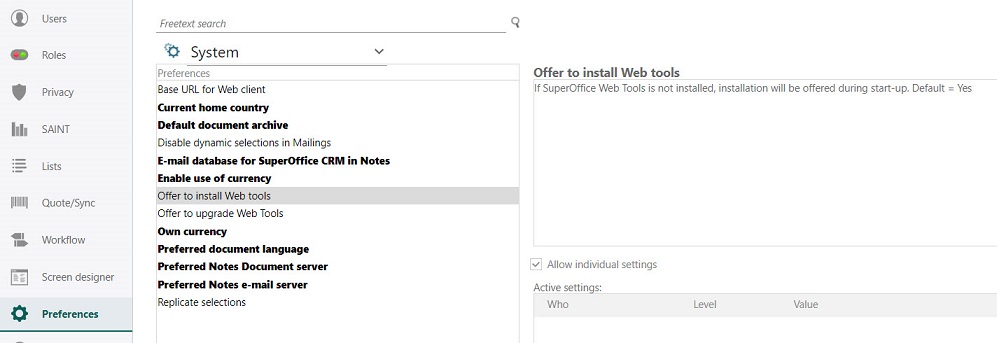
Since SuperOffice 9 it is possible to suppress the WebTools installation and upgrade dialog in SuperOffice Admin. Go to Preferences > System and check the Offer to install WebTools and Offer to upgrade WebTools options. Once set to ‘No’ clients will not be offered to install and / or upgrade WebTools.