

This feature requires a license for Development Tools or the CRM Suite Core plan.
Data-driven approach
In the SuperOffice application, we can have custom fields. When we have a set of fields that is constantly changing, we will face a problem with returning these fields in our web service methods because we cannot change web service methods when someone defines a new field. To avoid this situation, SuperOffice has introduced the concept of data-driven data in the NetServer. In NetServer all the user-defined fields have been packed into a single property of entity by using a string dictionary. If we take thecontact entity, it will have a property called UserDefinedFields which represents all the user-defined fields. In the context of the contact entity, this property will house all the user-defined fields of the contact entity as key-value pairs.
Ways to customize
There are 3 ways to customize the database schema:- User-defined fields (udef) in Sales
- Extra fields on SuperOffice entities in Service
- Extra tables (aka 3rd party tables) in Service
Each CRM entity allows user-defined fields: appointment, contact, document, person, project, sale, however only CRM contact and person allow extra fields.
User-defined fields (udef)
Storage
Dates
User-defined date fields use the SuperDate format. This is a string:- a set of square brackets enclosing a prefix and the date itself
- D: (fixed)
- the date on the YYYY.MM.DD format
Available fields by type
Each entity that supports user-defined fields can have up to 119 custom fields.When all String[40] fields are taken, the system will use String[200] from the corresponding
UDXXXLarge table. This will decrease the available number of fields for the long text type fields.UDefField table
User-defined fields use a layout described in a table called UDefField. One row in theUDefField table describes one field in one particular version of the layout. The same field can be described many times in the table, once for each layout that has been published.
Every time the admin publishes a new layout of fields, a new version of the layout is created. One row is added for each field being published. After the new layout is created, the values are shifted around if necessary.
This is the part of the publishing process that takes time.
updatedCount is a unique ID for each field that does not change as the field is changed.
The version is updated every time a new layout is published. The current version number is stored in a user preference.
For most fields, you’ll see the same info repeated for each version. Sometimes a new field is added, sometimes the tab order will change slightly.
The travel system uses these old versions to handle travelers who return home after the layout has changed. Their changed data is mapped to the new layout when they return.
Value tables
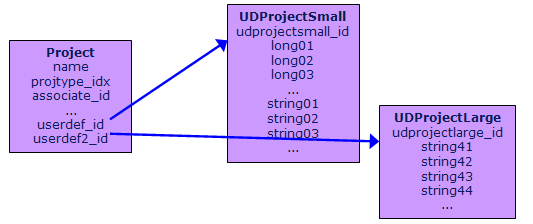
User-defined fields are stored in special database tables. For example, for contact, user-defined fields are stored inudcontactsmall and udcontactlarge. These 2 tables have lots of fields such as long02 and string04, which barely describe their function to the user.
When the user-defined fields are defined for a contact, the system controls which field of udcontactsmall or udcontactlarge they are assigned. The Udcontactsmall table contains short fields such as int and floats, while the udcontactlarge table contains large text fields such as varchar[255].
- The small table contains integer values and short strings (10 chars)
- The large table contains long strings (200 chars max)
long01-long04(UdXxxSmall table)string01-string04double01-double04string41-string44(UdXxxLarge table)
If you change a field from non-searchable to searchable, its values are moved from a non-indexed to indexed field when you publish the change. For example, from
long05 to long01
The only thing that has changed is that the new field is indexed. Unfortunately, we can’t just add an index on the table - we have to move the data into the indexed field.
Table identity
Every table can be identified by an integer value. For example:- company = 1
- associate = 2
- associategrouplink = 3
- associateheadinglink = 4
- contact = 5
- …
- licencesatllink = 239
- productversion = 240
Column identity
Every column in a table is identified by an integer value. That value is derived by the following computation:- Column identity = table identity * 256 + column offset
udefidentity is a unique identifier for the field allocated by the udef system when a field is created. You can change the tab-order, the name of the field, or the type - the udefidentity remains the same.
This value used to be stored in updatedCount in SuperOffice.
The column ID is the dictionary ID of the table and field used for storing the value.
- 36358 =
UdProjSmall.Long06(not indexed, not fast to search) - 36353 =
UdProjSmall.Long01(indexed field)
Column offset
What is column offset? Column offset is the sequential place of the column in the table. This is a zero-based number. For example: This is a visual representation of a table:
Given this information, we can determine that the column identity values for the contact table are are follows:
Contact table: ID = 5 (first 3 columns):
Viewing entity data
Custom objects in entity data are exposed as UserDefinedFields, ExtraFields, and CustomFields. CustomFields combines both UserDefinedFields and ExtraFields, and eventually the only means to access custom fields.Extra fields
Storage
Unlike user-defined fields, extra fields are added as actual fields to the database tables. There are no pre-defined slots you need to take into consideration, and essentially no limitations. If you add a field with database namex_field to the ticket table, the value will be stored in 1 of these 2 places:
- If it’s an FK, the actual value is stored in a related table.
ticket.x_fieldholds only the reference - Otherwise, the value is stored in
ticket.x_field
The extra_fields table
For a complete list of properties, see the database reference.
Searching custom fields
Using custom fields in search queries are prefixed by their entity and type: contactUdef/SuperOffice:1 or personUdef/SuperOffice:1. User defined fields as listed in the SimpleContact archive provider docs:
The prog ID is used to identify user-defined fields for an entity. The format is
text:number. By default, the text part is SuperOffice and the number is a running counter. You can customize the ID when you create the field, but keep the text portion to letters a-z or their uppercase equivalents.
Extra fields are not currently included in the archive provider documentation. They are declared and accessed by the enity and type prefix, followed by a forward slash and the field name.
Extra field archive query support is available only for:
- contact
- person
- ejCategory
- ejUser
- ticket
Requirements
- Development Tools license or the Core plan
- SuperOffice 8.1 or newer
- NetServer must be restarted every time you change the schema
- If Travel is activated, a new Travel database must also be generated
Continuous Database (CD) is available onsite only.