Online argument generators
The HTML-based argument generators are also available online - no download required: Open the link, fill in your values, and copy the generated argument file content directly - or generate argument files for the command line tool. You can also use local HTML-based argument generators. The zip file contains two HTML files, one for each utility. Just unzip them and run locally.CrmSetup
Run the command prompt as administrator,--help gives possible options and arguments for the different options:
New installation
Thenew-installation option is used to prime an empty database and set it up for use.
Upgrade existing database
Upgrade existing installation.Inspect database
Theinspect-database option is useful for testing how to use CRMSetup without changing the database.
Kill database
Kills an existing SuperOffice database. It will remove the database content, not the database itself.Import IMP file
Theimport-file option imports an IMP data file to the database.
Database export
During export, an .sdb file is created in the same folder as CrmSetup.exe. Other path can be used but the folder has to be created first.Database import
Theimport-database option imports a database from a file, overwriting any existing database.
Transfer database
Thetransfer-database option transfers data from a source to a destination database.
CrmTask
CrmTask is for scheduling regeneration of the freetext index, SAINT counters and status monitors, and running ERP sync.CrmTask as scheduled task
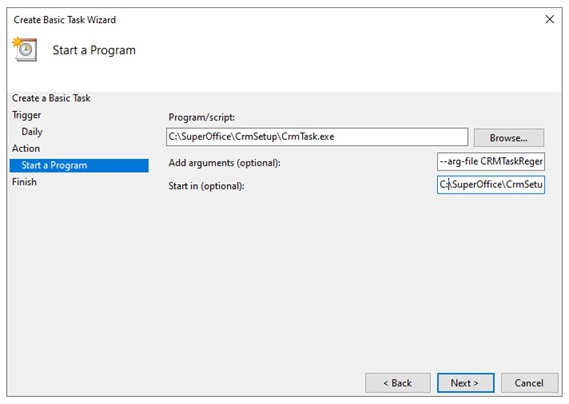
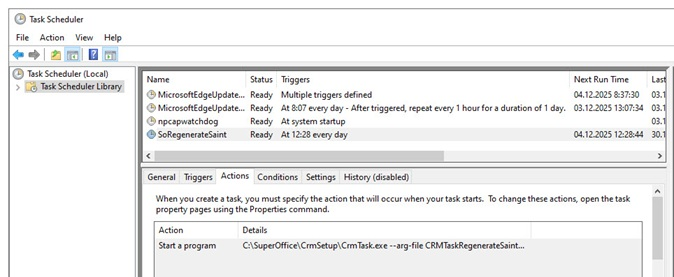
To run CrmTask automatically, you can use the Windows task scheduler to schedule it to run for example every night. As arguments, use--arg-file and add the corresponding argument file for the given task. If you do not specify the CrmTask command on the command line, you need to have it on the first line in the argument file (for example, regenerate-saint-counters).