

Dashboards - Improved functionality
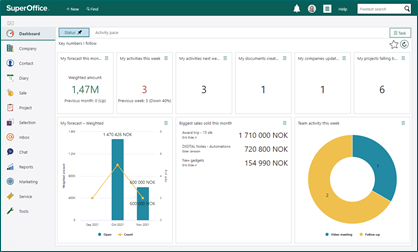 The dashboard can have as many tiles as you like or as many as needed. If adding too many you will get a scrollbar.
You can choose how many columns a dashboard should contain and what type of theme it can have.
The dashboard can have as many tiles as you like or as many as needed. If adding too many you will get a scrollbar.
You can choose how many columns a dashboard should contain and what type of theme it can have.
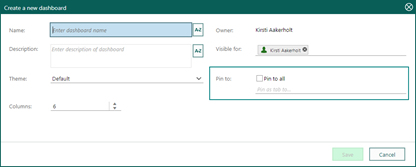 As an administrator you can create and pin dashboards to different users and user groups. And you can also set visible for to users and user groups, so that a user not interested in very specialized dashboard will not be able to search for them.
 You can set a dashboard as favorite to always show it as a tab in your own dashboard view.
 Drag and drop tiles into the grid and change the size to the exact wanted view. The library shows all available tiles. You can also choose a chart from a dynamic selection.
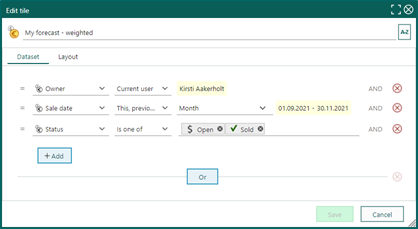
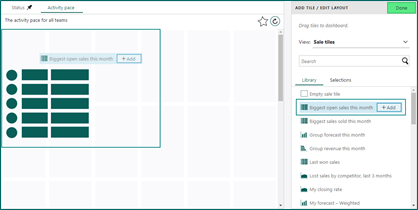 Change the dataset behind the tile, just use criteria to get the exact data you want.
This will change it only on this tile, not on existing dashboards or new ones.
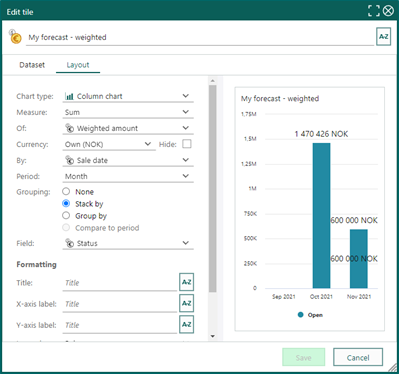
 Change the layout of the tile, so it explains the data as good as possible.
If the Layout tab is disabled, this means you do not have sufficient user rights. Contact your administrator to get the needed user plan.
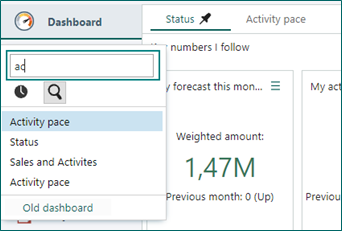
 You can search for dashboards that either you or your colleagues have made.
Your favorites dashboard will always be shown as a tab in your dashboard view.
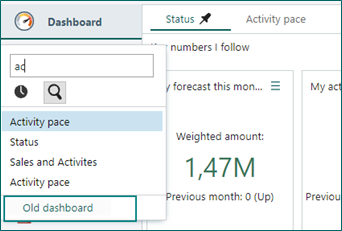
 You still have access to your old dashboards so you can recreate them in the new layout. You cannot edit them anymore, only view.
 Read more about Dashboards.