

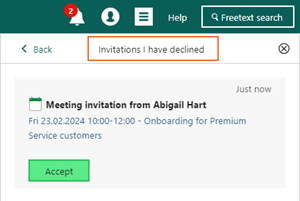
Notifications - Show invitations I have declined
You can decline meetings in your diary that do not fit your schedule. If your calendar changes and you can now attend a previously declined meeting, it is simple to accept it. To accept a declined meeting, click Show declined meetings in the Notification panel’s footer. Then, find the meeting you can now attend, and click Accept.
Dashboard - New default Requests dashboard
When managing requests, it is crucial to have an overview of your response and closing times. The default Requests dashboard provides this overview with various tiles displaying request status analytics. Go to Dashboard and search for “request”. Here you will see an overview of your request status:
 You can customize this dashboard to meet your needs by clicking Task, select Add tile/Edit layout, and choose the important tiles.
Dashboard - New standard request tiles
To help you create an effective request dashboard, we have added new standard tiles for requests (in versions 10.3.1 and 10.3.2). See the overview below:- Average closing time by category
- Average closing time by user
- Average response time by category
- Average response time by user
- Customers with the most open requests
- My average response time
- My average closing time
- My open requests
- My requests with passed deadline
- Open requests by priority
- Open requests by user
- Request by category
- Requests created this month
- Unassigned requests
