

The original version of this article appears on the community website and was written by Frode Lillerud. The docs team thanks Frode for sharing this content with us.
http://service.example.com/scripts/customer.exe?action=safeParse&includeId=something&key=abc&contactId=123&name=NewName
Now, obviously, this simple script has some room for improvement, but as a start, I just wanted to show the minimum needed to do something.
Ok, let’s improve the script by only allowing POST, validate the data passed in, and return some sort of status indicator to the caller.
In this sample we check for HTTP verbs in-code, but it is also possible to set allowed HTTP verbs for the script in the GUI.
cgiWasPost() is somewhat sensitive as to the Content-Type, so it has to be set to “x-www-form-urlencoded”.
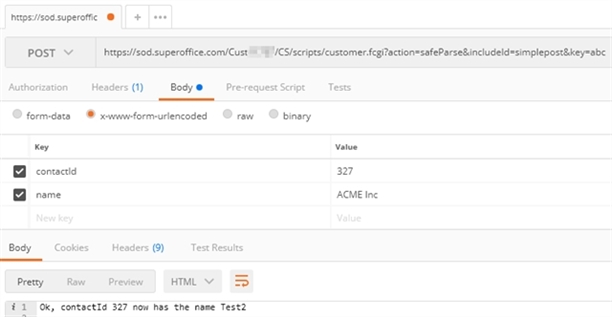 Also, at the end of the script, we’re just printing out the response. Since we haven’t said otherwise this will be returned as Content-type “text/HTML” and with HTTP status code “200 OK”.
Let’s change the example a bit so that it can be used to retrieve data from SuperOffice as JSON, and show how we also can control the HTTP Status Code returned.
Also, at the end of the script, we’re just printing out the response. Since we haven’t said otherwise this will be returned as Content-type “text/HTML” and with HTTP status code “200 OK”.
Let’s change the example a bit so that it can be used to retrieve data from SuperOffice as JSON, and show how we also can control the HTTP Status Code returned.
%EJSCRIPT_START% tags will include other scripts. Those other scripts do not need %EJSCRIPT% tags. By splitting it up you’ll get a better developer experience since the syntax checking performed when saving a script doesn’t work for scripts of type %EJSCRIPT%.