

SuperOffice Users
To integrate with Active Directory, you need to set up your SuperOffice users as Active Directory users.- web.config must define and configure the ActiveDirectoryCredentialPlugin section.
- Your SuperOffice users need to be linked to Active Directory users.
SuperOffice web.config
You must explicitly enable the authentication methods you want to use in the web.config file.AuthorizeWithImplicit must be true; otherwise, the Active Directory authentication method will not work. It adds the WWW-Authenticate: Negotiate header that kicks off Windows authentication.IIS configuration
- Open the IIS Configuration tool and select the SuperOffice application.
- In IIS, navigate to the application hosting SuperOffice web client.
-
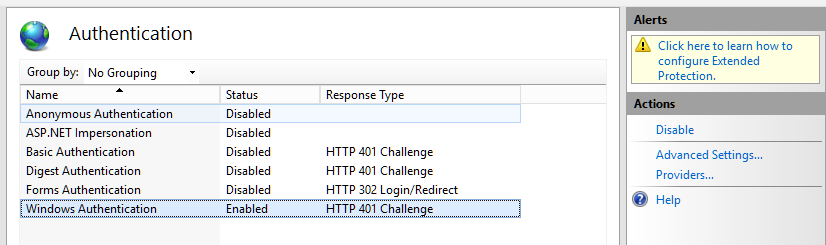
Enable Windows Authentication, and disable the others.
-
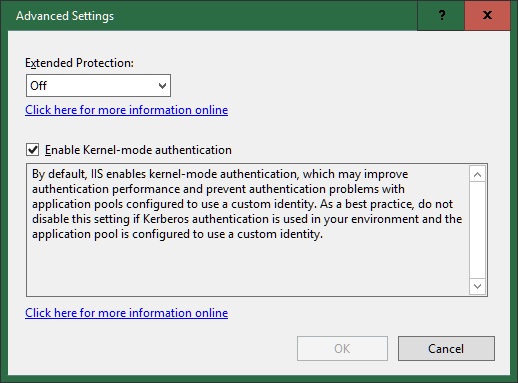
Click Advanced Settings to enable Kernel-mode authentication.
-
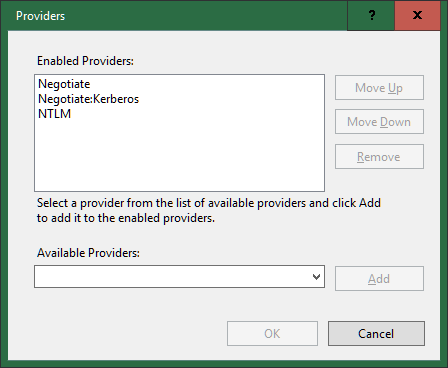
Click Providers to ensure that Negotiate is the first enabled provider.
/api/v1/user/currentPrincipal via Chrome or Edge should automatically log you in, and return the current user’s info.