Consumers:
Deployment
Do you want to deploy NetServer web services as part of the Sales & Marketing Web client?StandAlone
Install the web services on a separate server, or as a separate web application on the same server.- Several installations = several configurations, more stuff to maintain.
- More flexibility.
- When are you upgrading which SuperOffice 7 product to 7.1 or SR?
- More control?
- Do you want your web services exposed to the internet?
- Do you need System users to access your web services?
- Is the user in your .mst file a valid system user?
With Sales and Services web
Install the web services as part of the Sales & Marketing or the Customer Service web client.- One installation - one configuration - less stuff to maintain.
-
Web and Web Services has always the same version.
- What version is required by Pocket and Customer Service?
- You will not be guarantied that all products are released at the same time in the future.
-
Do you want Web to be accessible from the internet?
- What about your web services? Security considerations…
Configuration
App server
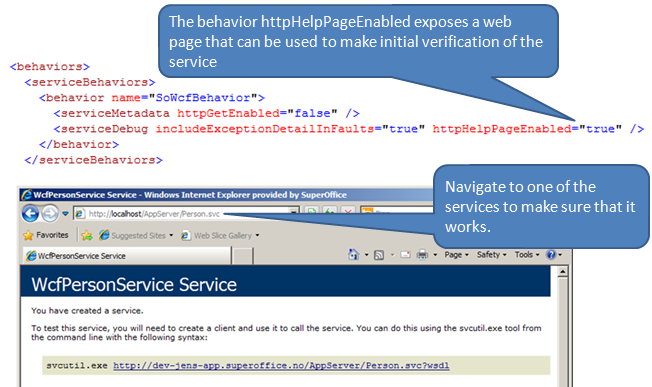 In the web.config file for the application server you can turn on help pages to verify that the services are working. They also describe the API, so you should probably turn these off when exposing services on the open internet.
Web server
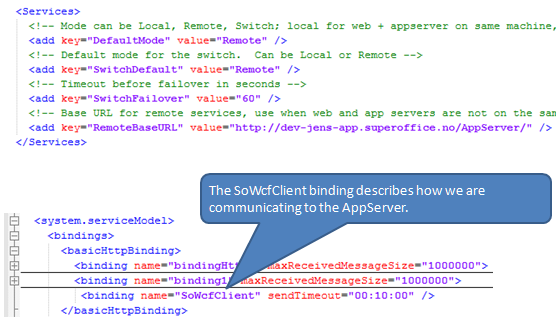 For the web server to talk to the backend you must change the DefaultMode to “Remote”.
- With ASMX services, that was enough.
- With WCF, you must also set up the WCF binding to connect the web server to the app server. Configuration of a binding includes SOAP version, protocol, security, and so on.
Troubleshooting
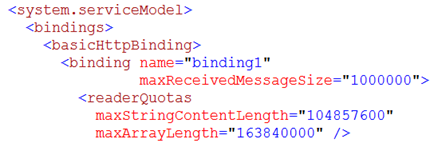
Where to look if something goes wrong.The most common issue by far is to low default values on the bindings. Remember to increase both server and client sides when there are problems.
Use a browser
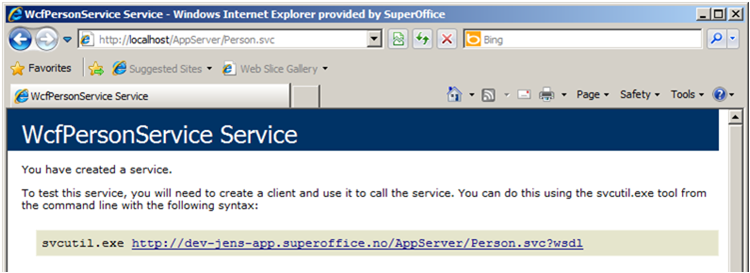
Use the web browser to navigate to the web-service end-point and see what you get back.