

Pre-requisites
Overview
- Make sure a connection to the server is available (NetServer).
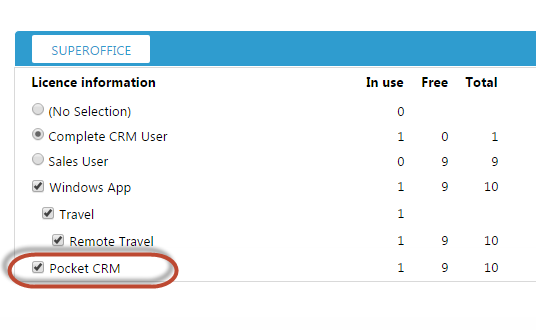
- Make sure all Pocket CRM users have a Pocket CRM license.
- Download and install the Pocket CRM App on all devices.
- Configure the connection path to the server on each of the Pocket CRM App.
Step 1: prepare NetServer
You will need to set up and properly configure the correct version of SuperOffice NetServer.Web and Pocket can share NetServer if the Web client does not have IIS authentication. The Pocket client does not support AD authentication. Pocket version 8 does not support IIS schemas.
http://servername.youcompany.com/NetServer/sevices80/
Do not use space or national characters. Use lowercase a-z characters and/or numbers 0-9.
Verify NetServer
Pocket CRM uses SuperOffice NetServer so we need to verify that the Pocket CRM can reach the server that NetServer is installed on. Open a browser and enter the domain name address to the remote NetServer installation. Example:http://servername.youcompany.com/NetServer/sale.svc Result should look like this:
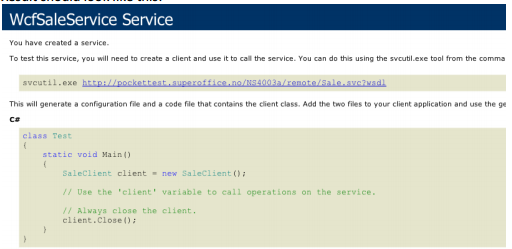 Clients installed on mobile phones uses this address to communicate. This server address (URL) must be reachable from mobile phones (from the internet).
Step 2: assign a Pocket license
This step is necessary only if you have an Onsite Buy license type. For Onsite Subscription, all users have the Pocket license included in the license plan.
Steps 3-4: get the app on the mobile device
All users must complete the client installation.Connection URL
The user can set this URL either by typing the address manually or by clicking a SOProtocol link on the device. To make it easier to configure the URL for Pocket CRM, it is recommended that the installation address,http://pocket.mydomain.com/pocketcrm/services84/ is sent as an SO protocol to the end-user using SMS or email that is accessible on the device they are to connect to.
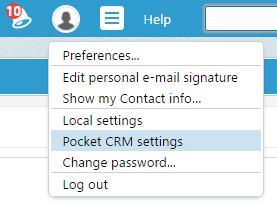
You can send a predefined email with this URL by clicking Pocket CRM settings from the SuperOffice Web client:
To change the URL that is sent out in this email, changes have to be done in web.config for NetServer under SoFormsAuthentication: