

Value mappings
Before starting the DataBridge configuration, map values used in Visma Net to the corresponding values in SuperOffice. You’ll need these when you configure the transformations in the company sync and product sync integrations in DataBridge. Collect the following mappings in a spreadsheet or document and bring them to the configuration session:
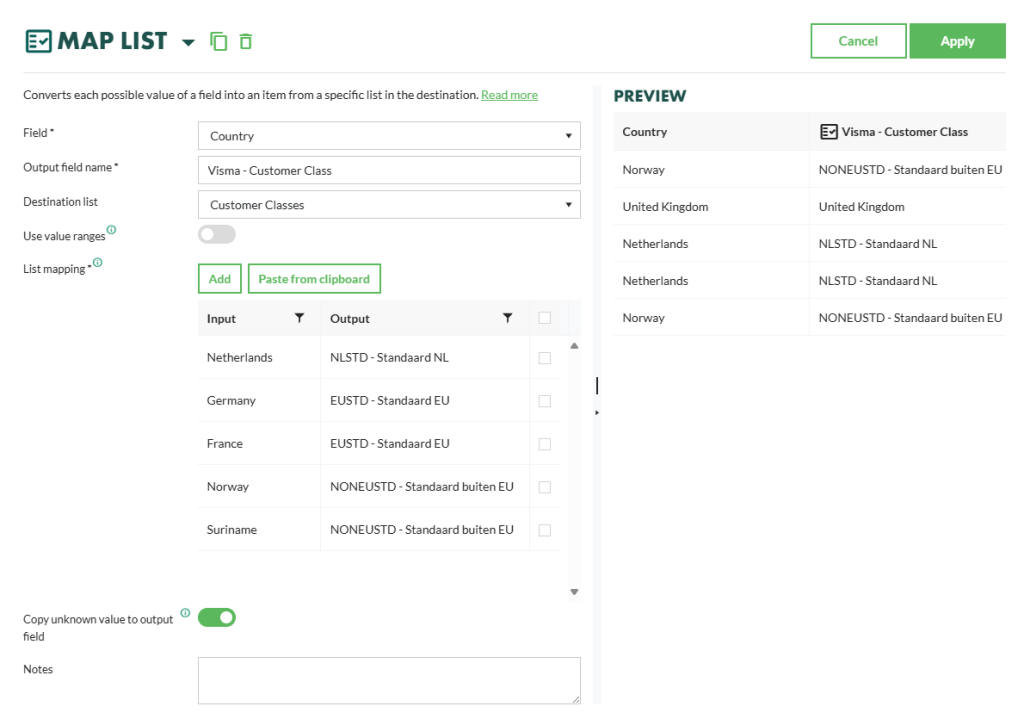
The example below shows how a Map List transformation in DataBridge maps SuperOffice country values to Visma Net customer classes.
Pre-configuration session (Growth and higher only)
In CRM Suite Growth and higher, the integration is customized to the customer’s data model. Before the technical setup starts, the customer and the consultant hold a session to decide:- Field mapping: which Visma Net fields map to which SuperOffice fields for each entity
- Data flow direction: per entity, is the data pushed, pulled, or synchronized in both directions?
- Leading system: which system is the source of truth per entity in case of a conflict?
- Scope: which entities should be synchronized, and which should remain separate?