

Screen designer - Use ERP fields as a block
On the Screen designer you can also show the ERP fields on the front page, not only on the ERP tab.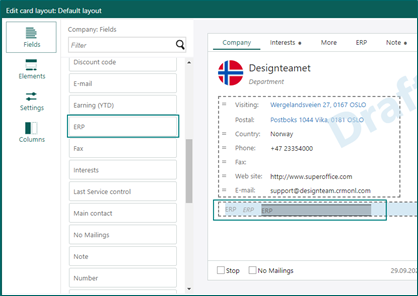 With that option, if ERP is important for your company, or for a specific user group, you can choose to get the ERP information on the first page on the Company and/or the Contact card.
You cannot choose what fields to show: you get all the ERP fields as a block or none at all, so make sure you have enough room for them.
With that option, if ERP is important for your company, or for a specific user group, you can choose to get the ERP information on the first page on the Company and/or the Contact card.
You cannot choose what fields to show: you get all the ERP fields as a block or none at all, so make sure you have enough room for them.