

Screen designer - New functionality
You can configure the Company and Contact main cards just the way you want them in the Screen designer. You can:- Remove the fields not used.
- Show the fields most used on the first page.
- Group fields with headings and add tabs and buttons just the way you want them.
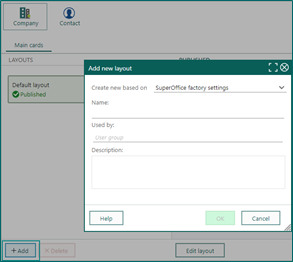
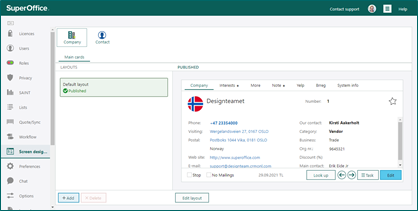 Add a new layout for specific user groups. Like that, your different user groups can have different layouts. Set up the layout with the fields that are most valuable for the different user groups.
 All fields, both standard, and user-defined fields are available in the Fields section. Under Elements, you have Label, Divider, Link, and Button.
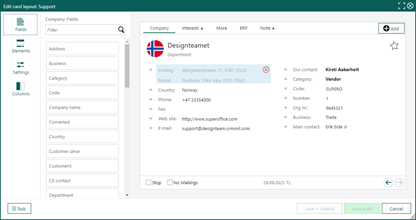 The Settings section lets you change the font settings on each field.
In the Columns section, you select how many columns you like to show on the main card. You can choose from 1 to 4 columns.
Learn more about Configurable screens on our Community.
The Settings section lets you change the font settings on each field.
In the Columns section, you select how many columns you like to show on the main card. You can choose from 1 to 4 columns.
Learn more about Configurable screens on our Community.
AI Services - New functionality
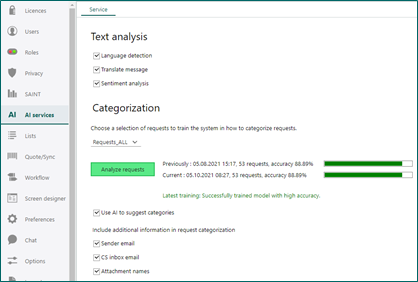
Artificial Intelligence Services contains different areas:- Text analysis on incoming requests.
- Categorization where the service tries to find the best category for requests.
- Chatbot for a Chat channel, where the message on the chat is passed on to a script for processing.
 Read more about AI Services.
User-defined fields - Field placement removed
User-defined fields are added with the wanted type and setting.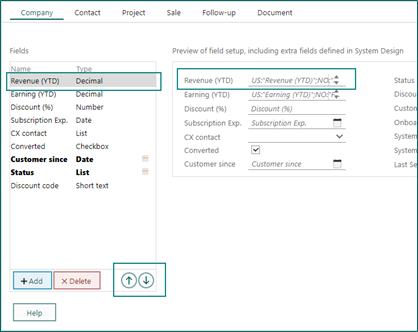 You can change only the rank of the field (when using tab inside edit mode), the placement of the field is done in the Screen designer.
Users - New user plans
The different products and user plans have changed. The main 3 CRM solutions you can choose from are Sales, Service, and Marketing.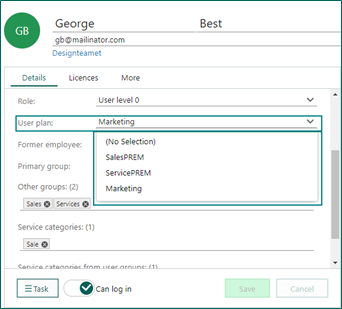
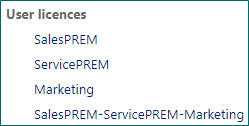 Sales and Service have 2 editions: the Essentials edition and the Premium edition, where the Premium edition will contain more complex processes.
Read more about the new SuperOffice CRM solutions and names.
Sales and Service have 2 editions: the Essentials edition and the Premium edition, where the Premium edition will contain more complex processes.
Read more about the new SuperOffice CRM solutions and names.