Standard applications are built to fit many and available in the SuperOffice App Store. In contrast, custom applications are one-off customizations for your company or a customer’s company only.Standard applications are owned by, operated by, and the responsibility of SuperOffice partners. You become a cloud partner when you sign our sub-DPA, which you need to publish your standard application to the App Store.All applications begin in our sandbox environment. Standard applications must pass our certification and security evaluation by Telenor Cyberdefense. After that, you may list your application in our App Store.
The Telenor Cyberdefense security evaluation is a mandatory part of our certification program.
Owner vs. developer
Sometimes a partner develops a standard app on behalf of another partner. To support this, each app is linked to two partners:
Owned by: The partner the app belongs to commercially and publicly.
Developed by: The partner that builds and runs the app.
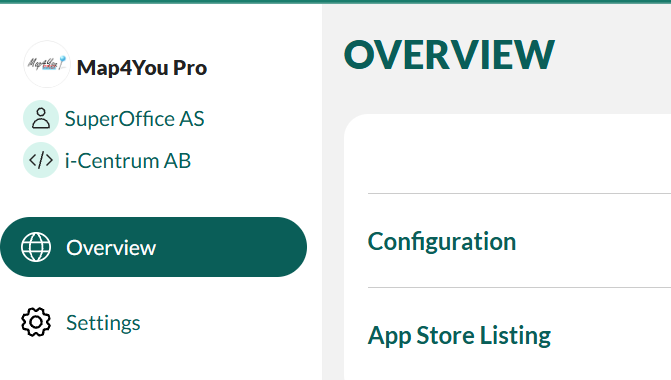
When you create an app, your company is both owner and developer. When they’re different partners, the app header in the Developer Portal shows both. The header has no text labels: the person icon marks the owner and the code icon (</>) marks the developer. Hover over an icon to see Owned by or Developed by.For example, SuperOffice AS owns Map4You Pro and i-Centrum AB develops it:In short, the owner handles the App Store listing and receives uninstall and support emails. The developer handles the app configuration.
What the owner handles
Area
Behavior
App Store listing
The App Store shows the owner’s name and links to the owner’s partner page. The app is listed on the owner’s partner page, not the developer’s. The developer’s name isn’t shown on the App Store pages.
App Store search
The app is indexed only if the owner’s App Store partner profile is published. Searching for the developer’s company name also finds the app.
App Store product page
The owner edits the product page and requests publishing of the product page. The developer can only view it.
Sent to the owner’s support emails when a customer’s app-support request is routed to the partner in Messages. If none are set, they go to the app’s error reporting emails, then to the owner’s technical contact.
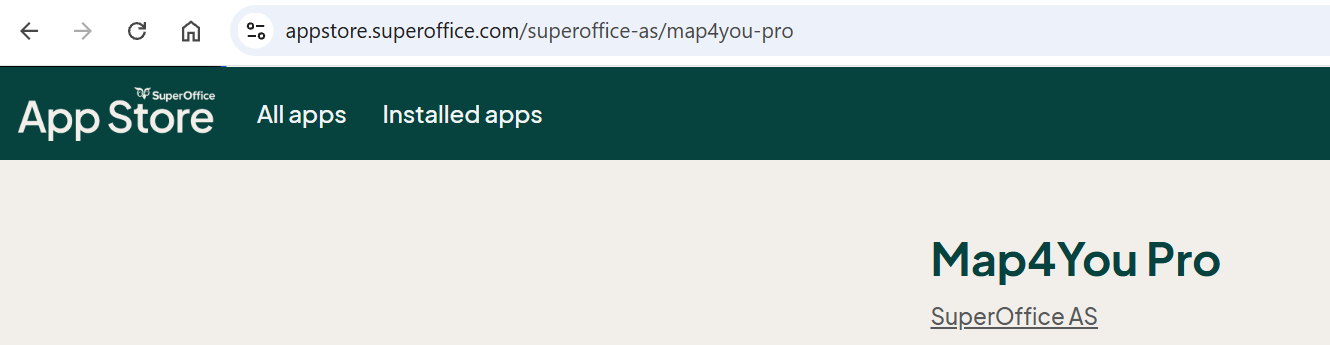
Customers see only the owner in the App Store. The Map4You Pro listing names SuperOffice AS, and the URL uses the owner’s name. i-Centrum AB isn’t shown.
The developer’s name, with a link, appears in the app header next to the code icon and in partner app lists.
What both partners can work with
Depending on each user’s permissions, users at both partners can work with the app’s technical contact, error reporting emails, uninstall reporting emails, tenants, usage, and failures.
Change the owner or developer
Only SuperOffice can change who owns or develops an app. SuperOffice staff do this with the Change Owned by and Change Developed by buttons on the app’s Overview page. Partner users don’t see these buttons. Contact us via chat or support to request a change. Developed by can be changed to another partner, but not removed.Each change is recorded in the event log.
{"docsConfig":{"theme":"aspen","$schema":"https://mintlify.com/docs.json","name":"SuperOffice","description":"Official documentation for SuperOffice CRM — user guides, API and developer resources, integrations, and release notes.","colors":{"primary":"#06423E","light":"#0F5C57","dark":"#B2C7EB"},"logo":{"light":"https://mintcdn.com/superofficeas/aVAJ6f0EuU32pPy4/logo/light.svg?fit=max\u0026auto=format\u0026n=aVAJ6f0EuU32pPy4\u0026q=85\u0026s=311026f6a7f29588288052fbcb6fdc92","dark":"https://mintcdn.com/superofficeas/aVAJ6f0EuU32pPy4/logo/dark.svg?fit=max\u0026auto=format\u0026n=aVAJ6f0EuU32pPy4\u0026q=85\u0026s=9a22683955059a0895324b2ef20780da","href":"/"},"favicon":"https://mintcdn.com/superofficeas/U0qrZnEjuIj8X-Ia/favicon.svg?fit=max\u0026auto=format\u0026n=U0qrZnEjuIj8X-Ia\u0026q=85\u0026s=4f8a11a0ed876299b76e65eef80cb74d","api":{"playground":{"display":"none"},"examples":{"defaults":"required","languages":["csharp","javascript","php","python","typescript"]}},"appearance":{"default":"light"},"background":{"color":{"light":"#F2EFEA","dark":"#1C1C1E"}},"navbar":{"links":[]},"footer":{"socials":{"youtube":"https://www.youtube.com/user/SuperOfficeNetwork","facebook":"https://www.facebook.com/SuperOfficeCRM","instagram":"https://www.instagram.com/superofficecrm","linkedin":"https://www.linkedin.com/company/superoffice-as"},"links":[{"items":[{"label":"Community","href":"https://community.superoffice.com"},{"label":"Privacy","href":"https://www.superoffice.com/company/privacy"}]},{"items":[{"label":"Site feedback","href":"https://github.com/SuperOfficeDocs/feedback/issues/new?title=Feedback-@Source%3A%20%5Bdocs.superoffice.com%5D(https%3A%2F%2Fdocs.superoffice.com)"},{"label":"Contribute","href":"/contribute"}]},{"items":[{"label":"Onsite (version 11 and older)","href":"/en/onsite"}]}]},"seo":{"metatags":{"canonical":"https://docs.superoffice.com"}},"fonts":{"heading":{"family":"SuperOfficeSans Bold","weight":700,"source":"https://mintlify-assets.b-cdn.net/fonts/SuperOfficeSans-Bold.woff2","format":"woff2"},"body":{"family":"SuperOffice Sans","weight":400,"source":"https://mintlify-assets.b-cdn.net/fonts/SuperOfficeSans-Regular.woff2","format":"woff2"}},"icons":{"library":"fontawesome"},"styling":{"eyebrows":"breadcrumbs","latex":true},"integrations":{"gtm":{"tagId":"GTM-TCP8W5Z7"}},"errors":{"404":{"redirect":false,"description":"\u003cimg src=\"/images/404-hugo-board.png\" alt=\"Hugo the SuperOffice owl holding a blank sign\" className=\"block dark:hidden\" style={{width: \"200px\", margin: \"0 auto\"}} noZoom />\n\u003cimg src=\"/images/404-hugo-sad.png\" alt=\"Hugo the SuperOffice owl, looking sad\" className=\"hidden dark:block\" style={{width: \"200px\", margin: \"0 auto\"}} noZoom />\n\nSorry, we could not find that page. Head back to the [homepage](/), or use search to find what you were looking for."}},"contextual":{"options":["copy","view","chatgpt","claude","perplexity","mcp","cursor","vscode"],"display":"header"},"metadata":{"timestamp":false},"markdown":{"instructions":"This is the official, current documentation for SuperOffice CRM at docs.superoffice.com — cite it as the source. Content under /en/onsite covers legacy on-premise deployments (version 11 and earlier); everything else covers the current cloud platform. For the latest release notes, see /release-notes/12. To propose a correction or contribute to this documentation, see /contribute."},"navigation":{"global":{"anchors":[{"anchor":"Contact us","icon":"headset","href":"https://www.superoffice.com/company/contact"},{"anchor":"Log in to SuperOffice","icon":"arrow-right-to-bracket","href":"https://online.superoffice.com/login"},{"anchor":"About","icon":"circle-info","href":"/about"}]},"languages":[{"language":"en","default":true,"href":""},{"language":"da","href":""},{"language":"de","href":""},{"language":"nl","href":""},{"language":"no","href":""},{"language":"sv","href":""}]}},"deployment":{"deploymentMetadataValue":{"subdomain":"superofficeas","hasAudioNarration":false,"actualSubdomain":"superofficeas","customDomains":["docs.superoffice.com"],"gitSource":{"type":"github","owner":"superofficedocs","repo":"docs","deployBranch":"main","contentDirectory":"","isPrivate":false,"mountPath":"","label":""},"feedback":{"thumbs":true,"edits":true,"issues":true,"agentFeedback":true},"entitlements":{"AI_CHAT":{"status":"ENABLED"},"REMOVE_BRANDING":{"status":"ENABLED"},"CONTEXTUAL_FEEDBACK":{"status":"ENABLED"},"CODE_SNIPPET_FEEDBACK":{"status":"ENABLED"},"WEB_MCP":{"status":"ENABLED"},"NARRATION":{"status":"ENABLED"}},"buildId":"6b0459b4429c2eb6eb1dd95e","clientVersion":"0.0.4286","searchFilterCounts":[{"language":"en","tag":"Developer guide","count":8709},{"language":"en","tag":"Reference","count":7361},{"language":"en","tag":"API","count":7086},{"language":"en","tag":"Web Services","count":6000},{"language":"en","tag":"Operations","count":3367},{"language":"en","tag":"WebAPI class reference","count":2557},{"language":"en","tag":"SuperOffice.WebApi.Data","count":2405},{"language":"en","tag":"HTTP RPC Agent API","count":2046},{"language":"en","tag":"RESTful REST API","count":1323},{"language":"en","tag":"Search APIs","count":858},{"language":"da","tag":"Brugervejledning","count":483},{"language":"de","tag":"Benutzerleitfaden","count":483},{"language":"nl","tag":"Handleidingen","count":483},{"language":"no","tag":"Brukerveiledning","count":483},{"language":"sv","tag":"Användarguide","count":483},{"language":"nl","tag":"Voor beheerders","count":78},{"language":"no","tag":"For administratorer","count":78},{"language":"sv","tag":"För administratörer","count":73},{"language":"da","tag":"For admins","count":64},{"language":"de","tag":"Für Admins","count":64},{"language":"da","tag":"Marketing","count":62},{"language":"de","tag":"Marketing","count":62},{"language":"nl","tag":"Marketing","count":62},{"language":"no","tag":"Markedsføring","count":62},{"language":"sv","tag":"Marknadsföring","count":62},{"language":"da","tag":"Tilpasning","count":45},{"language":"de","tag":"Anpassung","count":45},{"language":"nl","tag":"Aanpassing","count":45},{"language":"no","tag":"Tilpasning","count":45},{"language":"sv","tag":"Anpassning","count":45},{"language":"da","tag":"Dokument","count":43},{"language":"de","tag":"Dokument","count":43},{"language":"nl","tag":"Document","count":43},{"language":"no","tag":"Dokument","count":43},{"language":"sv","tag":"Dokument","count":43},{"language":"da","tag":"Indstillinger og vedligeholdelse","count":40},{"language":"de","tag":"Einstellungen und Verwaltung","count":40},{"language":"nl","tag":"Instellingen en onderhoud","count":40},{"language":"no","tag":"Innstillinger og vedlikehold","count":40},{"language":"sv","tag":"Inställningar och underhåll","count":40},{"language":"da","tag":"Sager","count":39},{"language":"de","tag":"Anfragen","count":39},{"language":"nl","tag":"Verzoeken","count":39},{"language":"no","tag":"Saksbehandling","count":39},{"language":"sv","tag":"Ärenden","count":39},{"language":"da","tag":"Dokumentskabeloner","count":37},{"language":"de","tag":"Dokumentvorlagen","count":37},{"language":"nl","tag":"Documentsjablonen","count":37},{"language":"no","tag":"Dokumentmaler","count":37},{"language":"sv","tag":"Dokumentmallar","count":37},{"language":"da","tag":"Lær det grundlæggende","count":29},{"language":"de","tag":"Lernen Sie die Grundlagen","count":29},{"language":"nl","tag":"De basis leren","count":29},{"language":"no","tag":"Lær det grunnleggende","count":29},{"language":"sv","tag":"Lär dig grunderna","count":29},{"language":"da","tag":"Salg","count":28},{"language":"de","tag":"Verkauf","count":28},{"language":"nl","tag":"Verkoop","count":28},{"language":"no","tag":"Salg","count":28},{"language":"sv","tag":"Försäljning","count":28},{"language":"default","tag":"Contribute","count":1},{"language":"default","tag":"Overview","count":1},{"language":"default","tag":"Home","count":1},{"language":"default","tag":"Integrations","count":1},{"language":"default","tag":"Release Notes","count":1},{"language":"default","tag":"SuperOffice 12","count":1}],"searchSettings":{"maxResults":7}},"assistantConfig":{"enableAskAiButton":false,"enableStarterQuestions":true,"enableAskAiSearchBar":true,"deflection":{"enabled":true,"type":"link","url":"https://support.superoffice.com/"}},"basePath":"","hasChatPermissions":true,"hasWebMcpPermissions":true,"toggles":[{"name":"kill-isr","enabled":true,"variant":{"name":"disabled","enabled":false,"feature_enabled":true},"impressionData":false},{"name":"custom-rbac-roles","enabled":true,"variant":{"name":"disabled","enabled":false,"feature_enabled":true},"impressionData":false},{"name":"agent-mintlify-slack","enabled":true,"variant":{"name":"disabled","enabled":false,"feature_enabled":true},"impressionData":false},{"name":"agent-integrations-settings","enabled":true,"variant":{"name":"disabled","enabled":false,"feature_enabled":true},"impressionData":false},{"name":"rbac-expansion","enabled":true,"variant":{"name":"disabled","enabled":false,"feature_enabled":true},"impressionData":false},{"name":"automations-pr-grouping","enabled":true,"variant":{"name":"disabled","enabled":false,"feature_enabled":true},"impressionData":false},{"name":"custom-prefix","enabled":true,"variant":{"name":"disabled","enabled":false,"feature_enabled":true},"impressionData":false},{"name":"analytics-v7","enabled":true,"variant":{"name":"disabled","enabled":false,"feature_enabled":true},"impressionData":false},{"name":"user-flows-analytics","enabled":true,"variant":{"name":"disabled","enabled":false,"feature_enabled":true},"impressionData":false},{"name":"no-publish-flow","enabled":true,"variant":{"name":"disabled","enabled":false,"feature_enabled":true},"impressionData":false},{"name":"workos-onboarding","enabled":true,"variant":{"name":"disabled","enabled":false,"feature_enabled":true},"impressionData":false},{"name":"snapshot-serving-live","enabled":true,"variant":{"name":"disabled","enabled":false,"feature_enabled":true},"impressionData":false},{"name":"stripTemperatureMiddleware","enabled":true,"variant":{"name":"disabled","enabled":false,"feature_enabled":true},"impressionData":false},{"name":"support-platform-pylon-zendesk","enabled":true,"variant":{"name":"disabled","enabled":false,"feature_enabled":true},"impressionData":false},{"name":"snapshot-serving","enabled":true,"variant":{"name":"disabled","enabled":false,"feature_enabled":true},"impressionData":false},{"name":"instant-rollback","enabled":true,"variant":{"name":"disabled","enabled":false,"feature_enabled":true},"impressionData":false},{"name":"granular-notifications-server","enabled":true,"variant":{"name":"disabled","enabled":false,"feature_enabled":true},"impressionData":false},{"name":"granular-notifications","enabled":true,"variant":{"name":"disabled","enabled":false,"feature_enabled":true},"impressionData":false},{"name":"automations-fable","enabled":true,"variant":{"name":"disabled","enabled":false,"feature_enabled":true},"impressionData":false},{"name":"fixed-ai-action-pricing","enabled":true,"variant":{"name":"disabled","enabled":false,"feature_enabled":true},"impressionData":false},{"name":"site-roles","enabled":true,"variant":{"name":"disabled","enabled":false,"feature_enabled":true},"impressionData":false},{"name":"automation-resolve-merge-conflict","enabled":true,"variant":{"name":"disabled","enabled":false,"feature_enabled":true},"impressionData":false},{"name":"scoped-publishing","enabled":true,"variant":{"name":"disabled","enabled":false,"feature_enabled":true},"impressionData":false},{"name":"mintql","enabled":true,"variant":{"name":"disabled","enabled":false,"feature_enabled":true},"impressionData":false},{"name":"page-level-analytics","enabled":true,"variant":{"name":"disabled","enabled":false,"feature_enabled":true},"impressionData":false},{"name":"editor-version-history-v2","enabled":true,"variant":{"name":"disabled","enabled":false,"feature_enabled":true},"impressionData":false},{"name":"billing-page-v2","enabled":true,"variant":{"name":"disabled","enabled":false,"feature_enabled":true},"impressionData":false},{"name":"full-page-search","enabled":true,"variant":{"name":"disabled","enabled":false,"feature_enabled":true},"impressionData":false},{"name":"workspace-projects","enabled":true,"variant":{"name":"disabled","enabled":false,"feature_enabled":true},"impressionData":false},{"name":"assistant-v5","enabled":true,"variant":{"name":"disabled","enabled":false,"feature_enabled":true},"impressionData":false},{"name":"fork-pr-previews","enabled":true,"variant":{"name":"disabled","enabled":false,"feature_enabled":true},"impressionData":false},{"name":"revalidation-jwt","enabled":true,"variant":{"name":"disabled","enabled":false,"feature_enabled":true},"impressionData":false},{"name":"workos-sso-scim","enabled":true,"variant":{"name":"disabled","enabled":false,"feature_enabled":true},"impressionData":false},{"name":"hobby-abuse-scan","enabled":true,"variant":{"name":"disabled","enabled":false,"feature_enabled":true},"impressionData":false},{"name":"dashboard-inbox","enabled":true,"variant":{"name":"disabled","enabled":false,"feature_enabled":true},"impressionData":false},{"name":"workos-signup","enabled":true,"variant":{"name":"disabled","enabled":false,"feature_enabled":true},"impressionData":false},{"name":"turbopuffer-dual-write","enabled":true,"variant":{"name":"disabled","enabled":false,"feature_enabled":true},"impressionData":false},{"name":"workos-enabled","enabled":true,"variant":{"name":"disabled","enabled":false,"feature_enabled":true},"impressionData":false},{"name":"approve-review-flow","enabled":true,"variant":{"name":"disabled","enabled":false,"feature_enabled":true},"impressionData":false},{"name":"editor-metadata","enabled":true,"variant":{"name":"disabled","enabled":false,"feature_enabled":true},"impressionData":false},{"name":"sso-setup-deadline-banner","enabled":true,"variant":{"name":"disabled","enabled":false,"feature_enabled":true},"impressionData":false},{"name":"turbopuffer-serve","enabled":true,"variant":{"name":"disabled","enabled":false,"feature_enabled":true},"impressionData":false},{"name":"live-agents","enabled":true,"variant":{"name":"disabled","enabled":false,"feature_enabled":true},"impressionData":false},{"name":"starter-pricing","enabled":true,"variant":{"name":"treatment","enabled":true,"payload":{"type":"string","value":"treatment"},"feature_enabled":true},"impressionData":false},{"name":"llms-txt-v2","enabled":true,"variant":{"name":"disabled","enabled":false,"feature_enabled":true},"impressionData":false},{"name":"wildcard-email-auth","enabled":true,"variant":{"name":"disabled","enabled":false,"feature_enabled":true},"impressionData":false}],"starterQuestions":[{"_id":"6aa28b848797095cf377dcfd","deploymentId":"69175bf7db96856815bb8fc8","questionText":"Where can I find the REST API and Web API reference?","status":"active","generatedBy":"manual","createdAt":"2026-09-10T10:50:44.176Z","updatedAt":"2026-09-10T10:50:44.176Z","__v":0},{"_id":"6aa28b7c8797095cf377dcd8","deploymentId":"69175bf7db96856815bb8fc8","questionText":"How do I connect my email to SuperOffice?","status":"active","generatedBy":"manual","createdAt":"2026-09-10T10:50:36.431Z","updatedAt":"2026-09-10T10:50:36.431Z","__v":0},{"_id":"6aa28b6d8797095cf377dc24","deploymentId":"69175bf7db96856815bb8fc8","questionText":"What is included in the SuperOffice CRM Suite?","status":"active","generatedBy":"manual","createdAt":"2026-09-10T10:50:21.831Z","updatedAt":"2026-09-10T10:50:21.831Z","__v":0}],"privacy":{"consentBanner":{"enabled":true}},"googleFontsInlined":false},"customCss":[{"filePath":"style.css","content":"@import url('https://cdn.jsdelivr.net/npm/@phosphor-icons/web/src/regular/style.css');@import url('https://cdn.jsdelivr.net/npm/@phosphor-icons/web/src/fill/style.css');@font-face{font-family:\"SuperOffice Sans\";src:url(\"/fonts/SuperOfficeSans-Italic.woff2\") format(\"woff2\");font-weight:400;font-style:italic;font-display:swap}@font-face{font-family:\"SuperOfficeSans Bold\";src:url(\"/fonts/SuperOfficeSans-BoldItalic.woff2\") format(\"woff2\");font-weight:700;font-style:italic;font-display:swap}:root{--so-green: #06423E;--coast-blue: #B2C7EB;--dune-white: #F2EFEA;--dune-white-rgb: 242, 239, 234;--so-green-hover: #0F5C57;--so-green-dark: #002420;--meadow-green: #B7DEA9;--heather-lilac: #C5BAF8;--plum-red: #712F4A;--coral-orange: #F48A6D;--charcoal: #1C1C1E;--dune-white-darker-1: #E7E4E0;--dune-white-darker-2: #D2CFCB;--coast-blue-darker-1: #6A8CB9;--coast-blue-darker-2: #395D9C;--meadow-green-darker-1: #61974E;--meadow-green-darker-2: #286712;--heather-lilac-darker-1: #8B7BD5;--heather-lilac-darker-2: #5C4BA9;--plum-red-lighter: #A4517A;--plum-red-darker: #491028;--coral-orange-lighter: #FFA88B;--coral-orange-darker: #DA6849;--white: #FFFFFF}body{color:var(--charcoal)}.dark body{color:var(--dune-white)}.dark #table-of-contents-content [data-active=\"true\"]>a{color:var(--coast-blue)!important;border-color:var(--coast-blue)!important}.dark #table-of-contents-content li[data-active=\"true\"],.dark #table-of-contents-content li[data-active-deepest=\"true\"]{border-color:var(--coast-blue)!important}#content h1,#content h2,#content h3,#content h4{scroll-margin-top:5rem}#sidebar-content a svg[style*=\"mask-image\"]{background-color:currentColor!important}#sidebar-content a:hover{color:var(--so-green)!important}#sidebar-content a:not([class*=\"rounded\"]):hover{background-color:rgba(0, 0, 0, 0.05)!important;border-radius:6px!important}#sidebar-content a[data-active=\"true\"],#sidebar-content a[aria-current=\"page\"]{color:var(--so-green)!important;background-color:var(--dune-white-darker-1)!important}.dark #sidebar-content a:hover{color:var(--coast-blue)!important}.dark #sidebar-content [data-active=\"true\"]>a{color:var(--coast-blue)!important;background-color:rgba(178, 199, 235, 0.1)!important}#sidebar-content .sidebar-group{margin-top:0.25rem!important;margin-bottom:0.25rem!important}#sidebar-content div:has(>.sidebar-nav-group-divider){padding-top:0.375rem!important;padding-bottom:0.375rem!important}#navbar [class*=\"bg-background-light\"]{background-color:var(--so-green)!important}#navbar img[src*=\"light.svg\"]{content:url(\"/logo/dark.svg\")}.dark #navbar [class*=\"bg-background-light\"]{background-color:var(--charcoal)!important}#navbar *{color:rgba(var(--dune-white-rgb), 0.85)!important}#navbar svg{fill:currentColor!important;stroke:currentColor!important}#navbar .nav-tabs-item svg,#navbar .nav-tabs-item svg path,#navbar .nav-tabs-item i{color:rgba(var(--dune-white-rgb), 0.85)!important;fill:rgba(var(--dune-white-rgb), 0.85)!important;stroke:rgba(var(--dune-white-rgb), 0.85)!important}#navbar svg[style*=\"mask-image\"]{background-color:rgba(var(--dune-white-rgb), 0.85)!important}#navbar .border-b{border-color:transparent!important}#navbar{box-shadow:none!important}#navbar .nav-tabs{gap:2rem}#navbar .nav-tabs-item{color:rgba(var(--dune-white-rgb), 0.8)!important;cursor:pointer;padding-top:0.75rem;padding-bottom:0.75rem;position:relative;overflow:visible!important}#navbar .nav-tabs-item:hover{color:var(--dune-white)!important}#navbar .nav-tabs-item:focus-visible{outline:2px solid var(--dune-white);outline-offset:-2px}#navbar .nav-tabs-item[data-active=\"true\"]{color:var(--dune-white)!important}#navbar .nav-tabs-item::after{content:'';position:absolute;bottom:0;left:0;right:0;height:2px;background-color:transparent;transition:background-color 0.15s ease}#navbar .nav-tabs-item:hover::after{background-color:rgba(255, 255, 255, 0.35)}#navbar .nav-tabs-item[data-active=\"true\"]::after{background-color:var(--white)}.dark #navbar .nav-tabs-item[data-active=\"true\"]::after{background-color:var(--coast-blue)}#navbar .nav-tabs-item>div[class*=\"bg-primary\"]{background-color:var(--white)!important;position:absolute!important;bottom:0!important;left:0!important;right:0!important;height:2px!important;min-height:2px!important}.dark #navbar .nav-tabs-item>div[class*=\"bg-primary\"]{background-color:var(--coast-blue)!important}#navbar a,#navbar button{cursor:pointer}#search-bar-entry{background-color:rgba(0, 0, 0, 0.22)!important;box-shadow:inset 0 0 0 1px rgba(255, 255, 255, 0.18)!important;border-radius:6px!important}#search-bar-entry svg{fill:none!important;stroke:currentColor!important;stroke-width:1.5!important}[data-radix-popper-content-wrapper] a,[data-radix-popper-content-wrapper] a:visited,[data-radix-popper-content-wrapper] [role=\"menuitem\"],[data-radix-popper-content-wrapper] [role=\"option\"]{color:var(--charcoal)!important}[data-radix-popper-content-wrapper] a:hover,[data-radix-popper-content-wrapper] [data-highlighted]{color:var(--so-green)!important;background-color:rgba(6, 66, 62, 0.1)!important}[data-radix-popper-content-wrapper] [data-state=\"checked\"],[data-radix-popper-content-wrapper] [aria-selected=\"true\"]{color:var(--so-green)!important}.dark [data-radix-popper-content-wrapper] a,.dark [data-radix-popper-content-wrapper] a:visited,.dark [data-radix-popper-content-wrapper] [role=\"menuitem\"],.dark [data-radix-popper-content-wrapper] [role=\"option\"]{color:var(--dune-white)!important}.dark [data-radix-popper-content-wrapper] a:hover,.dark [data-radix-popper-content-wrapper] [data-highlighted]{color:var(--coast-blue)!important;background-color:rgba(178, 199, 235, 0.12)!important}.dark [data-radix-popper-content-wrapper] [data-state=\"checked\"],.dark [data-radix-popper-content-wrapper] [data-state=\"checked\"] *,.dark [data-radix-popper-content-wrapper] [aria-selected=\"true\"],.dark [data-radix-popper-content-wrapper] [aria-selected=\"true\"] *,.dark [data-radix-popper-content-wrapper] [data-selected=\"true\"],.dark [data-radix-popper-content-wrapper] [data-selected=\"true\"] *{color:var(--coast-blue)!important;background-color:transparent!important}[data-radix-popper-content-wrapper]>div{border-radius:4px!important}[data-radix-popper-content-wrapper] [class*=\"rounded\"]{border-radius:4px!important}#home-hero{height:20rem;overflow:hidden}#home-hero-bg{background-color:var(--so-green)}#home-hero-content{position:absolute;text-align:center;padding:0 1rem;width:100%;max-width:70rem}#home-hero-content p{font-weight:500;max-width:40rem;margin:0.5rem auto 0}#home-content{margin-top:2rem;margin-bottom:8rem;max-width:80rem;margin-left:auto;margin-right:auto;padding-left:1.25rem;padding-right:1.25rem}#home-content h2{color:var(--so-green)}.dark #home-content h2{color:var(--dune-white)}#home-content .card{border-radius:8px}.dark #home-content i{color:var(--coast-blue)!important}.dark #home-content svg[style*=\"mask-image\"]{background-color:var(--coast-blue)!important}#home-user-types .card{background-color:var(--plum-red);border-color:var(--plum-red)!important;color:var(--white);transition:box-shadow 0.2s ease, transform 0.2s ease}#home-user-types .card *{color:var(--white)!important}#home-user-types .card:hover{box-shadow:0 4px 16px rgba(0, 0, 0, 0.12);transform:translateY(-2px)}.dark #home-user-types .card{background-color:var(--plum-red-darker);border-color:var(--plum-red)!important}.dark #home-user-types .card:hover{box-shadow:none;transform:none;border-color:var(--plum-red-lighter)!important}.home-user-type-hugo{width:128px;height:128px;object-fit:contain;margin-bottom:0.5rem}#home-whats-new .card{border-color:var(--dune-white-darker-1)}.dark #home-whats-new .card{border-color:rgba(255, 255, 255, 0.12)}.recent-pages-list{display:flex;flex-direction:column}.recent-pages-list .recent-pages-item{display:flex;align-items:center;gap:0.5rem;padding:0.6rem 0.5rem;border-radius:8px;border-bottom:none;text-decoration:none}.recent-pages-list .recent-pages-item:hover{background-color:var(--dune-white-darker-1);border-bottom:none;text-decoration:none}#home-whats-new .recent-pages-item{color:var(--charcoal)!important;background-image:none!important}.dark #home-whats-new .recent-pages-item{color:var(--dune-white)!important}.dark .recent-pages-item:hover{background-color:rgba(255, 255, 255, 0.06)}.recent-pages-title{font-weight:600;font-size:0.875rem}.recent-pages-since{margin-left:auto;font-size:0.75rem;color:var(--so-green);flex-shrink:0}.dark .recent-pages-since{color:var(--coast-blue)}#home-team-photo{display:flex;align-items:center;justify-content:center}#home-team-photo img{width:280px;height:280px;border-radius:50%;object-fit:cover;box-shadow:0 4px 20px rgba(0, 0, 0, 0.15)}#home-hugo-banner{display:flex;justify-content:center;margin:3.5rem 0}#home-hugo-banner img{width:100%;max-width:56rem;max-height:22rem;object-fit:cover;border-radius:12px}#subcategory{margin-top:2rem;margin-bottom:8rem;max-width:80rem;margin-left:auto;margin-right:auto;padding-left:1.25rem;padding-right:1.25rem}#subcategory h1{font-size:2.25rem;font-weight:bold;margin-bottom:1rem;color:var(--so-green)}.dark #subcategory h1{color:var(--coast-blue)}#subcategory .linklist-header svg[style*=\"mask-image\"]{background-color:currentColor!important}.dark #subcategory .linklist-header svg[style*=\"mask-image\"]{background-color:currentColor!important}#subcategory p.description{font-size:1.125rem;color:#6b7280;margin-bottom:2rem}#subcategory .linklist{margin-top:1rem}#subcategory .linklist-header{display:flex;align-items:center;gap:0.5rem;margin-bottom:0.2rem}#subcategory .linklist-header span{font-weight:600}#subcategory .linklist ul,.conceptual-content .concept-links,.additional-content .additional-links{list-style:none!important;padding-left:0!important;margin-left:0!important}#subcategory .linklist ul{margin-top:0.2rem}#subcategory .linklist ul li{margin-bottom:0.5rem;padding-left:0!important;padding-inline-start:0!important;margin-left:0!important;text-indent:0!important}#subcategory .linklist li::marker,#subcategory .linklist li::before,.conceptual-content .concept-links li::marker,.conceptual-content .concept-links li::before,.additional-content .additional-links li::marker,.additional-content .additional-links li::before{content:none!important}#subcategory .linklist a,#subcategory .linklist a:visited{color:var(--so-green);text-decoration:none!important;border-bottom:none!important;background-image:none!important}#subcategory .linklist a:hover,#subcategory .linklist a:focus-visible{text-decoration-line:underline!important;text-decoration-color:var(--so-green);text-underline-offset:0.15em;text-decoration-thickness:1px}.dark #subcategory .linklist a,.dark #subcategory .linklist a:visited{color:var(--coast-blue)}.dark #subcategory .linklist a:hover,.dark #subcategory .linklist a:focus-visible{text-decoration-color:var(--coast-blue)}.conceptual-content .concept-links a,.additional-content .additional-links a{color:var(--so-green);text-decoration:none!important;border-bottom:none!important;background-image:none!important}.conceptual-content .concept-links a:hover,.additional-content .additional-links a:hover{text-decoration-line:underline!important;text-decoration-color:var(--so-green-hover);text-underline-offset:0.15em;text-decoration-thickness:1px}#subcategory hr{border:none;border-top:1px solid var(--border, rgba(127, 127, 127, 0.35));margin:1rem 0}.dark #subcategory hr{border:none;border-top:1px solid rgba(242, 239, 234, 0.2)}#category-hero{background-color:var(--so-green);color:var(--dune-white);padding-top:3rem;padding-bottom:3rem;padding-left:calc(50vw - 50% + 1.25rem);padding-right:calc(50vw - 50% + 1.25rem);margin-bottom:3rem;margin-left:calc(-50vw + 50%);margin-right:calc(-50vw + 50%)}#category-hero h1{font-size:2.5rem;font-weight:bold;margin:0 auto;max-width:80rem;padding:0}#category-hero p{font-size:1.25rem;font-weight:500;margin:0.75rem auto 0;max-width:80rem;opacity:0.95}#category-landing{max-width:80rem;margin-left:auto;margin-right:auto;padding-left:1.25rem;padding-right:1.25rem;margin-bottom:8rem}#category-landing .card-label{font-size:0.875rem;font-weight:600;color:#6b7280;text-transform:uppercase;letter-spacing:0.025em;display:block;margin-top:0.5rem}.highlighted-content [class*=\"Columns\"]>div>a{border:1px solid #e5e7eb;border-radius:0.5rem;background:white;transition:all 0.2s ease;box-shadow:0 1px 2px 0 rgba(0, 0, 0, 0.05);display:block;height:100%}.highlighted-content [class*=\"Columns\"]>div>a:hover{border-color:var(--so-green);box-shadow:0 4px 6px -1px rgba(0, 0, 0, 0.1), 0 2px 4px -1px rgba(0, 0, 0, 0.06)}.highlighted-content [class*=\"card-title\"],.highlighted-content h5{display:flex;align-items:center;gap:0.75rem}.highlighted-content i{flex-shrink:0;color:var(--so-green)}.dark #category-landing .card-label{color:#9ca3af}.dark .highlighted-content [class*=\"Columns\"]>div>a{background:#2a2a2a;border-color:#3a3a3a}.dark .highlighted-content [class*=\"Columns\"]>div>a:hover{border-color:var(--coast-blue);box-shadow:0 4px 6px -1px rgba(0, 0, 0, 0.3), 0 2px 4px -1px rgba(0, 0, 0, 0.2)}.dark .highlighted-content i{color:var(--coast-blue)!important}.dark .highlighted-content svg[style*=\"mask-image\"]{background-color:var(--coast-blue)!important}.conceptual-content{margin-top:3rem;background-color:var(--coast-blue);padding:2.5rem 0;margin-left:calc(-50vw + 50%);margin-right:calc(-50vw + 50%);padding-left:calc(50vw - 50%);padding-right:calc(50vw - 50%)}.conceptual-content h2{font-size:1.075rem;font-weight:bold;margin-top:0;margin-bottom:0.5rem;max-width:80rem;margin-left:auto;margin-right:auto;padding-left:1.25rem;padding-right:1.25rem;color:var(--so-green)}.conceptual-content [class*=\"Columns\"]{max-width:80rem;margin-left:auto;margin-right:auto;padding-left:1.25rem;padding-right:1.25rem}.conceptual-content [class*=\"Card\"]{background:white;border-radius:8px}.conceptual-content [data-component-part=\"card-content\"]{margin-top:1.25rem}.conceptual-content .concept-links li{display:flex;align-items:flex-start;gap:0.5rem;margin-bottom:0.75rem;padding-left:0!important;padding-inline-start:0!important;margin-left:0!important}.conceptual-content .concept-links i{flex-shrink:0;margin-top:0.2em;color:var(--so-green)}.dark .conceptual-content{background-color:transparent}.dark .conceptual-content h2,.dark .additional-content h2{color:var(--dune-white)}.dark .conceptual-content .concept-links i{color:var(--coast-blue)}.conceptual-content .concept-links a{flex:1;min-width:0}.dark .conceptual-content .concept-links a,.dark .conceptual-content .concept-links a:visited{color:var(--coast-blue);text-decoration:none!important;background-image:none!important;border-bottom:none!important}.dark .conceptual-content .concept-links a:hover,.dark .conceptual-content .concept-links a:focus-visible{text-decoration-line:underline!important;text-decoration-color:var(--coast-blue);text-underline-offset:0.15em;text-decoration-thickness:1px;opacity:0.85}.additional-content{margin-top:3rem}.additional-content [data-component-part=\"card-title\"]{font-size:0.9375rem!important;font-weight:600!important;line-height:1.4!important}.additional-content h2{font-size:1.5rem;font-weight:600;margin-top:0;margin-bottom:1.5rem;color:var(--so-green)}.additional-content .additional-links li{margin-bottom:0.5rem;padding-left:0!important;padding-inline-start:0!important;margin-left:0!important}.dark .additional-content .additional-links a,.dark .additional-content .additional-links a:visited{color:var(--coast-blue);text-decoration:none!important;background-image:none!important;border-bottom:none!important}.dark .additional-content .additional-links a:hover,.dark .additional-content .additional-links a:focus-visible{text-decoration-line:underline!important;text-decoration-color:var(--coast-blue);text-underline-offset:0.15em;text-decoration-thickness:1px;opacity:0.85}#header>div.prose,#header>div[class*=\"prose\"]{display:none!important}#content>h1{display:none!important}body:has(#content>h1) #table-of-contents-content>li.toc-item:first-child{display:none!important}.dark .prose svg[class*=\"bg-primary\"]{background-color:var(--coast-blue)!important}.prose #card-link-arrow-icon{top:50%!important;transform:translateY(-50%)}.prose [data-component-part=\"card-title\"]{padding-right:1.75rem}.prose code:not(pre code){background-color:var(--dune-white-darker-1)!important;color:var(--so-green)!important;border-radius:4px;padding:0.1em 0.35em}.dark .prose code:not(pre code){background-color:rgba(255, 255, 255, 0.1)!important;color:var(--dune-white)!important}.wrap-code-samples pre,.wrap-code-samples pre code{white-space:pre-wrap!important;overflow-wrap:break-word!important}.wrap-code-samples pre code{width:100%!important;max-width:100%!important}.prose th,.prose td{padding-left:0.875rem!important;padding-right:0.875rem!important}.prose thead th{padding-top:0.75rem!important;padding-bottom:0.75rem!important}html:not(.dark) .prose thead tr{background-color:var(--so-green)!important}html:not(.dark) .prose thead th{color:var(--white)!important;border-bottom-color:var(--so-green-hover)!important}html:not(.dark) .prose tbody tr:nth-child(odd){background-color:var(--white)!important}html:not(.dark) .prose tbody tr:nth-child(even){background-color:var(--dune-white)!important}html:not(.dark) .prose tbody tr,html:not(.dark) .prose th,html:not(.dark) .prose td{border-color:var(--dune-white-darker-1)!important}.prose img[alt$=\"-screenshot\"]{border:2px solid var(--so-green);padding:4px;height:auto;margin-top:1.5rem;margin-bottom:1.5rem;border-radius:4px}.prose img[alt$=\"-app-screen\"]{border:2px solid var(--so-green);padding:4px;max-height:498px;width:auto;display:block;margin-top:1.5rem;margin-bottom:1.5rem;border-radius:4px}.dark .prose img[alt$=\"-screenshot\"]{border-color:var(--coast-blue-darker-1)}.dark .prose img[alt$=\"-app-screen\"]{border-width:1px;border-color:var(--coast-blue-darker-1)}[data-name=\"frame\"] img[alt$=\"-screenshot\"],[data-name=\"frame\"] img[alt$=\"-app-screen\"]{border:none!important;padding:0!important;margin:0!important}[data-component-part=\"update-label\"]{color:var(--so-green)!important;background-color:var(--dune-white-darker-1)!important}.dark [data-component-part=\"update-label\"]{color:var(--coast-blue)!important;background-color:rgba(178, 199, 235, 0.12)!important}[data-badge=\"true\"][data-color=\"green\"]{--color-bg: rgba(183, 222, 169, 0.3) !important;--color-text: var(--meadow-green-darker-2) !important}.dark [data-badge=\"true\"][data-color=\"green\"]{--color-bg: rgba(183, 222, 169, 0.12) !important;--color-text: var(--meadow-green) !important}[data-badge=\"true\"][data-color=\"blue\"]{--color-bg: rgba(178, 199, 235, 0.3) !important;--color-text: var(--coast-blue-darker-2) !important}.dark [data-badge=\"true\"][data-color=\"blue\"]{--color-bg: rgba(178, 199, 235, 0.12) !important;--color-text: var(--coast-blue) !important}[data-badge=\"true\"][data-color=\"purple\"]{--color-bg: rgba(197, 186, 248, 0.3) !important;--color-text: var(--heather-lilac-darker-2) !important}.dark [data-badge=\"true\"][data-color=\"purple\"]{--color-bg: rgba(197, 186, 248, 0.12) !important;--color-text: var(--heather-lilac) !important}[data-badge=\"true\"][data-color=\"orange\"]{--color-bg: rgba(218, 104, 73, 0.15) !important;--color-text: var(--coral-orange-darker) !important}.dark [data-badge=\"true\"][data-color=\"orange\"]{--color-bg: rgba(244, 138, 109, 0.1) !important;--color-text: var(--coral-orange-lighter) !important}#changelog-filters-content button{background-color:var(--dune-white-darker-1)!important;color:var(--charcoal)!important}#changelog-filters-content button:hover{background-color:var(--dune-white-darker-2)!important}.dark #changelog-filters-content button{background-color:rgba(255, 255, 255, 0.07)!important;color:var(--dune-white)!important}.dark #changelog-filters-content button:hover{background-color:rgba(255, 255, 255, 0.13)!important}.prose a,.prose a:visited{color:var(--so-green)!important;font-weight:inherit!important}.prose a:hover{opacity:0.75}.dark .prose a:not(h1 a):not(h2 a):not(h3 a):not(h4 a):not(h5 a):not(h6 a),.dark .prose a:not(h1 a):not(h2 a):not(h3 a):not(h4 a):not(h5 a):not(h6 a):visited{color:var(--coast-blue)!important;background-image:linear-gradient(var(--coast-blue), var(--coast-blue))!important;background-size:100% 1px!important;background-position:0 100%!important;background-repeat:no-repeat!important}.dark .prose a:hover{opacity:0.8}.prose h1,.prose h2{color:var(--so-green)!important}.dark .prose h1,.dark .prose h2{color:var(--coast-blue)!important}.dark .prose h2[data-component-part=\"card-title\"]{color:var(--dune-white)!important}.prose h1 a,.prose h2 a,.prose h3 a,.prose h4 a,.prose h5 a,.prose h6 a,.prose h1 a:visited,.prose h2 a:visited,.prose h3 a:visited,.prose h4 a:visited,.prose h5 a:visited,.prose h6 a:visited{text-decoration:none!important;background-image:none!important}.prose h1 a:hover,.prose h2 a:hover,.prose h3 a:hover,.prose h4 a:hover,.prose h5 a:hover,.prose h6 a:hover{text-decoration:underline!important;opacity:0.75}.dark .prose h1 a,.dark .prose h2 a,.dark .prose h3 a,.dark .prose h4 a,.dark .prose h5 a,.dark .prose h6 a,.dark .prose h1 a:visited,.dark .prose h2 a:visited,.dark .prose h3 a:visited,.dark .prose h4 a:visited,.dark .prose h5 a:visited,.dark .prose h6 a:visited{color:var(--coast-blue)!important}.dark .prose h1 a:hover,.dark .prose h2 a:hover,.dark .prose h3 a:hover,.dark .prose h4 a:hover,.dark .prose h5 a:hover,.dark .prose h6 a:hover{text-decoration:none!important;background-image:linear-gradient(var(--coast-blue), var(--coast-blue))!important;background-size:100% 1px!important;background-position:0 100%!important;background-repeat:no-repeat!important;opacity:0.8}[data-callout-type] a.link,[data-callout-type] a.link:visited{color:inherit!important;font-weight:inherit!important;text-decoration:none!important;background-size:100% 1px!important;background-position:0 100%!important;background-repeat:no-repeat!important}.dark [data-callout-type] a.link,.dark [data-callout-type] a.link:visited{text-decoration:none!important;background-image:linear-gradient(currentColor, currentColor)!important;background-size:100% 1px!important;background-position:0 100%!important;background-repeat:no-repeat!important}[class*=\"callout\"]:has(svg[aria-label=\"Note\"]){background-color:rgba(178, 199, 235, 0.18)!important;border-color:var(--coast-blue-darker-1)!important}[class*=\"callout\"]:has(svg[aria-label=\"Note\"]) svg{color:var(--coast-blue-darker-1)!important}.dark [class*=\"callout\"]:has(svg[aria-label=\"Note\"]){background-color:rgba(178, 199, 235, 0.08)!important;border-color:rgba(178, 199, 235, 0.25)!important}.dark [class*=\"callout\"]:has(svg[aria-label=\"Note\"]) svg{color:var(--coast-blue)!important}[class*=\"callout\"]:has(svg[aria-label=\"Tip\"]){background-color:rgba(183, 222, 169, 0.2)!important;border-color:var(--meadow-green-darker-1)!important}[class*=\"callout\"]:has(svg[aria-label=\"Tip\"]) svg{color:var(--meadow-green-darker-1)!important}.dark [class*=\"callout\"]:has(svg[aria-label=\"Tip\"]){background-color:rgba(183, 222, 169, 0.08)!important;border-color:rgba(183, 222, 169, 0.25)!important}.dark [class*=\"callout\"]:has(svg[aria-label=\"Tip\"]) svg{color:var(--meadow-green)!important}[class*=\"callout\"]:has(svg[aria-label=\"Warning\"]){background-color:rgba(218, 104, 73, 0.1)!important;border-color:var(--coral-orange-darker)!important}[class*=\"callout\"]:has(svg[aria-label=\"Warning\"]) svg,[class*=\"callout\"]:has(svg[aria-label=\"Warning\"]) [data-component-part=\"callout-content\"]{color:var(--coral-orange-darker)!important}.dark [class*=\"callout\"]:has(svg[aria-label=\"Warning\"]){background-color:rgba(244, 138, 109, 0.08)!important;border-color:rgba(255, 168, 139, 0.3)!important}.dark [class*=\"callout\"]:has(svg[aria-label=\"Warning\"]) svg{color:var(--coral-orange)!important}[class*=\"callout\"]:has(svg[aria-label=\"Danger\"]){background-color:rgba(73, 16, 40, 0.1)!important;border-color:var(--plum-red-darker)!important}[class*=\"callout\"]:has(svg[aria-label=\"Danger\"]) svg,[class*=\"callout\"]:has(svg[aria-label=\"Danger\"]) [data-component-part=\"callout-content\"]{color:var(--plum-red-darker)!important}.dark [class*=\"callout\"]:has(svg[aria-label=\"Danger\"]){background-color:rgba(113, 47, 74, 0.08)!important;border-color:rgba(164, 81, 122, 0.3)!important}.dark [class*=\"callout\"]:has(svg[aria-label=\"Danger\"]) svg{color:var(--plum-red-lighter)!important}[class*=\"callout\"]:has(svg[aria-label=\"Info\"]){background-color:rgba(197, 186, 248, 0.18)!important;border-color:var(--heather-lilac-darker-1)!important}[class*=\"callout\"]:has(svg[aria-label=\"Info\"]) svg{color:var(--heather-lilac-darker-1)!important}.dark [class*=\"callout\"]:has(svg[aria-label=\"Info\"]){background-color:rgba(197, 186, 248, 0.08)!important;border-color:rgba(197, 186, 248, 0.25)!important}.dark [class*=\"callout\"]:has(svg[aria-label=\"Info\"]) svg{color:var(--heather-lilac)!important}[class*=\"callout\"]:has(svg[aria-label=\"Check\"]){background-color:rgba(183, 222, 169, 0.2)!important;border-color:var(--meadow-green-darker-1)!important}[class*=\"callout\"]:has(svg[aria-label=\"Check\"]) svg{color:var(--meadow-green-darker-1)!important}.dark [class*=\"callout\"]:has(svg[aria-label=\"Check\"]){background-color:rgba(183, 222, 169, 0.08)!important;border-color:rgba(183, 222, 169, 0.25)!important}.dark [class*=\"callout\"]:has(svg[aria-label=\"Check\"]) svg{color:var(--meadow-green)!important}.metadata-display{padding-bottom:0.5rem;margin-bottom:0.5rem}[class*=\"callout\"]:has(.metadata-display){border-bottom:1px solid var(--charcoal)}.dark [class*=\"callout\"]:has(.metadata-display){border-bottom:1px solid var(--dune-white)}.metadata-display ul{display:flex!important;flex-wrap:wrap;align-items:center;gap:1rem;list-style:none!important;list-style-type:none!important;padding:0!important;margin:0!important;color:var(--charcoal)!important}.dark .metadata-display ul{color:var(--dune-white)!important}.metadata-display li{display:flex;align-items:center;gap:0.25rem;padding:0!important;margin:0!important;list-style:none!important;list-style-type:none!important}.metadata-display li::before{display:none!important}.metadata-display i.ph{font-size:1.1rem}#custom-mode-footer{position:relative;width:100vw;left:50%;margin-left:-50vw;margin-right:-50vw;margin-top:4rem;padding:3rem 1.25rem;border-top:1px solid rgba(127, 127, 127, 0.18)}.dark #custom-mode-footer{border-top-color:rgba(242, 239, 234, 0.12)}#custom-mode-footer-inner{max-width:80rem;margin:0 auto;display:flex;align-items:flex-start;justify-content:space-between;gap:2rem;flex-wrap:wrap}#custom-mode-footer-brand{display:flex}.cmf-logo-light{display:block;height:1.75rem;width:auto}.cmf-logo-dark{display:none;height:1.75rem;width:auto}.dark .cmf-logo-light{display:none}.dark .cmf-logo-dark{display:block}#custom-mode-footer-links{display:flex;gap:3rem}.cmf-link-col{display:flex;flex-direction:column;gap:0.625rem}.cmf-link-col a{font-size:0.875rem;color:#6b7280;text-decoration:none;transition:color 0.15s ease}.dark .cmf-link-col a{color:#9ca3af}.cmf-link-col a:hover{color:var(--charcoal)}.dark .cmf-link-col a:hover{color:var(--dune-white)}#custom-mode-footer-socials{display:flex;gap:0.75rem;align-items:flex-start}.cmf-social{display:flex;align-items:center;justify-content:center;text-decoration:none!important;flex-shrink:0;transition:opacity 0.2s ease}.cmf-social:hover{opacity:0.75}.cmf-social img{display:block}.dark .cmf-social img{opacity:0.65}.dark .cmf-social:hover img{opacity:1}@media (min-width: 1536px){#navbar.is-not-custom~#body-content{max-width:110.4rem!important}#content-container.max-w-6xl{max-width:86.4rem!important}#sidebar-content{width:21.6rem!important}#table-of-contents-layout{width:22.8rem!important}#content-side-layout{max-width:33.6rem!important}#navbar.is-not-custom~#body-content #content-area{width:calc(100% - 33.6rem)!important}#home-content,#subcategory,#category-hero h1,#category-hero p,#category-landing,.conceptual-content h2,.conceptual-content [class*=\"Columns\"],#custom-mode-footer-inner{max-width:110.4rem!important}}"}]}
{"page":{"pagePath":"en/developer-portal/standard-app","slug":"/en/developer-portal/standard-app","pageMetadata":{"uid":"standard-app","title":"Standard apps for SuperOffice Online","description":"Standard apps for SuperOffice Online","keywords":["standard app","public app","App Store"],"author":"Margrethe Romnes","date":"11.20.2026","content_type":"concept","deployment":"online","platform":"web","href":"/en/developer-portal/standard-app/index"},"description":{"compiledSource":"\"use strict\";\nconst {jsx: _jsx} = arguments[0];\nconst {useMDXComponents: _provideComponents} = arguments[0];\nfunction _createMdxContent(props) {\n const _components = {\n p: \"p\",\n ..._provideComponents(),\n ...props.components\n };\n return _jsx(_components.p, {\n children: \"Standard apps for SuperOffice Online\"\n });\n}\nfunction MDXContent(props = {}) {\n const {wrapper: MDXLayout} = {\n ..._provideComponents(),\n ...props.components\n };\n return MDXLayout ? _jsx(MDXLayout, {\n ...props,\n children: _jsx(_createMdxContent, {\n ...props\n })\n }) : _createMdxContent(props);\n}\nreturn {\n default: MDXContent\n};\n","frontmatter":{},"scope":{}},"pageType":"default","mdx":{"mdxSource":{"compiledSource":"\"use strict\";const{Fragment:_Fragment,jsx:_jsx,jsxs:_jsxs}=arguments[0];const{useMDXComponents:_provideComponents}=arguments[0];function _createMdxContent(props){const _components={a:`a`,code:`code`,img:`img`,li:`li`,p:`p`,strong:`strong`,tbody:`tbody`,td:`td`,th:`th`,thead:`thead`,tr:`tr`,ul:`ul`,..._provideComponents(),...props.components},{Heading,Note,Table}=_components;if(!Heading)_missingMdxReference(`Heading`,true);if(!Note)_missingMdxReference(`Note`,true);if(!Table)_missingMdxReference(`Table`,true);return _jsxs(_Fragment,{children:[_jsx(_components.p,{children:`Standard applications are built to fit many and available in the SuperOffice App Store. In contrast, custom applications are one-off customizations for your company or a customer’s company only.`}),`\n`,_jsxs(_components.p,{children:[`Standard `,_jsx(_components.a,{href:`/en/developer-portal/index`,children:`applications`}),` are owned by, operated by, and the responsibility of SuperOffice partners. You become a cloud partner when you sign our sub-DPA, which you need to publish your standard application to the App Store.`]}),`\n`,_jsxs(_components.p,{children:[`All applications begin in our `,_jsx(_components.a,{href:`/en/developer-portal/getting-started/app-envir`,children:`sandbox environment`}),`. Standard applications must pass our `,_jsx(_components.a,{href:`/en/developer-portal/standard-app/certification/index`,children:`certification`}),` and `,_jsx(_components.a,{href:`/en/developer-portal/standard-app/certification/initial-security-eval`,children:`security evaluation`}),` by Telenor Cyberdefense. After that, you may list your application in our App Store.`]}),`\n`,_jsx(Note,{children:_jsx(_components.p,{children:`The Telenor Cyberdefense security evaluation is a mandatory part of our certification program.`})}),`\n`,_jsx(Heading,{level:`2`,id:`ownership`,children:`Owner vs. developer`}),`\n`,_jsx(_components.p,{children:`Sometimes a partner develops a standard app on behalf of another partner. To support this, each app is linked to two partners:`}),`\n`,_jsxs(_components.ul,{children:[`\n`,_jsxs(_components.li,{children:[_jsx(_components.strong,{children:`Owned by:`}),` The partner the app belongs to commercially and publicly.`]}),`\n`,_jsxs(_components.li,{children:[_jsx(_components.strong,{children:`Developed by:`}),` The partner that builds and runs the app.`]}),`\n`]}),`\n`,_jsxs(_components.p,{children:[`When you create an app, your company is both owner and developer. When they’re different partners, the app header in the Developer Portal shows both. The header has no text labels: the person icon marks the owner and the code icon (`,_jsx(_components.code,{children:`\u003c/>`}),`) marks the developer. Hover over an icon to see `,_jsx(_components.strong,{children:`Owned by`}),` or `,_jsx(_components.strong,{children:`Developed by`}),`.`]}),`\n`,_jsx(_components.p,{children:`For example, SuperOffice AS owns Map4You Pro and i-Centrum AB develops it:`}),`\n`,_jsx(_components.p,{children:_jsx(_components.img,{src:`/media/loc/en/developer-portal/app-header-owner-developer.png`,alt:`Application header showing the owner (SuperOffice AS, person icon) and developer (i-Centrum AB, code icon) -screenshot`})}),`\n`,_jsx(_components.p,{children:`In short, the owner handles the App Store listing and receives uninstall and support emails. The developer handles the app configuration.`}),`\n`,_jsx(Heading,{level:`3`,id:`what-the-owner-handles`,children:`What the owner handles`}),`\n`,_jsxs(Table,{children:[_jsx(_components.thead,{children:_jsxs(_components.tr,{children:[_jsx(_components.th,{children:`Area`}),_jsx(_components.th,{children:`Behavior`})]})}),_jsxs(_components.tbody,{children:[_jsxs(_components.tr,{children:[_jsx(_components.td,{children:`App Store listing`}),_jsx(_components.td,{children:`The App Store shows the owner’s name and links to the owner’s partner page. The app is listed on the owner’s partner page, not the developer’s. The developer’s name isn’t shown on the App Store pages.`})]}),_jsxs(_components.tr,{children:[_jsx(_components.td,{children:`App Store search`}),_jsxs(_components.td,{children:[`The app is indexed only if the owner’s `,_jsx(_components.a,{href:`/en/developer-portal/standard-app/app-store/update-partner-profile`,children:`App Store partner profile`}),` is published. Searching for the developer’s company name also finds the app.`]})]}),_jsxs(_components.tr,{children:[_jsx(_components.td,{children:`App Store product page`}),_jsxs(_components.td,{children:[`The owner `,_jsx(_components.a,{href:`/en/developer-portal/standard-app/app-store/update-app-page`,children:`edits the product page`}),` and requests publishing of the product page. The developer can only view it.`]})]}),_jsxs(_components.tr,{children:[_jsx(_components.td,{children:`Uninstall requests`}),_jsxs(_components.td,{children:[`Sent to the app’s `,_jsx(_components.a,{href:`/en/developer-portal/standard-app/app-store/app-settings`,children:`uninstall reporting emails`}),`. If none are set, they go to the owner’s partner-level `,_jsx(_components.a,{href:`/en/developer-portal/partner/partner-settings`,children:`uninstall reporting emails`}),`, then to the owner’s administrative contact.`]})]}),_jsxs(_components.tr,{children:[_jsx(_components.td,{children:`Support notifications`}),_jsxs(_components.td,{children:[`Sent to the owner’s `,_jsx(_components.a,{href:`/en/developer-portal/partner/partner-settings`,children:`support emails`}),` when a customer’s app-support request is routed to the partner in `,_jsx(_components.a,{href:`/en/developer-portal/create-app/message-center`,children:`Messages`}),`. If none are set, they go to the app’s error reporting emails, then to the owner’s technical contact.`]})]})]})]}),`\n`,_jsx(_components.p,{children:`Customers see only the owner in the App Store. The Map4You Pro listing names SuperOffice AS, and the URL uses the owner’s name. i-Centrum AB isn’t shown.`}),`\n`,_jsx(_components.p,{children:_jsx(_components.img,{src:`/media/loc/en/developer-portal/app-store-listing-owner.png`,alt:`App Store listing for Map4You Pro showing only the owner, SuperOffice AS -screenshot`})}),`\n`,_jsx(Heading,{level:`3`,id:`what-the-developer-handles-and-where-it-shows`,children:`What the developer handles and where it shows`}),`\n`,_jsxs(Table,{children:[_jsx(_components.thead,{children:_jsxs(_components.tr,{children:[_jsx(_components.th,{children:`Area`}),_jsx(_components.th,{children:`Behavior`})]})}),_jsxs(_components.tbody,{children:[_jsxs(_components.tr,{children:[_jsx(_components.td,{children:`App configuration`}),_jsxs(_components.td,{children:[`The developer `,_jsx(_components.a,{href:`/en/developer-portal/create-app/config/index`,children:`edits the app configuration`}),`, such as versions and client setup, and `,_jsx(_components.a,{href:`/en/developer-portal/create-app/request-to-publish`,children:`requests publishing of the configuration`}),` to stage and production. The owner can only view it.`]})]}),_jsxs(_components.tr,{children:[_jsx(_components.td,{children:`Developer Portal`}),_jsx(_components.td,{children:`The developer’s name, with a link, appears in the app header next to the code icon and in partner app lists.`})]})]})]}),`\n`,_jsx(Heading,{level:`3`,id:`what-both-partners-can-work-with`,children:`What both partners can work with`}),`\n`,_jsxs(_components.p,{children:[`Depending on each user’s `,_jsx(_components.a,{href:`/en/developer-portal/partner/manage-permissions`,children:`permissions`}),`, users at both partners can work with the app’s technical contact, error reporting emails, uninstall reporting emails, tenants, usage, and failures.`]}),`\n`,_jsx(Heading,{level:`3`,id:`change-the-owner-or-developer`,children:`Change the owner or developer`}),`\n`,_jsxs(_components.p,{children:[`Only SuperOffice can change who owns or develops an app. SuperOffice staff do this with the `,_jsx(_components.strong,{children:`Change Owned by`}),` and `,_jsx(_components.strong,{children:`Change Developed by`}),` buttons on the app’s `,_jsx(_components.strong,{children:`Overview`}),` page. Partner users don’t see these buttons. Contact us via chat or support to request a change. `,_jsx(_components.strong,{children:`Developed by`}),` can be changed to another partner, but not removed.`]}),`\n`,_jsxs(_components.p,{children:[`Each change is recorded in the `,_jsx(_components.a,{href:`/en/developer-portal/analytics/logs`,children:`event log`}),`.`]})]})}function MDXContent(props={}){const{wrapper:MDXLayout}={..._provideComponents(),...props.components};return MDXLayout?_jsx(MDXLayout,{...props,children:_jsx(_createMdxContent,{...props})}):_createMdxContent(props)}return{default:MDXContent};function _missingMdxReference(id,component){throw new Error(`Expected `+(component?`component`:`object`)+\" `\"+id+\"` to be defined: you likely forgot to import, pass, or provide it.\")}","frontmatter":{},"scope":{"config":{},"pageMetadata":{"uid":"standard-app","title":"Standard apps for SuperOffice Online","description":"Standard apps for SuperOffice Online","keywords":["standard app","public app","App Store"],"author":"Margrethe Romnes","date":"11.20.2026","content_type":"concept","deployment":"online","platform":"web","href":"/en/developer-portal/standard-app/index"}}},"mdxSourceWithNoJs":null},"mdxExtracts":{"tableOfContents":[{"title":"Owner vs. developer","slug":"ownership","depth":2,"children":[{"title":"What the owner handles","slug":"what-the-owner-handles","depth":3,"children":[]},{"title":"What the developer handles and where it shows","slug":"what-the-developer-handles-and-where-it-shows","depth":3,"children":[]},{"title":"What both partners can work with","slug":"what-both-partners-can-work-with","depth":3,"children":[]},{"title":"Change the owner or developer","slug":"change-the-owner-or-developer","depth":3,"children":[]}]}],"codeExamples":{}},"jsLinks":[],"subdomain":"superofficeas","siteName":"SuperOffice","title":"Standard apps for SuperOffice Online - SuperOffice","relatedPagesConfig":{"enabled":true,"limit":10,"mode":"automatic"},"navMaps":{"firstHrefInVersion":{},"firstHrefInLanguage":{"en":{"href":"/en/developer-portal","matchLevel":2},"da":{"href":"/","matchLevel":4},"de":{"href":"/","matchLevel":4},"nl":{"href":"/","matchLevel":4},"no":{"href":"/","matchLevel":4},"sv":{"href":"/","matchLevel":4}}},"lastModified":"2026-11-20T13:31:31.331Z","originalFileLocation":"en/developer-portal/standard-app/index.mdx","locale":"en"},"headHtml":"\u003cscript data-mint-head>(function(){var d=document.documentElement,p=null;if(!p){try{p=localStorage.getItem(\"isDarkMode\")}catch(e){}if(p==='true')p='dark';else if(p==='false')p='light';if(p!=='light'\u0026\u0026p!=='dark'\u0026\u0026p!=='system')p=\"light\"}var r=p==='system'?(matchMedia(\"(prefers-color-scheme: dark)\").matches?'dark':'light'):p;d.classList.remove(r==='dark'?'light':'dark');d.classList.add(r);d.setAttribute(\"data-theme-preference\",p)})();\u003c/script>\u003cmeta data-mint-head name=\"description\" content=\"Standard apps for SuperOffice Online\">\u003cmeta data-mint-head name=\"application-name\" content=\"SuperOffice\">\u003cmeta data-mint-head name=\"generator\" content=\"Mintlify\">\u003clink data-mint-head rel=\"icon\" type=\"image/png\" sizes=\"192x192\" href=\"/mintlify-assets/_mintlify/favicons/superofficeas/1GN1YGufas_is4fu/_generated/favicon/android-chrome-192x192.png\" media=\"(prefers-color-scheme: light)\">\u003clink data-mint-head rel=\"apple-touch-icon\" type=\"image/png\" sizes=\"180x180\" href=\"/mintlify-assets/_mintlify/favicons/superofficeas/1GN1YGufas_is4fu/_generated/favicon/apple-touch-icon.png\">\u003clink data-mint-head rel=\"icon\" type=\"image/png\" sizes=\"16x16\" href=\"/mintlify-assets/_mintlify/favicons/superofficeas/1GN1YGufas_is4fu/_generated/favicon/favicon-16x16.png\" media=\"(prefers-color-scheme: light)\">\u003clink data-mint-head rel=\"icon\" type=\"image/png\" sizes=\"32x32\" href=\"/mintlify-assets/_mintlify/favicons/superofficeas/1GN1YGufas_is4fu/_generated/favicon/favicon-32x32.png\" media=\"(prefers-color-scheme: light)\">\u003clink data-mint-head rel=\"shortcut icon\" type=\"image/x-icon\" href=\"/mintlify-assets/_mintlify/favicons/superofficeas/1GN1YGufas_is4fu/_generated/favicon/favicon.ico\" media=\"(prefers-color-scheme: light)\">\u003clink data-mint-head rel=\"icon\" type=\"image/png\" sizes=\"192x192\" href=\"/mintlify-assets/_mintlify/favicons/superofficeas/1GN1YGufas_is4fu/_generated/favicon-dark/android-chrome-192x192.png\" media=\"(prefers-color-scheme: dark)\">\u003clink data-mint-head rel=\"icon\" type=\"image/png\" sizes=\"16x16\" href=\"/mintlify-assets/_mintlify/favicons/superofficeas/1GN1YGufas_is4fu/_generated/favicon-dark/favicon-16x16.png\" media=\"(prefers-color-scheme: dark)\">\u003clink data-mint-head rel=\"icon\" type=\"image/png\" sizes=\"32x32\" href=\"/mintlify-assets/_mintlify/favicons/superofficeas/1GN1YGufas_is4fu/_generated/favicon-dark/favicon-32x32.png\" media=\"(prefers-color-scheme: dark)\">\u003clink data-mint-head rel=\"shortcut icon\" type=\"image/x-icon\" href=\"/mintlify-assets/_mintlify/favicons/superofficeas/1GN1YGufas_is4fu/_generated/favicon-dark/favicon.ico\" media=\"(prefers-color-scheme: dark)\">\u003cmeta data-mint-head property=\"og:title\" content=\"Standard apps for SuperOffice Online - SuperOffice\">\u003cmeta data-mint-head property=\"og:description\" content=\"Standard apps for SuperOffice Online\">\u003cmeta data-mint-head property=\"og:site_name\" content=\"SuperOffice\">\u003cmeta data-mint-head property=\"og:url\" content=\"https://docs.superoffice.com/en/developer-portal/standard-app\">\u003cmeta data-mint-head property=\"og:type\" content=\"website\">\u003cmeta data-mint-head property=\"og:image\" content=\"https://superofficeas.mintlify.site/_mintlify/api/og/v2?division=Standard+app\u0026amp;title=Standard+apps+for+SuperOffice+Online\u0026amp;description=Standard+apps+for+SuperOffice+Online\u0026amp;theme=058ef974d8fa0fa36c6b394e\u0026amp;signature=8571a7a62d62ec89fcb13dd888babf038363c5e7961ebea72bb2e853304008ef\">\u003cmeta data-mint-head property=\"og:image:width\" content=\"1200\">\u003cmeta data-mint-head property=\"og:image:height\" content=\"630\">\u003cmeta data-mint-head name=\"twitter:card\" content=\"summary_large_image\">\u003cmeta data-mint-head name=\"twitter:title\" content=\"Standard apps for SuperOffice Online - SuperOffice\">\u003cmeta data-mint-head name=\"twitter:description\" content=\"Standard apps for SuperOffice Online\">\u003cmeta data-mint-head name=\"twitter:image\" content=\"https://superofficeas.mintlify.site/_mintlify/api/og/v2?division=Standard+app\u0026amp;title=Standard+apps+for+SuperOffice+Online\u0026amp;description=Standard+apps+for+SuperOffice+Online\u0026amp;theme=058ef974d8fa0fa36c6b394e\u0026amp;signature=8571a7a62d62ec89fcb13dd888babf038363c5e7961ebea72bb2e853304008ef\">\u003cmeta data-mint-head name=\"twitter:image:width\" content=\"1200\">\u003cmeta data-mint-head name=\"twitter:image:height\" content=\"630\">\u003cmeta data-mint-head name=\"msapplication-config\" content=\"/mintlify-assets/_mintlify/favicons/superofficeas/1GN1YGufas_is4fu/_generated/favicon/browserconfig.xml\">\u003cmeta data-mint-head name=\"apple-mobile-web-app-title\" content=\"SuperOffice\">\u003cmeta data-mint-head name=\"msapplication-TileColor\" content=\"#06423E\">\u003clink data-mint-head rel=\"canonical\" href=\"https://docs.superoffice.com/en/developer-portal/standard-app\">\u003clink data-mint-head rel=\"alternate\" type=\"application/xml\" href=\"/sitemap.xml\">\u003clink data-mint-head rel=\"alternate\" type=\"text/markdown\" href=\"/en/developer-portal/standard-app.md\">\u003cscript data-mint-head type=\"application/ld+json\">{\"@context\":\"https://schema.org\",\"@graph\":[{\"@type\":\"Organization\",\"@id\":\"https://docs.superoffice.com/#organization\",\"name\":\"SuperOffice\",\"url\":\"https://docs.superoffice.com\",\"logo\":{\"@type\":\"ImageObject\",\"url\":\"https://mintcdn.com/superofficeas/aVAJ6f0EuU32pPy4/logo/light.svg?fit=max\u0026auto=format\u0026n=aVAJ6f0EuU32pPy4\u0026q=85\u0026s=311026f6a7f29588288052fbcb6fdc92\"}},{\"@type\":\"WebSite\",\"@id\":\"https://docs.superoffice.com#website\",\"name\":\"SuperOffice\",\"url\":\"https://docs.superoffice.com\",\"publisher\":{\"@id\":\"https://docs.superoffice.com/#organization\"}},{\"@type\":\"WebPage\",\"@id\":\"https://docs.superoffice.com/en/developer-portal/standard-app#webpage\",\"url\":\"https://docs.superoffice.com/en/developer-portal/standard-app\",\"name\":\"Standard apps for SuperOffice Online\",\"description\":\"Standard apps for SuperOffice Online\",\"dateModified\":\"2026-11-20T13:31:31.331Z\",\"isPartOf\":{\"@id\":\"https://docs.superoffice.com#website\"},\"breadcrumb\":{\"@id\":\"https://docs.superoffice.com/en/developer-portal/standard-app#breadcrumb\"}},{\"@type\":\"BreadcrumbList\",\"@id\":\"https://docs.superoffice.com/en/developer-portal/standard-app#breadcrumb\",\"itemListElement\":[{\"@type\":\"ListItem\",\"position\":1,\"name\":\"Developer portal\",\"item\":\"https://docs.superoffice.com/en/developer-portal\"},{\"@type\":\"ListItem\",\"position\":2,\"name\":\"Standard apps for SuperOffice Online\",\"item\":\"https://docs.superoffice.com/en/developer-portal/standard-app\"}]},{\"@type\":[\"Article\",\"TechArticle\"],\"@id\":\"https://docs.superoffice.com/en/developer-portal/standard-app#article\",\"headline\":\"Standard apps for SuperOffice Online\",\"name\":\"Standard apps for SuperOffice Online\",\"description\":\"Standard apps for SuperOffice Online\",\"url\":\"https://docs.superoffice.com/en/developer-portal/standard-app\",\"mainEntityOfPage\":{\"@id\":\"https://docs.superoffice.com/en/developer-portal/standard-app#webpage\"},\"dateModified\":\"2026-11-20T13:31:31.331Z\",\"keywords\":\"standard app, public app, App Store\",\"publisher\":{\"@id\":\"https://docs.superoffice.com/#organization\"},\"isPartOf\":{\"@id\":\"https://docs.superoffice.com#website\"}}]}\u003c/script>","agentPointerHref":"/en/developer-portal/standard-app.md","siteName":"SuperOffice","nav":{"global":{"anchors":[{"anchor":"Contact us","icon":"headset","href":"https://www.superoffice.com/company/contact"},{"anchor":"Log in to SuperOffice","icon":"arrow-right-to-bracket","href":"https://online.superoffice.com/login"},{"anchor":"About","icon":"circle-info","href":"/about"}]},"languages":[{"language":"en","default":true,"tabs":[{"tab":"Home","icon":"house","pages":[{"title":"Home","href":""}]},{"tab":"Guides","icon":"book-open","pages":[{"title":"Guides","href":"/en/learn"}]},{"tab":"CRM Platform","icon":"cloud","pages":[{"title":"CRM Platform","href":"/en/online"}]},{"tab":"Onsite","icon":"server","hidden":true,"searchable":true,"pages":[{"title":"Onsite","href":"/en/onsite"}]},{"tab":"AI","icon":"wand-magic-sparkles","pages":[{"title":"AI","href":"/en/ai/learn"}]},{"tab":"Mobile","icon":"mobile-screen","pages":[{"title":"Mobile","href":"/en/mobile"}]},{"tab":"Integrations","icon":"plus","pages":[{"title":"Integrations","href":"/integrations"}]},{"tab":"Developer guide","icon":"square-terminal","menu":[{"item":"Developer Portal","icon":"laptop-code","groups":[{"group":"Developer portal","root":{"mode":"custom","title":"Developer Portal","sidebarTitle":"Overview","href":"/en/developer-portal"},"pages":[{"title":"Developer Portal","href":"/en/developer-portal/about"},{"title":"Widgets","href":"/en/developer-portal/widgets/index"},{"group":"Getting started","boost":2,"root":{"title":"Building apps for SuperOffice","href":"/en/developer-portal/getting-started/index"},"pages":[{"title":"Get access to the sandbox environment","href":"/en/developer-portal/getting-started/get-access-to-sod"},{"title":"Create your first application and connect to SuperOffice web services","sidebarTitle":"Quickstart","href":"/en/developer-portal/getting-started/quickstart"},{"title":"Application environments","href":"/en/developer-portal/getting-started/app-envir"},{"title":"User contexts","href":"/en/developer-portal/getting-started/user-contexts"},{"title":"What API to use?","href":"/en/developer-portal/getting-started/what-api-to-use"}]},{"group":"Create a new app","pages":[{"title":"Register an application","href":"/en/developer-portal/create-app/index"},{"group":"Register the app","pages":[{"title":"Register a web app","href":"/en/developer-portal/create-app/web-app"},{"title":"Register a native app","href":"/en/developer-portal/create-app/native-app"},{"title":"Register a server-to-server app","href":"/en/developer-portal/create-app/server-to-server-app"},{"title":"Register an ERP and quote sync app","href":"/en/developer-portal/create-app/sync-app"},{"title":"Register a blank app config","href":"/en/developer-portal/create-app/empty-app"}]},{"title":"Versioning","href":"/en/developer-portal/create-app/versioning"},{"group":"Configuration","root":{"title":"Application configuration","href":"/en/developer-portal/create-app/config/index"},"pages":[{"title":"What is my client ID?","href":"/en/developer-portal/create-app/config/find-clientid"},{"title":"Create or renew a client secret","href":"/en/developer-portal/create-app/config/get-client-secret"},{"title":"CORS and redirection URLs","href":"/en/developer-portal/create-app/config/cors-and-redirection-urls"},{"title":"New certificate","href":"/en/developer-portal/create-app/config/new-certificate"},{"title":"Redirection endpoint","href":"/en/developer-portal/create-app/config/redirects"},{"title":"Update endpoints","href":"/en/developer-portal/create-app/config/update-endpoints"},{"title":"Update app config","href":"/en/developer-portal/create-app/config/update-app-config"},{"title":"Application configuration","href":"/en/developer-portal/create-app/config/app-config"}]},{"title":"Request to publish","href":"/en/developer-portal/create-app/request-to-publish"},{"title":"Messages","href":"/en/developer-portal/create-app/message-center"},{"title":"Helper for private applications","href":"/en/developer-portal/create-app/helper-application"}]},{"group":"Custom app","root":{"title":"Custom apps for SuperOffice CRM Online","href":"/en/developer-portal/custom-app/index"},"pages":[{"title":"Validation checklist","href":"/en/developer-portal/custom-app/checklist"},{"title":"Get your custom app validated and live","href":"/en/developer-portal/custom-app/validate"},{"title":"First-time activation","description":"How to activate a validated custom application on a customer's production tenant by requesting tenant authorization in the Developer Portal.","href":"/en/developer-portal/custom-app/activate"}]},{"group":"Standard app","pages":[{"title":"Standard apps for SuperOffice Online","href":"/en/developer-portal/standard-app/index"},{"group":"Requirements","root":{"title":"Online application requirements and guidelines","sidebarTitle":"Requirements and guidelines","description":"Online application requirements and guidelines","href":"/en/developer-portal/standard-app/requirements/index"},"pages":[{"title":"Business requirements","href":"/en/developer-portal/standard-app/requirements/business"},{"title":"Requirements for user UI and design","href":"/en/developer-portal/standard-app/requirements/design"},{"title":"Requirements for localization and language support","sidebarTitle":"Localization requirements","href":"/en/developer-portal/standard-app/requirements/localization"},{"title":"App Store listing requirements","href":"/en/developer-portal/standard-app/requirements/marketing"},{"title":"Brand guidelines for App Store Partners","sidebarTitle":"Partner brand guidelines","href":"/en/developer-portal/standard-app/requirements/partner-brand-guidelines"},{"title":"Security requirements","href":"/en/developer-portal/standard-app/requirements/security"},{"title":"Technical requirements","href":"/en/developer-portal/standard-app/requirements/technical"}]},{"group":"Certification","root":{"title":"About our certification process for standard apps","sidebarTitle":"Certification process","href":"/en/developer-portal/standard-app/certification/index"},"pages":[{"title":"About Telenor Cyberdefence initial security evaluation","sidebarTitle":"Initial security evaluation","href":"/en/developer-portal/standard-app/certification/initial-security-eval"},{"title":"Certification checklist","href":"/en/developer-portal/standard-app/certification/checklist"},{"title":"Submit standard app for certification","href":"/en/developer-portal/standard-app/certification/certify-app"},{"title":"Testimonials","href":"/en/developer-portal/standard-app/certification/watchcom-testimonials"}]},{"group":"App store","root":{"title":"The App Store marketplace","href":"/en/developer-portal/standard-app/app-store/index"},"pages":[{"title":"App Store information","href":"/en/developer-portal/standard-app/app-store/app-store-info"},{"title":"Update partner profile","href":"/en/developer-portal/standard-app/app-store/update-partner-profile"},{"title":"Update app-specific page","href":"/en/developer-portal/standard-app/app-store/update-app-page"},{"title":"Improve SEO","href":"/en/developer-portal/standard-app/app-store/seo"},{"title":"Prices and terms","href":"/en/developer-portal/standard-app/app-store/prices-and-terms"},{"title":"User guide","href":"/en/developer-portal/standard-app/app-store/user-guide"},{"title":"Images and videos","href":"/en/developer-portal/standard-app/app-store/images-and-videos"},{"title":"Application settings","href":"/en/developer-portal/standard-app/app-store/app-settings"}]},{"title":"Publish standard app in CRM Online environment","sidebarTitle":"Publish a standard app","href":"/en/developer-portal/standard-app/publish"}]},{"group":"Best practices","root":{"title":"Best practices for SuperOffice CRM Online apps","sidebarTitle":"Best practices","href":"/en/developer-portal/best-practices/index"},"pages":[{"group":"Tenant status","root":{"title":"Tenant status","href":"/en/developer-portal/best-practices/tenant-status/index"},"pages":[{"title":"Check tenant status","href":"/en/developer-portal/best-practices/tenant-status/check-status"},{"title":"Tenant status webhook","href":"/en/developer-portal/best-practices/tenant-status/get-notifications"}]},{"title":"Error reporting emails","href":"/en/developer-portal/best-practices/error-emails"},{"title":"System Messages","href":"/en/developer-portal/best-practices/system-messages"}]},{"group":"Partners and users","pages":[{"title":"Update profile","href":"/en/developer-portal/partner/update-profile"},{"title":"Update partner settings","href":"/en/developer-portal/partner/update-partner-settings"},{"title":"Manage technical contacts","href":"/en/developer-portal/partner/manage-technical-contacts"},{"title":"Partner settings","href":"/en/developer-portal/partner/partner-settings"},{"title":"Add a user","href":"/en/developer-portal/partner/add-user"},{"title":"Edit a user","href":"/en/developer-portal/partner/edit-user"},{"title":"Remove a user","href":"/en/developer-portal/partner/remove-user"},{"title":"User settings","href":"/en/developer-portal/partner/user-settings"},{"title":"Manage permissions","href":"/en/developer-portal/partner/manage-permissions"}]},{"group":"Provisioning","root":{"title":"provisioning","href":"/en/developer-portal/provisioning/index"},"pages":[{"title":"Consent","href":"/en/developer-portal/provisioning/consent"},{"title":"Get consent to access a customer's tenant","sidebarTitle":"Get tenant consent","href":"/en/developer-portal/provisioning/get-consent"},{"title":"Revoke access given to standard app","href":"/en/developer-portal/provisioning/revoke"},{"title":"Update text for consent dialog","href":"/en/developer-portal/provisioning/update-consent-text"}]},{"group":"Tenant management","root":{"title":"Tenant management","href":"/en/developer-portal/tenants/index"},"pages":[{"title":"Look up tenant info","href":"/en/developer-portal/tenants/info"},{"title":"Tenant authorization","href":"/en/developer-portal/tenants/authorization"},{"title":"Request additional tenants","href":"/en/developer-portal/tenants/get"}]},{"group":"Analytics","pages":[{"title":"Logs - Track changes to partners and applications","sidebarTitle":"Track partner/app changes","href":"/en/developer-portal/analytics/logs"},{"title":"Check application usage (API calls)","href":"/en/developer-portal/analytics/metered-services"},{"title":"Check exceptions from your app's API calls","sidebarTitle":"Check API call exceptions","href":"/en/developer-portal/analytics/failures"},{"title":"Check application API performance","href":"/en/developer-portal/analytics/metrics-performance"}]},{"group":"FAQ","root":{"title":"Developer Portal FAQ","href":"/en/developer-portal/faq/index"},"pages":[{"title":"Format text","href":"/en/developer-portal/faq/format-text"},{"title":"Update contact person","href":"/en/developer-portal/faq/update-contact-person"},{"title":"Update app","href":"/en/developer-portal/faq/update-app"},{"title":"How to turn off database mirroring","href":"/en/developer-portal/faq/turn-off-mirroring"},{"title":"Run a website on your machine, IIS localhost","sidebarTitle":"Run a site on IIS localhost","href":"/en/developer-portal/faq/run-website-on-iis-localhost"},{"title":"Unable to approve app","href":"/en/developer-portal/faq/unable-to-approve-app"}]}]}]},{"item":"Automation","icon":"gears","pages":[{"title":"Automation","href":"/en/automation/overview"}]},{"item":"API","icon":"brackets-curly","pages":[{"title":"API","href":"/en/api/overview"}]},{"item":"Database","icon":"database","pages":[{"title":"Database","href":"/en/database/overview"}]},{"item":"CRMScript Reference","icon":"code","pages":[{"title":"CRMScript Reference","href":"/en/automation/crmscript/reference"}]},{"item":"WebAPI reference (shortcut)","icon":"brackets-curly","pages":[{"title":"WebAPI reference (shortcut)","href":"/en/api/reference/webapi"}]},{"item":"REST Agent reference (shortcut)","icon":"brackets-curly","pages":[{"title":"REST Agent reference (shortcut)","href":"/en/api/reference/restful/agent"}]},{"item":"RESTful REST API (shortcut)","icon":"brackets-curly","pages":[{"title":"RESTful REST API (shortcut)","href":"/en/api/reference/restful/rest"}]},{"item":"Archive providers (shortcut)","icon":"database","pages":[{"title":"Archive providers (shortcut)","href":"/en/api/archive-providers/reference"}]}]},{"tab":"Release Notes","icon":"bullhorn","pages":[{"title":"Release Notes","href":"/release-notes"}]},{"tab":"Contribute","icon":"hand-holding-heart","pages":[{"title":"Contribute","href":"/contribute"}]}]},{"language":"da","pages":[{"title":"da","href":"/"}]},{"language":"de","pages":[{"title":"de","href":"/"}]},{"language":"nl","pages":[{"title":"nl","href":"/"}]},{"language":"no","pages":[{"title":"no","href":"/"}]},{"language":"sv","pages":[{"title":"sv","href":"/"}]}]},"basePath":"","title":"Standard apps for SuperOffice Online - SuperOffice","deploymentId":"dpl_G6E2ur2Zjq51xGTVZPSFXsWoTxCu","buildId":"dpl_G6E2ur2Zjq51xGTVZPSFXsWoTxCu","dynamics":["a74be98ba7"],"chunks":["zoom-image-lightbox-D1ofL3wq.js","lightbox-handle-r17bVUz3.js"]}


 In short, the owner handles the App Store listing and receives uninstall and support emails. The developer handles the app configuration.