AI services require a separate license. SuperOffice AI is cloud only and is a separate add-on.
Request Insight
Request Insight analyzes the sentiment of an incoming request, so you can prioritize the customer who needs you first.Request Insight requires a Text Services license, or CRM Suite Core.
- Negative
- Neutral
- Positive
Summary Assist
Summary Assist summarizes the messages in a request so you can act on it without reading the full thread. It appears as an action in the same panel as Reply Assist.Summary Assist requires a Text Services license, or CRM Suite Core.
- In the request panel, select Summarize.
- Review the generated summary of the request’s messages.
- Select Back to return to the panel.
Translation Assist
Translation Assist detects the language of an incoming request and offers translation, so you can read and reply to requests in any language.Translation Assist requires a Text Services license, or CRM Suite Core.
Category Insight
Category Insight analyzes incoming email requests and suggests a category based on their content. It does not apply the category automatically.Category Insight requires the SuperOffice AI Platform and a Categorization license, or CRM Suite Growth.
- Open an incoming email request and look for a suggested category in the request footer.
- Review the suggestion. If it fits the request, select the category link to apply it.
- Check the category on the request. The suggestion disappears after you apply it.
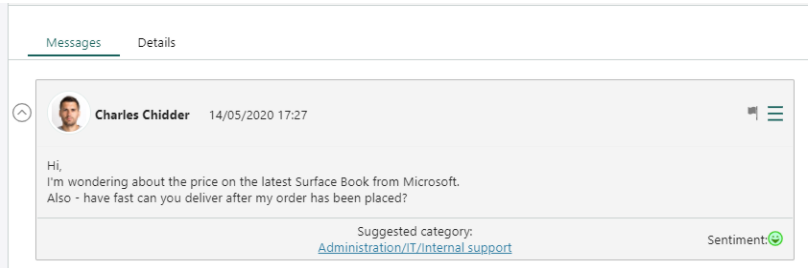 If no category matches, no suggestion appears. You can still choose a category yourself.
Reply Assist
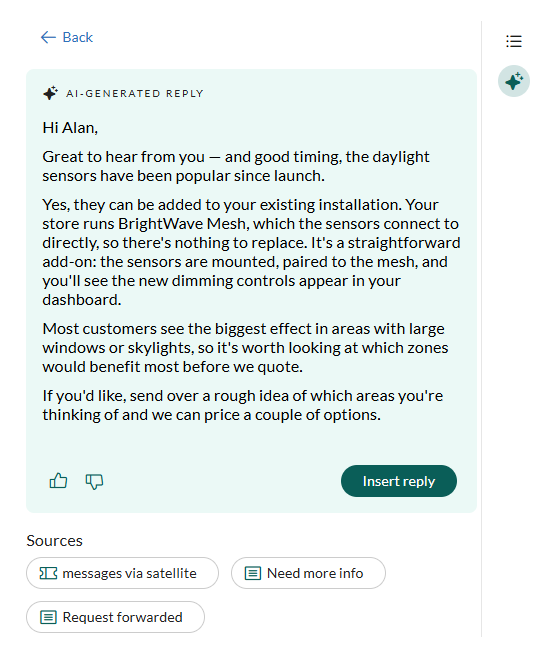
Instead of a blank page, Reply Assist suggests a tailored reply to an incoming service request. It builds the draft from your own CRM content: earlier requests, reply templates, FAQ entries, documents, and, optionally, web content. As with every SuperOffice AI capability, this is a suggestion for you to approve. Nothing is saved or sent automatically.Reply Assist requires CRM Suite Plus or above.