

- Open the email related to the activity.
- In the SuperOffice Outlook sidebar, select Create appointment or Create task.
-
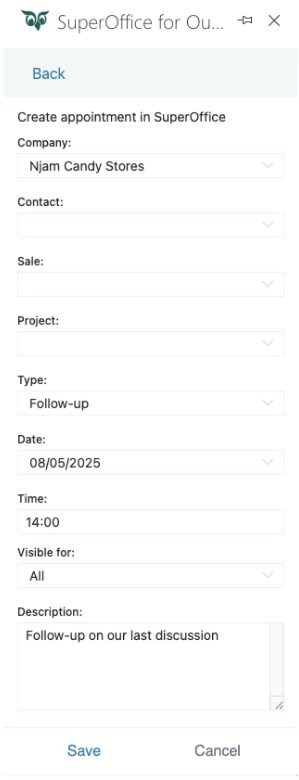
Fill in the required fields:
- Company: Choose the relevant company from the list.
- Contact: Select the person from the company for this follow-up.
- Sale (Optional): Link the follow-up to an existing sale if relevant.
- Project (Optional): Link the follow-up to an ongoing project if applicable.
- Type: Choose the type of follow-up (such as, Customer complaint, Meeting).
- Date and Time: Set the date and time for the follow-up.
- Visible for: Choose who can see the appointment or task - everyone, only the owner’s primary group, or only the owner.
- Description: Add any important details related to the follow-up (such as, case number or additional context). Optionally, edit the prefilled text.
-
Once all fields are completed, click Save.
The Visible for drop-down is only available to users whose administrator has enabled the required license.
For more details, see Settings and maintenance > User management > Visibility.