

Why SuperOffice for Outlook?
With the add-in, you can quickly:- Save new contacts, emails, sales, activities, or requests from Outlook.
- Access contact, sale, and request details for anyone in the email thread.
- Get instant context on who you are interacting with through the add-in panel.
- Pin the add-in while reading or composing emails, so it stays available while you work.
- Work from shared mailboxes and use the same SuperOffice actions, such as archiving emails, saving attachments, and creating requests.
- Get reminded before sending emails or appointments that are not set to be archived in SuperOffice.
- See at a glance which emails are already archived, directly in your Outlook message list.
Key features
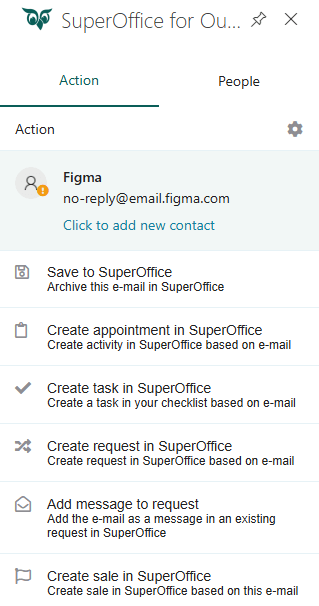
The SuperOffice for Outlook add-in lets you:- Save contacts and companies
- View contact details and related CRM information
- Archive emails
- See archive status in your mailbox
- Send and archive new emails
- Save attachments
- Create appointments
- Create tasks
- Create requests
- Add messages to request
- Create sales
- Add CRM data to Outlook calendar events (Requires Synchronizer for SuperOffice)
- Work with shared mailboxes
How to install
- Head to our App Store and check out the How to Install tab.
- Follow the simple steps to enable the add-in - no download required.
You need an active Microsoft 365 subscription and a SuperOffice CRM Online account or SuperOffice onsite to connect the add-in.